Question: Need help with IV. Redirecting input and output part , I have this so far : #include #include #include #include #include #define MAX_LINE 80 /*
Need help with IV. Redirecting input and output part , I have this so far :
#include #include #include #include #include
#define MAX_LINE 80 /* The maximum length command */
int main(void)
{
char *args[MAX_LINE/2 + 1]; /* command line arguments */
int should_run = 1; /* flag to determine when to exit program */
while (should_run) { // Display shell prompt printf("osh> ");
fflush(stdout); char command[MAX_LINE+1]; // Read the command from standard input fgets(command,MAX_LINE+1,stdin);
// If the command is to exit, set should_run to 0 if (!strcmp(command,"exit ")) should_run = 0; else { // Fork this process int pid = fork();
// In child process pid will equal 0 if(pid == 0) { // strlen(command) gives length of command // command[strlen(command)-1] will be ' ' as fgets // takes the new line character from stdin as well // We dont want it, so we set the value at that position to 0 command[strlen(command)-1] = 0;
// Tokenise the command using " "(whitespace) as delimiter // This function will return the first set of characters in // the command before the first whitespace encountered char *token = strtok(command, " ");
int i = 0; while(token != NULL) { // Store the token to the argument array args[i] = token; // Tokenise again. By passing NULL as argument, we are // telling strtok() to use the same string it last used. // This time the token we receive will be the next set of // characters after the previous " " and before the next " ". token = strtok(NULL, " "); i++; }
// Make the last argument NULL. args[i] = NULL; // Call execvp() execvp(args[0],args); exit(0); } else { // The character at command[strlen(command)-1] is ' ' // at command[strlen(command)-2] is the last entered character // If it is '&', then continue without waiting for the child process // completion if(command[strlen(command)-2] == '&') continue; else // wait for child process wait(NULL); } } }
return 0;
}
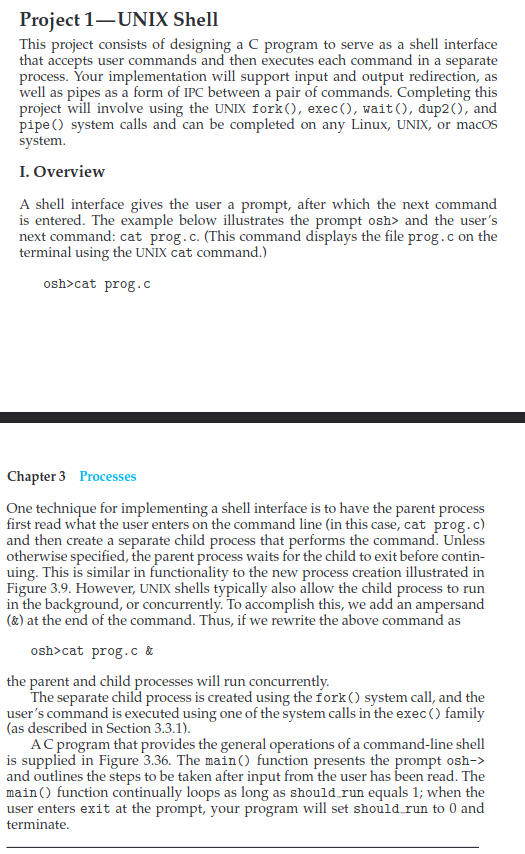
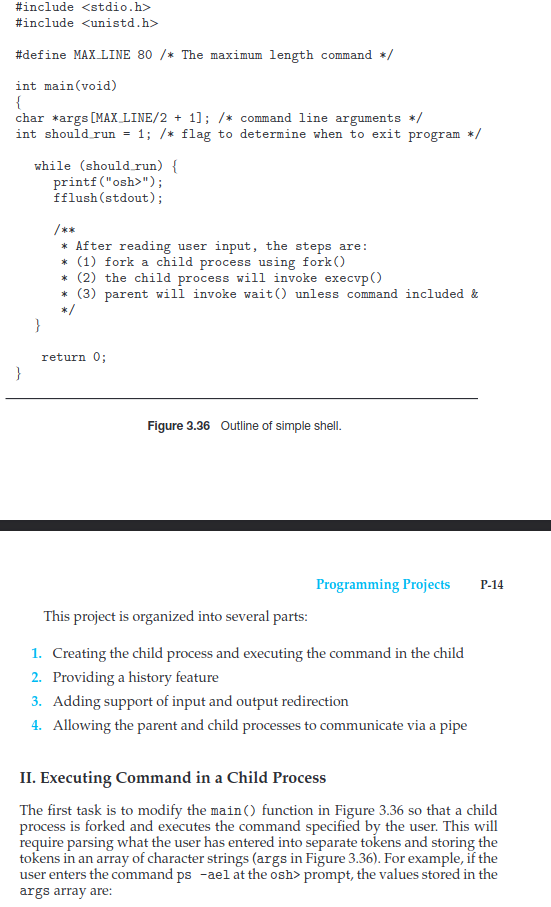
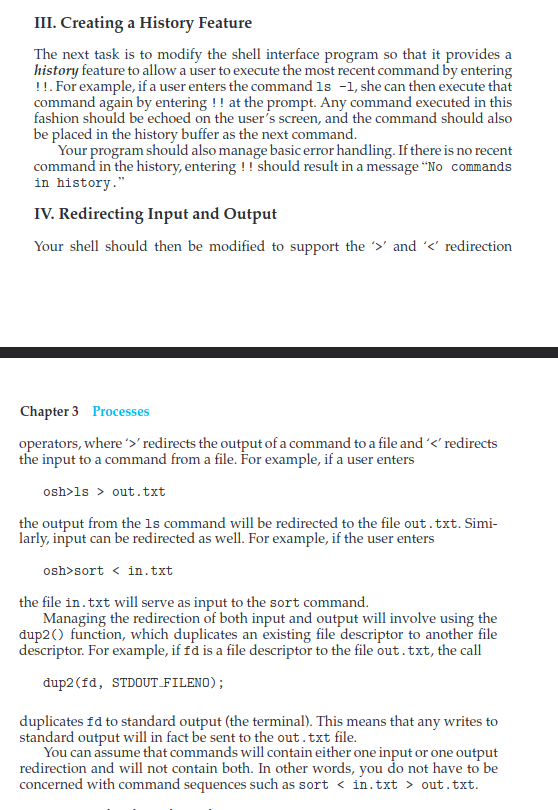
Project 1UNIX Shell This project consists of designing a C program to serve as a shell interface that accepts user commands and then executes each command in a separate process. Your implementation will support input and output redirection, as well as pipes as a form of IPC between a pair of commands. Completing this project will involve using the UNIX fork(), exec(), wait(), dup20, and pipe() system calls and can be completed on any Linux, UNIX, or macos system. I. Overview A shell interface gives the user a prompt, after which the next command is entered. The example below illustrates the prompt osh> and the user's next command: cat prog.c. (This command displays the file prog.c on the terminal using the UNIX cat command.) osh>cat prog.c Chapter 3 Processes One technique for implementing a shell interface is to have the parent process first read what the user enters on the command line (in this case, cat prog.c) and then create a separate child process that performs the command. Unless otherwise specified, the parent process waits for the child to exit before contin- uing. This is similar in functionality to the new process creation illustrated in Figure 3.9. However, UNIX shells typically also allow the child process to run in the background, or concurrently. To accomplish this, we add an ampersand (&) at the end of the command. Thus, if we rewrite the above command as osh>cat prog.c & the parent and child processes will run concurrently. The separate child process is created using the fork() system call, and the user's command is executed using one of the system calls in the exec() family (as described in Section 3.3.1). AC program that provides the general operations of a command-line shell is supplied in Figure 3.36. The main() function presents the prompt osh-> and outlines the steps to be taken after input from the user has been read. The main() function continually loops as long as should run equals 1; when the user enters exit at the prompt, your program will set should run to 0 and terminate. #include #include #define MAX LINE 80 /* The maximum length command */ int main(void) { char *args [MAX LINE/2 + 1]; /* command line arguments */ int should run = 1; /* flag to determine when to exit program */ while (should run) { printf ("osh>"); fflush(stdout); /** * After reading user input, the steps are: * (1) fork a child process using fork() * (2) the child process will invoke execup * (3) parent will invoke wait() unless command included & */ } return 0; } Figure 3.36 Outline of simple shell. P-14 Programming Projects This project is organized into several parts: 1. Creating the child process and executing the command in the child 2. Providing a history feature 3. Adding support of input and output redirection 4. Allowing the parent and child processes to communicate via a pipe II. Executing Command in a Child Process The first task is to modify the main() function in Figure 3.36 so that a child process is forked and executes the command specified by the user. This will require parsing what the user has entered into separate tokens and storing the tokens in an array of character strings (args in Figure 3.36). For example, if the user enters the command ps -ael at the osh> prompt, the values stored in the args array are: III. Creating a History Feature The next task is to modify the shell interface program so that it provides a history feature to allow a user to execute the most recent command by entering !!. For example, if a user enters the command ls -1, she can then execute that command again by entering !! at the prompt. Any command executed in this fashion should be echoed on the user's screen, and the command should also be placed in the history buffer as the next command. Your program should also manage basic error handling. If there is no recent command in the history, entering !! should result in a message "No commands in history." IV. Redirecting Input and Output Your shell should then be modified to support the '' and 'ls > out.txt the output from the ls command will be redirected to the file out.txt. Simi- larly, input can be redirected as well. For example, if the user enters osh>sort out.txt. Project 1UNIX Shell This project consists of designing a C program to serve as a shell interface that accepts user commands and then executes each command in a separate process. Your implementation will support input and output redirection, as well as pipes as a form of IPC between a pair of commands. Completing this project will involve using the UNIX fork(), exec(), wait(), dup20, and pipe() system calls and can be completed on any Linux, UNIX, or macos system. I. Overview A shell interface gives the user a prompt, after which the next command is entered. The example below illustrates the prompt osh> and the user's next command: cat prog.c. (This command displays the file prog.c on the terminal using the UNIX cat command.) osh>cat prog.c Chapter 3 Processes One technique for implementing a shell interface is to have the parent process first read what the user enters on the command line (in this case, cat prog.c) and then create a separate child process that performs the command. Unless otherwise specified, the parent process waits for the child to exit before contin- uing. This is similar in functionality to the new process creation illustrated in Figure 3.9. However, UNIX shells typically also allow the child process to run in the background, or concurrently. To accomplish this, we add an ampersand (&) at the end of the command. Thus, if we rewrite the above command as osh>cat prog.c & the parent and child processes will run concurrently. The separate child process is created using the fork() system call, and the user's command is executed using one of the system calls in the exec() family (as described in Section 3.3.1). AC program that provides the general operations of a command-line shell is supplied in Figure 3.36. The main() function presents the prompt osh-> and outlines the steps to be taken after input from the user has been read. The main() function continually loops as long as should run equals 1; when the user enters exit at the prompt, your program will set should run to 0 and terminate. #include #include #define MAX LINE 80 /* The maximum length command */ int main(void) { char *args [MAX LINE/2 + 1]; /* command line arguments */ int should run = 1; /* flag to determine when to exit program */ while (should run) { printf ("osh>"); fflush(stdout); /** * After reading user input, the steps are: * (1) fork a child process using fork() * (2) the child process will invoke execup * (3) parent will invoke wait() unless command included & */ } return 0; } Figure 3.36 Outline of simple shell. P-14 Programming Projects This project is organized into several parts: 1. Creating the child process and executing the command in the child 2. Providing a history feature 3. Adding support of input and output redirection 4. Allowing the parent and child processes to communicate via a pipe II. Executing Command in a Child Process The first task is to modify the main() function in Figure 3.36 so that a child process is forked and executes the command specified by the user. This will require parsing what the user has entered into separate tokens and storing the tokens in an array of character strings (args in Figure 3.36). For example, if the user enters the command ps -ael at the osh> prompt, the values stored in the args array are: III. Creating a History Feature The next task is to modify the shell interface program so that it provides a history feature to allow a user to execute the most recent command by entering !!. For example, if a user enters the command ls -1, she can then execute that command again by entering !! at the prompt. Any command executed in this fashion should be echoed on the user's screen, and the command should also be placed in the history buffer as the next command. Your program should also manage basic error handling. If there is no recent command in the history, entering !! should result in a message "No commands in history." IV. Redirecting Input and Output Your shell should then be modified to support the '' and 'ls > out.txt the output from the ls command will be redirected to the file out.txt. Simi- larly, input can be redirected as well. For example, if the user enters osh>sort out.txt









 Study Help