







Question: IDEA is able to generate a random sample. Watch the video called IDEA 10: Random Sampling, with the Sample-Detailed Sales file open, on the
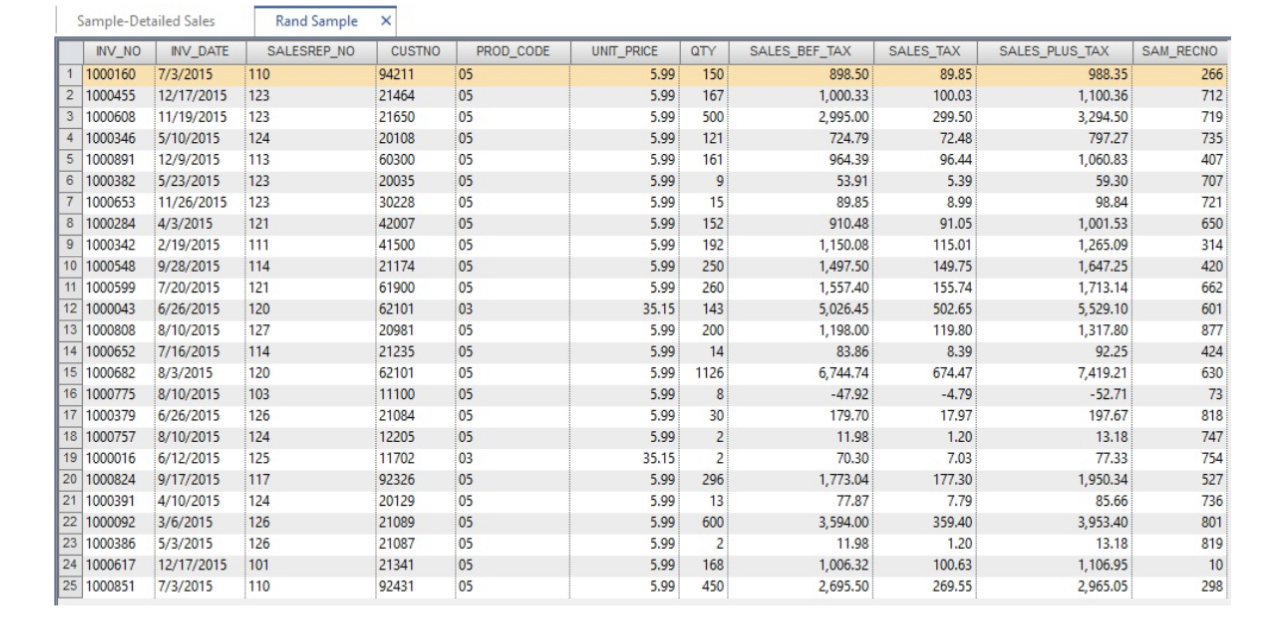
IDEA is able to generate a random sample. Watch the video called " IDEA 10: Random Sampling", with the Sample-Detailed Sales file open, on the Analysis tab, select Random.Enter 25 for the Number of records to select. Enter 7 for theRandom number seed. Rename the File name to "Rand Sample" leave the other settings as they are and click OK. IDEA will generate a new tab displaying your random sample. Print screen each item to submit in with your answer for this problem.
1) How many exceptions did you observe in your sample of 25?
Step by Step Solution
There are 3 Steps involved in it
1 Expert Approved Answer
Step: 1 Unlock

Question Has Been Solved by an Expert!
Get step-by-step solutions from verified subject matter experts
Step: 2 Unlock
Step: 3 Unlock
 Study Help