







Question: IEE 376 Operations Research Deterministic Techniques/Applications (Spring 2019) AMPL Project Part 1 Descripton: The purpose of this project is to get you acquainted with the
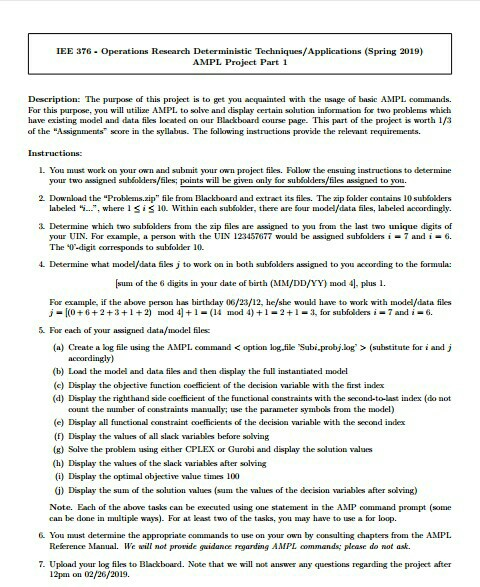
IEE 376 Operations Research Deterministic Techniques/Applications (Spring 2019) AMPL Project Part 1 Descripton: The purpose of this project is to get you acquainted with the usage of basic AMPL commands. For this purpose, you will utilize AMPL to solve and display certain solution information for two problems which have existing model and data files located on our Blackboard course page. This part of the project is worth 1/3 of the "Assignmens score in the syilabus. The following instructions provide the relevant requirements . You mast work on your own and submit your own project files. Follow the ensuing instructions to determine your two assigned ssbolders/iles; s will be given only for subfolders/files assigned to you 2 Download the "Problems.zip" file from Blackboard and extract its files. The zip folder contains 10 subEolders labeled ".., where 1sis10 Within each subEolder, there are four model/data files, labeled accordingly. & Determine which two subfolders from the zip files are assigned to yoa from the last two unique digits of your UIN. For example, a person with the UIN 123457677 would be assigned subfolders i-7 andi-6. The -digit corresponds to subfolder 1O. 4 Determine what model/data files j to work on in both subfolders assigued to you according to the formala: sum of the 6 digits in your date of birth (MMIDD/YY) mod 4. plus 1. For example, if the above person has birthday 06/23/12, hefshe would have to work with model/data files j-(0+6+2+3+1 +2) mod 4 +1 (14 mod 4) 1-213, for subfoldersi7 and i-6. . For each of your assigned data/usodel files: (a) Create a log file using the AMPL command (sulstitute for i andj (b) Load the model and data files and then display the full instantiated model (c) Display the objective function coefficient of the decision variable with the first index (d) Display the righthand side coefficient of the functional constraints with the second-to-last index (do not count the mumber of constraints manually; use the parameter symhols from the model) (e) Display all functional constraint coefficients of the decision variable with the second index (f) Display the valus of all slack variables before solving () Solve the problem using either CPLEX or Gurobi and display the solution values (h) Display the vlues of the slack variables after solving (i) Display the optimal objective value times 100 G) Display the sum of the solution values (sum the values of the decision variables after solving) Note. Each of the above tasks can be executed using one statement in the AMP command prompt (some can be done in mtiple ways). For at least two of the tasks, you may have to use a for loop. &You ust determine the appropriate commands to use on your own by consulting chapters from the AMPL Reference Manl. We aill not provide guidanoe regarding AMPL ommands; pease do not ask. 7. Upload your log files to Blackboard. Note that we will not answer any questions regarding the project after 12pm on 02/26/2019
Step by Step Solution
There are 3 Steps involved in it

Get step-by-step solutions from verified subject matter experts
 Study Help