







Question: If the visual basic code could be provided, it would be appreciated. The Olympic Games Organizing committee wants an application that they can use at
If the visual basic code could be provided, it would be appreciated.
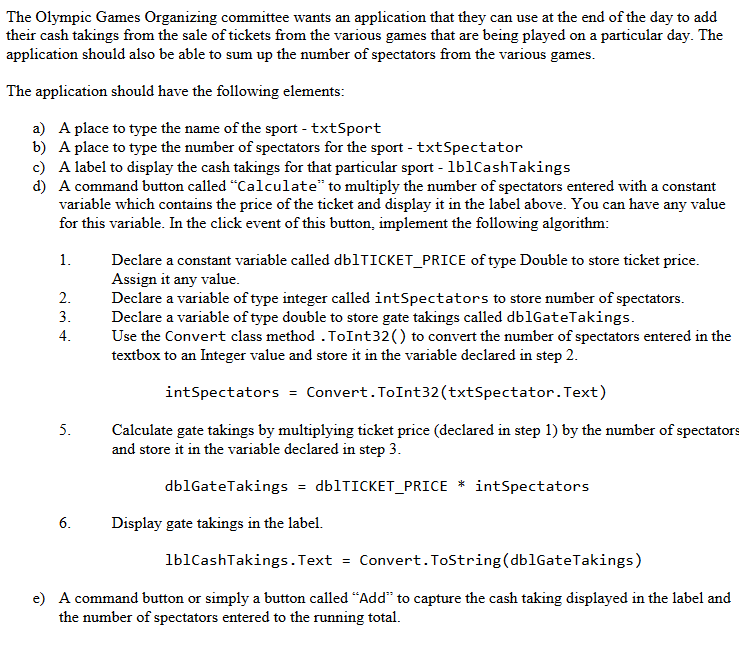
The Olympic Games Organizing committee wants an application that they can use at the end of the day to add their cash takings from the sale of tickets from the various games that are being played on a particular day. The application should also be able to sum up the number of spectators from the various games The application should have the following elements a) A place to type the name of the sport txtSport b) A place to type the number of spectators for the sport - txtSpectator c) A label to display the cash takings for that particular sport - 1blCashTakings d) A command button called "Calculate" to multiply the number of spectators entered with a constant variable which contains the price of the ticket and display it in the label above. You can have any value for this variable. In the click event of this button, implement the following algorithm: Declare a constant variable called db!TICKET-PRICE of type Double to store ticket price Assign it any value Declare a variable of type integer called intSpectators to store number of spectators Declare a variable of type double to store gate takings called dblGateTaking.s 4.Use the Convert class method . ToInt32() to convert the number of spectators entered in the textbox to an Integer value and store it in the variable declared in step 2 int spectators Convert . Toint32(txtSpectator . Text) Calculate gate takings by multiplying ticket price (declared in step 1) by the number of spectators and store it in the variable declared in step 3 db1GateTakings db!TICKET-PRICE * int Spectators Display gate takings in the label. lblCashTakings.Text Convert.ToString(dblGateTakings) e) A command button or simply a button called "Add" to capture the cash taking displayed in the label and the number of spectators entered to the running total. The Olympic Games Organizing committee wants an application that they can use at the end of the day to add their cash takings from the sale of tickets from the various games that are being played on a particular day. The application should also be able to sum up the number of spectators from the various games The application should have the following elements a) A place to type the name of the sport txtSport b) A place to type the number of spectators for the sport - txtSpectator c) A label to display the cash takings for that particular sport - 1blCashTakings d) A command button called "Calculate" to multiply the number of spectators entered with a constant variable which contains the price of the ticket and display it in the label above. You can have any value for this variable. In the click event of this button, implement the following algorithm: Declare a constant variable called db!TICKET-PRICE of type Double to store ticket price Assign it any value Declare a variable of type integer called intSpectators to store number of spectators Declare a variable of type double to store gate takings called dblGateTaking.s 4.Use the Convert class method . ToInt32() to convert the number of spectators entered in the textbox to an Integer value and store it in the variable declared in step 2 int spectators Convert . Toint32(txtSpectator . Text) Calculate gate takings by multiplying ticket price (declared in step 1) by the number of spectators and store it in the variable declared in step 3 db1GateTakings db!TICKET-PRICE * int Spectators Display gate takings in the label. lblCashTakings.Text Convert.ToString(dblGateTakings) e) A command button or simply a button called "Add" to capture the cash taking displayed in the label and the number of spectators entered to the running total
Step by Step Solution
There are 3 Steps involved in it

Get step-by-step solutions from verified subject matter experts
 Study Help