



Question: If you have not already done so, you will need to make sure you have access to the database management software that is required for
If you have not already done so, you will need to make sure you have access to the database management software that is required for this project, Microsoft Access. Review the Syllabus module for information about accessing this software.
Step 2: Open your database management software. Save a new database, and give it a title (e.g., "infosys305").
Step 3: Using your database management software, create the following tables: CUSTOMER table, CREDIT_CARD_ACCOUNT table, ITEM_TYPE table, MERCHANT table, and SALE table in that order. Use the data types from the attached Word document Download attached Word document define each field in each table.
Step 4: Create the Primary Key - Foreign Key (PK-FK) relationships among the tables.
Step 5: Enter data into the four tables. Add sample data in 20 rows for the CUSTOMER table, 30 rows for the CREDIT_CARD_ACCOUNT table, 15 rows for the MERCHANT table, and 60 rows for the SALE table. For the ITEM_TYPE table, use the data indicated in the Word document (attached in Step 3).
I am trying to make sure that I have the relationships right in this chart. I am having a hard time figuring if the customer_card-number Primary Key should be attached to the Credit card number Foreign Key based on my structions below. Please not I have done my own work.
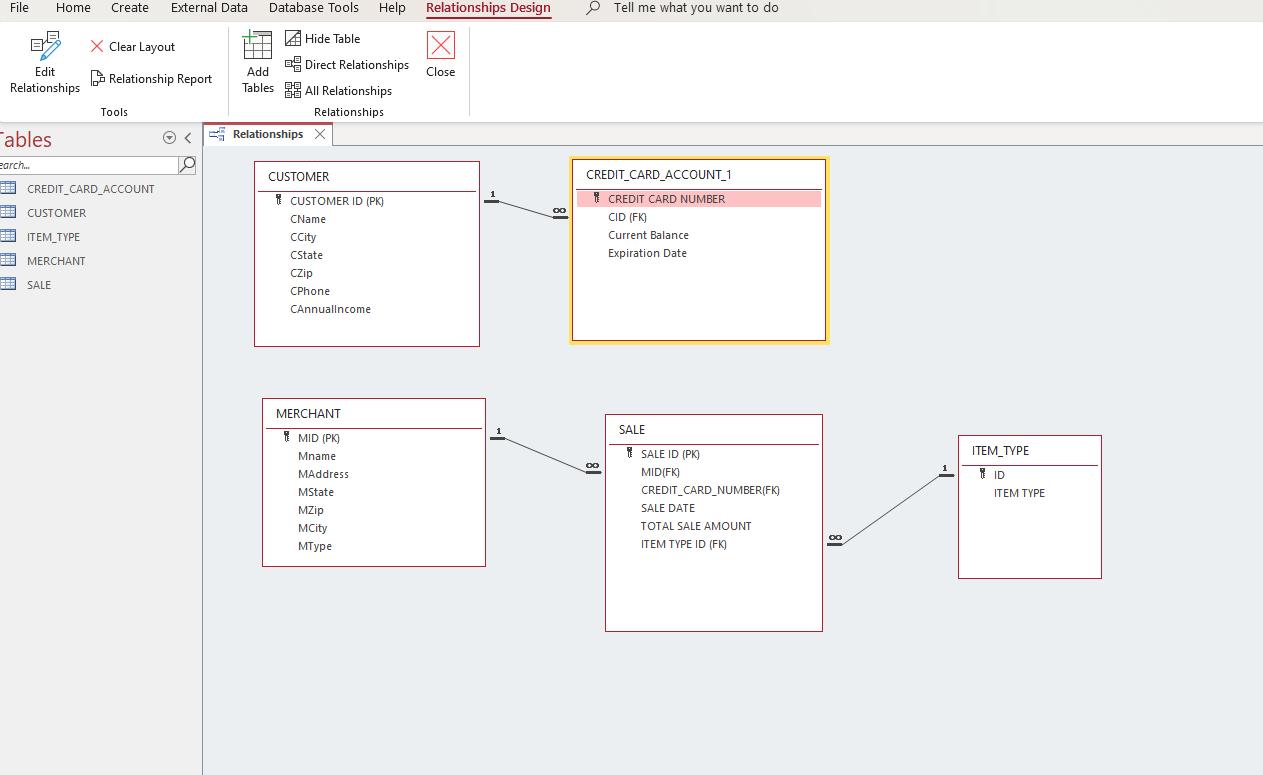
File Edit Relationships ables Home Create External Data earch... X Clear Layout Relationship Report Tools CREDIT CARD_ACCOUNT CUSTOMER ITEM_TYPE MERCHANT SALE < La Database Tools Help Relationships Design Hide Table Direct Relationships All Relationships Relationships Add Tables Relationships X CUSTOMER CUSTOMER ID (PK) CName CCity CState CZip CPhone CAnnuallncome MERCHANT MID (PK) Mname MAddress MState MZip MCity MType IXI Close 1 00 Tell me what you want to do CREDIT CARD_ACCOUNT_1 CREDIT CARD NUMBER CID (FK) Current Balance Expiration Date 00 SALE SALE ID (PK) MID(FK) CREDIT CARD NUMBER(FK) SALE DATE TOTAL SALE AMOUNT ITEM TYPE ID (FK) ITEM_TYPE ID ITEM TYPE
Step by Step Solution
There are 3 Steps involved in it
Based on the provided image and the information provided regarding the relationships among the tables it seems you have the basic structure of the dat... View full answer

Get step-by-step solutions from verified subject matter experts