



Question: Ignore the paste in Word Docment part. Also, state why Method 4 is a bad idea. Everything is written in MATLAB. na1000: SESIZE of vector
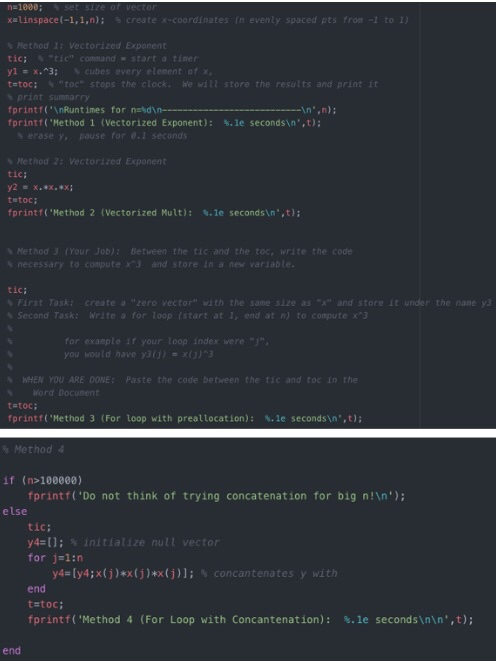
na1000: SESIZE of vector xolinspace(-1,1,n); create x-coordinates (nevenly spaced pts froe -1 to 1) Method 1: Vectorized Exponent tic; "tica command - start a timer yl = x^3; cubes every element of me tatoc: "To stops the clock. We will store the results and print it fprintf(" Runtimes for nad ---- fprintf('Method 1 (Vectorized Exponent): erase , pause for 0.1 seconds -- ',n): $. le secondsin',t): Method 2: Vectorized Exponent tic; y2 = x.ex.ex: toto: fprintf('Method 2 (Vectorized Mult): S. le seconds ",t); Method 3 (Your Job): Between the tic and the toc, write the code necessary to compute x3 and store in a new variable. tic; First Taskt create a "zero vector with the same size as "X" and store it under the name ye Second Task: Write a for loop (start at 1, end at n) to compute x^3 for example if your loop index were "j", you would have y30) = x() 3 WHEN YOU ARE DONE: Paste the code between the tic and toc in the Word Document tato: fprintf('Method 3 (For loop with preallocation): 8. le seconds ',t); Method 4 if (n>100000) fprintf('Do not think of trying concatenation for big n! '); else tic; y4=(); initialize null vector for j=1:6 y4=[y4;x(j)*x(j)*x(j)); concantenates y with end tatoc; fprintf('Method 4 (For Loop with Concantenation): $. le seconds ',t); end
Step by Step Solution
There are 3 Steps involved in it

Get step-by-step solutions from verified subject matter experts