







Question: Im following the steps to customize the linux kernel in virtual box below 1. Obtain kernel source code rpm file from a CentOS Update mirror
Im following the steps to customize the linux kernel in virtual box below
1. Obtain kernel source code rpm file from a CentOS Update mirror site:
Logon as "root" and make sure your current working directory is /root. If it is not, cd /root.
Then type one the following commands at the shell prompt (any of these kernel versions will do):
wget http://vault.centos.org/7.4.1708/updates/Source/SPackages/kernel-3.10.0-693.1.1.el7.src.rpm
Note: if the above kernel source code is no longer available from the mirror site, please download the latest distribution listed on that site.
2. yum install rpm-build
3. yum install redhat-rpm-config
4. yum install xmlto asciidoc hmaccalc python-devel newt-devel
5. yum install perl-ExtUtils-Embed pesign elfutils-devel zlib-devel binutils-devel
6. yum install audit-libs-devel java-devel numactl-devel pciutils-devel ncurses-devel
7. Unpackage the kernel source. Execute the following command from the directory that contains the kernel source rpm package you downloaded in step 1 above (likely /root)
rpm -Uvh kernel-3.10.*.src.rpm
8. Change directory (cd) to /root/rpmbuild/SPECS/ (verify this directory exists), and issue the following command:
rpmbuild -bp --target=x86_64 kernel.spec
Generic: rpmbuild -bp --target=$(uname -m) kernel.spec
9. Kernel tree will be located in /root/rpmbuild/BUILD/ (verify that this directory exists). Link to it from /usr/src with the following command:
ln -s /root/rpmbuild/BUILD/kernel-3.10.0-693.1.1.el7/linux-3.10.0-693.1.1.el7.x86_64 /usr/src/linux
NOTE: verify path /root/rpmbuild/BUILD/kernel-3.10.0-693.1.1.el7/linux-3.10.0-693.1.1.el7.x86_64 exists and adjust accordingly to match the kernel source version that you have installed.
10. Compile new kernel and its modules (run the following make commands from /usr/src/linux):
make bzImage
make modules
make
---------------------------------------------------------------------------------------------------------------------------------------------------------------------------------------------------------------------
HOWEVER IM STUCK ON STEP 9 ive created the symlink as instructed in step 9 but when try to run the make commands from /usr/src/linux as described in step 10,
by running cd /usr/src/linux
i get the error that the file or directory is not found ? I need to run step 10 from there but keep getting an error i feel like ive tried everything can someone please help
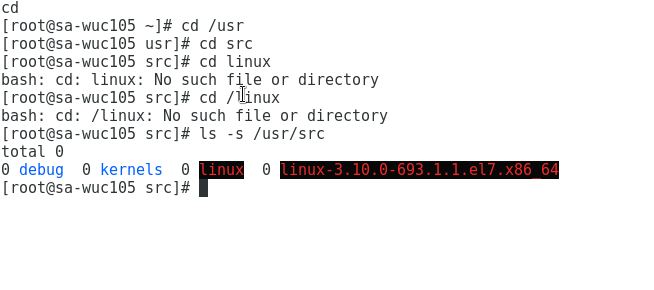
cd [root@sa-wuc105 -1# cd /usr [root@sa-wuc105 usr]# cd sr [root@sa-wu c105 src]# cd ?nux bash: cd: linux: No such file or directory [root@sa-wuc105 src]# cd linux bash: cd: /linux: No such file or directory [root@sa-wuc105 src]# s -s /usr/src total ? debugkernels inux linux-3.10.0-693.1.1.el7.x86_64 [root@sa-wuc105 src]# cd [root@sa-wuc105 -1# cd /usr [root@sa-wuc105 usr]# cd sr [root@sa-wu c105 src]# cd ?nux bash: cd: linux: No such file or directory [root@sa-wuc105 src]# cd linux bash: cd: /linux: No such file or directory [root@sa-wuc105 src]# s -s /usr/src total ? debugkernels inux linux-3.10.0-693.1.1.el7.x86_64 [root@sa-wuc105 src]#
Step by Step Solution
There are 3 Steps involved in it

Get step-by-step solutions from verified subject matter experts
 Study Help