







Question: I'm having trouble writing this program. The ack.join(sentence1) method does not add the ack to the end of every word in my sentence1 list as
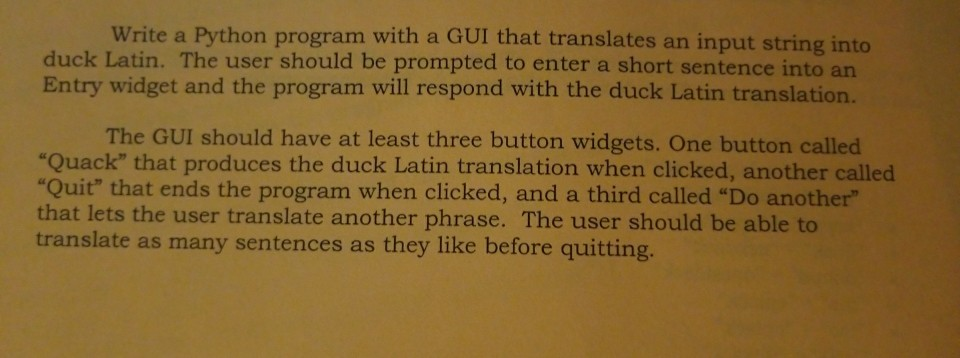
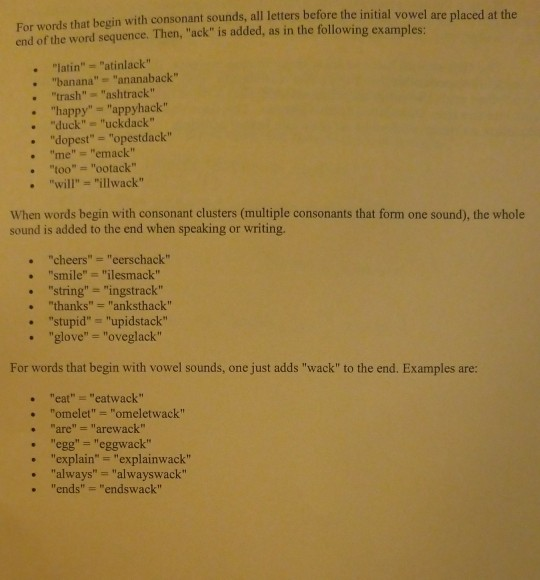
I'm having trouble writing this program. The "ack".join(sentence1) method does not add the ack to the end of every word in my sentence1 list as the message relayed is just the original text. I also need help about how I rearrange the consonants before the first vowel to move it to the end of the word and then add "ack". The description of the problem is in the pictures. 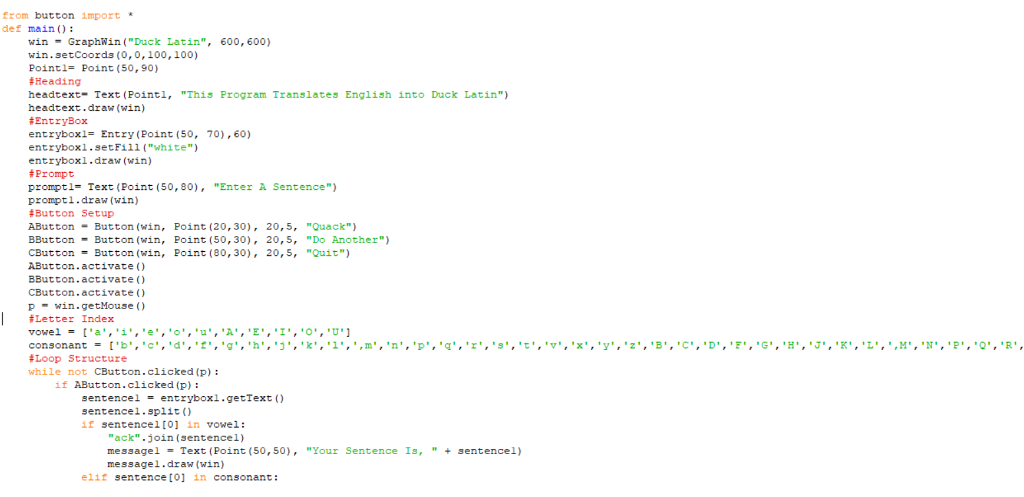
Erom button import def main): win GraphWin ("Duck Latin", 600, 600) win.setCoords (0,0,100, 100) Point 1= Point (50, 90) # Heading headtext Text (Pointl, "This Program Translates English into Duck Latin" headtext.draw (win) #Ent ryBox ent rybox-Ent ry (Point (50, 70),60) entryboxi.setFill ("white") entrybox1.draw (win) #Prompt promptl-Text (Point (50, 80),"Enter A Sentence") prompti.draw (win) #Button Setup AButtonButton (win, Point (20,30), 20,5, "Quack") BButton -Button (win, Point (50, 30), 20, S, "Do Another") CButton-Button (win, Point (80, 30), 20, 5, "Quit") AButton.activate () BButton.activate () CButton. activate ( ) pwin.getMouse ) #Letter Index vowel= ['a','1','e', 'o','u','A' ,'E','1','0','U. consonant = ['b','c','d','L','g','h','j','k','1','.:','n','p','q','z','s','t','v','x','y','z','3','C","D' , 'F','G','H','J','K','L',''M','N','P','Q','R', Loop Structure while not CButton.clicked (p): if AButton.clicked (p) sentence! = entryboxl.getText () sentencel.split () if sentencel[o1 in vowe1: "ack".join (sentencel) message 1 = Text (Point (50,50), messagel.draw (win) "Your Sentence Is, " + sentence!) elit sentence to in consonant: Erom button import def main): win GraphWin ("Duck Latin", 600, 600) win.setCoords (0,0,100, 100) Point 1= Point (50, 90) # Heading headtext Text (Pointl, "This Program Translates English into Duck Latin" headtext.draw (win) #Ent ryBox ent rybox-Ent ry (Point (50, 70),60) entryboxi.setFill ("white") entrybox1.draw (win) #Prompt promptl-Text (Point (50, 80),"Enter A Sentence") prompti.draw (win) #Button Setup AButtonButton (win, Point (20,30), 20,5, "Quack") BButton -Button (win, Point (50, 30), 20, S, "Do Another") CButton-Button (win, Point (80, 30), 20, 5, "Quit") AButton.activate () BButton.activate () CButton. activate ( ) pwin.getMouse ) #Letter Index vowel= ['a','1','e', 'o','u','A' ,'E','1','0','U. consonant = ['b','c','d','L','g','h','j','k','1','.:','n','p','q','z','s','t','v','x','y','z','3','C","D' , 'F','G','H','J','K','L',''M','N','P','Q','R', Loop Structure while not CButton.clicked (p): if AButton.clicked (p) sentence! = entryboxl.getText () sentencel.split () if sentencel[o1 in vowe1: "ack".join (sentencel) message 1 = Text (Point (50,50), messagel.draw (win) "Your Sentence Is, " + sentence!) elit sentence to in consonant
Step by Step Solution
There are 3 Steps involved in it

Get step-by-step solutions from verified subject matter experts
 Study Help