



Question: Im in MIS 320 and I need help understanding these questions In cell CB, use the DCOUNTA database function to calculate the number of apartments
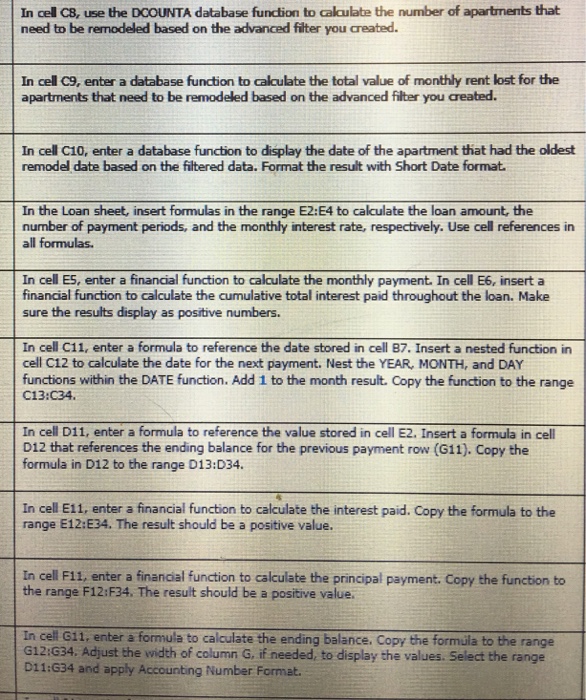
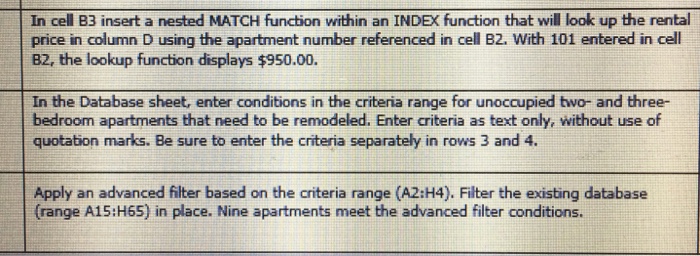
In cell CB, use the DCOUNTA database function to calculate the number of apartments that need to be remodeled based on the advanced filter you created. In cell C9, enter a database function to calculate the total value of monthly rent lost for the apartments that need to be remodeled based on the advanced filter you created. In cell C10, enter a database function to display the date of the apartment that had the oldest remodel date based on the filtered data. Format the result with Short Date format In the Loan sheet, insert formulas in the range E2:E4 to calculate the loan amount, the number of payment periods, and the monthly interest rate, respectively. Use cell references in all formulas. In cell ES, enter a financial function to calculate the monthly payment. In cell E6, insert a financial function to calculate the cumulative total interest paid throughout the loan. Make sure the results display as positive numbers. In cell Cl1, enter a formula to reference the date stored in cell B7. Insert a nested function in cell C12 to calculate the date for the next payment. Nest the YEAR, MONTH, and DAY functions within the DATE function. Add 1 to the month result. Copy the function to the range C13:C34 In cell D11, enter a formula to reference the value stored in cell E2. Insert a formula in cell D12 that references the ending balance for the previous payment row (611). Copy the formula in D12 to the range D13:D34. In cell E11, enter a financial function to calculate the interest paid. Copy the formula to the range E12:E34. The result should be a positive value. In cell F11, enter a financial function to calculate the principal payment. Copy the function to the range F12:F34. The result should be a positive value In cell 611, enter a formula to calculate the ending balance. Copy the formla to the range G12:G34. Adjust the width of column G, if needed, to display the values. Select the range D11:G34 and apply Accounting Number Format. In cell CB, use the DCOUNTA database function to calculate the number of apartments that need to be remodeled based on the advanced filter you created. In cell C9, enter a database function to calculate the total value of monthly rent lost for the apartments that need to be remodeled based on the advanced filter you created. In cell C10, enter a database function to display the date of the apartment that had the oldest remodel date based on the filtered data. Format the result with Short Date format In the Loan sheet, insert formulas in the range E2:E4 to calculate the loan amount, the number of payment periods, and the monthly interest rate, respectively. Use cell references in all formulas. In cell ES, enter a financial function to calculate the monthly payment. In cell E6, insert a financial function to calculate the cumulative total interest paid throughout the loan. Make sure the results display as positive numbers. In cell Cl1, enter a formula to reference the date stored in cell B7. Insert a nested function in cell C12 to calculate the date for the next payment. Nest the YEAR, MONTH, and DAY functions within the DATE function. Add 1 to the month result. Copy the function to the range C13:C34 In cell D11, enter a formula to reference the value stored in cell E2. Insert a formula in cell D12 that references the ending balance for the previous payment row (611). Copy the formula in D12 to the range D13:D34. In cell E11, enter a financial function to calculate the interest paid. Copy the formula to the range E12:E34. The result should be a positive value. In cell F11, enter a financial function to calculate the principal payment. Copy the function to the range F12:F34. The result should be a positive value In cell 611, enter a formula to calculate the ending balance. Copy the formla to the range G12:G34. Adjust the width of column G, if needed, to display the values. Select the range D11:G34 and apply Accounting Number Format
Step by Step Solution
There are 3 Steps involved in it

Get step-by-step solutions from verified subject matter experts