Question: I'm lost at this point when it comes Ellippsoid list app part. I can send my java code and the files it is trying to
I'm lost at this point when it comes Ellippsoid list app part. I can send my java code and the files it is trying to reference.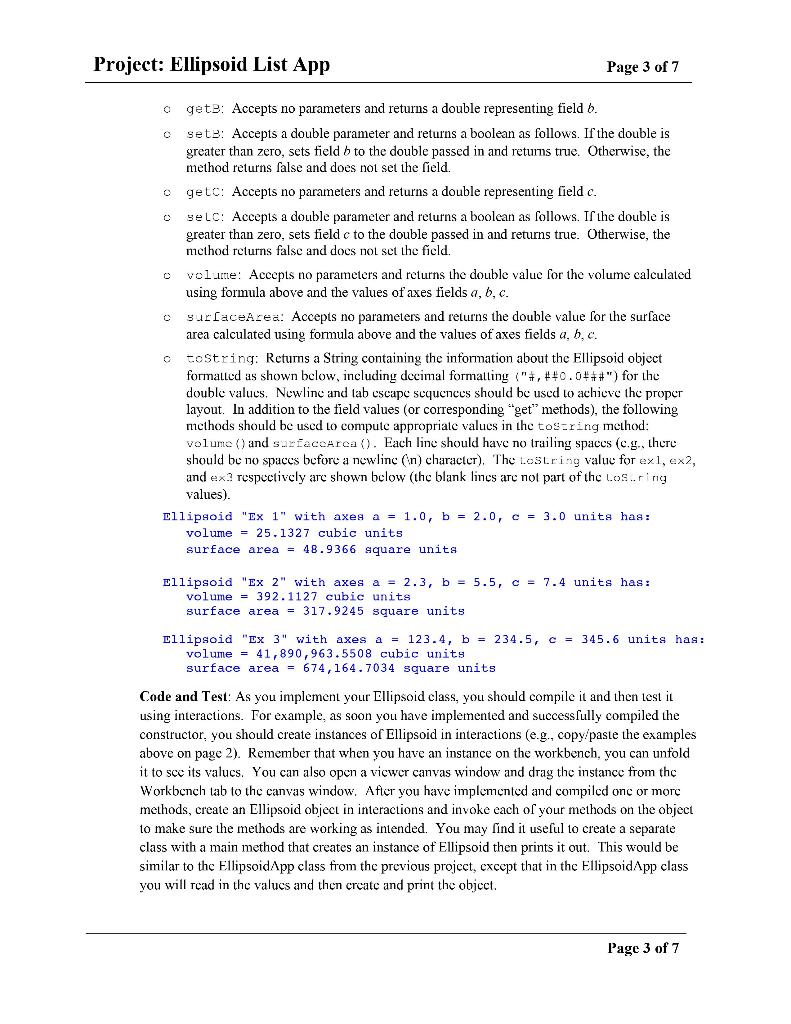
=============Ellipsoidlist.java===========
import java.text.DecimalFormat;
public class EllipsoidList { private String list; private ArrayList ellipsoidList; /** * Create a TriangleList object. * constructor. * @param listIn for listName * @param ellipsoidListIn for ellipsoidList */ public EllipsoidList(String listIn, ArrayList ellipsoidListIn) { list = listIn; ellipsoidList = ellipsoidListIn; } //methods /** * @return the list name */ public String getName() { return list; //// } /** * @return the list name */ public int numberOfEllipsoids() { int numberOfEllipsoids = 0; if (ellipsoidList.size() == 0) { return 0; } else { return ellipsoidList.size(); } } /** * @return the list name */ public double totalVolume() { double total = 0; int index = 0; while (index public String summaryInfo() { DecimalFormat decFt = new DecimalFormat("#,##0.###"); String result = ""; result += " "; result += "---- Summary for " + getName() + "----"; result += " Number of Ellipsoid Objects: " + numberOfEllipsoids(); result += " Total Volume: " + decFt.format(totalVolume()) + " cubic units"; result += " Total Surface Area: " + decFt.format(totalSurfaceArea()) + " square units"; result += " Average Volume: " + decFt.format(averageVolume()) + " cubic units"; result += " Average Surface Area: " + decFt.format(averageSurfaceArea()) + " square units"; return result; }
public ArrayList getList(){ return ellipsoidList; } public static EllipsoidList readFile(String filename) { try { Scanner infile = new Scanner(new File(filename)); EllipsoidList elist = new EllipsoidList(infile.nextLine(), new ArrayList()); while(infile.hasNext()) { elist.addEllipsoid(infile.next(), infile.nextDouble(), infile.nextDouble(), infile.nextDouble()); } infile.close(); return elist; } catch (FileNotFoundException e) { System.out.println(e.getMessage()); } return null; } public void addEllipsoid(String label, double a, double b, double c) { ellipsoidList.add(new Ellipsoid(label, a, b, c)); } public Ellipsoid findEllipsoid(String label){ for(Ellipsoid e : ellipsoidList) { if(e.getLabel().equalsIgnoreCase(label)) return e; } return null; } public Ellipsoid deleteEllipsoid(String label){ Ellipsoid e = findEllipsoid(label); if(e != null) ellipsoidList.remove(e); return e; } public Ellipsoid editEllipsoid(String label, double a, double b, double c){ Ellipsoid e = findEllipsoid(label); if(e != null) { e.setA(a); e.setB(b); e.setC(c); } return e; } }
============= Ellipsoid=============
import java.text.DecimalFormat; /** * * * @author * @version */ public class Ellipsoid { //Fields private String label = ""; private double a = 0; private double b = 0; private double c = 0; //constructor /** *@param labelIn establish the label *@param aIn establishes a axes. *@param bIn establishes b axes. *@param cIn establishes c axes. */ public Ellipsoid(String labelIn, double aIn, double bIn, double cIn) { setLabel(labelIn); setA(aIn); setB(bIn); setC(cIn); } //Methods /** *@return getLabel */ public String getLabel() { return label; } /** * * @param labelIn this retrieves a label. * @return setLabel */ public boolean setLabel(String labelIn) { if (labelIn == null) { return false; } else { label = labelIn.trim(); return true; } } /** * * @return getA */ public double getA() { return a; } /** * * @param aIn this returms a boolean. * @return setA */ public boolean setA(double aIn) { if (aIn > 0) { a = aIn; return true; } else { return false; } } /** * * @return getB */ public double getB() { return b; } /** * * @param bIn this returms a boolean. * @return setB */ public boolean setB(double bIn) { if (bIn > 0) { b = bIn; return true; } else { return false; } } /** * * @return getC */ public double getC() { return c; } /** * * @param cIn this returna a boolean. * @return setC */ public boolean setC(double cIn) { if (cIn > 0) { c = cIn; return true; } else { return false; } } /** * * @return volume */ public double volume() { double volume = ((4 * Math.PI * a * b * c) / 3); return volume; } /** * *@return surfaceArea */ public double surfaceArea() { double thePowers = (Math.pow((a * b), 1.6) + Math.pow((a * c), 1.6) + Math.pow((b * c), 1.6)) / 3; double surfaceArea = 4 * Math.PI * Math.pow(thePowers, (1.0 / 1.6)); return surfaceArea; } /** * * @return toString */ public String toString() { DecimalFormat decimalFormat = new DecimalFormat("#,##0.0###"); return "Ellipsoid \"" + getLabel() + "\" with axes a = " + decimalFormat.format(a) + ", b = " + decimalFormat.format(b) + ", c = " + decimalFormat.format(c) + " units has: \tvolume = " + decimalFormat.format(volume()) + " cubic units" + " \tsurface area = " + decimalFormat.format(surfaceArea()) + " square units"; } }
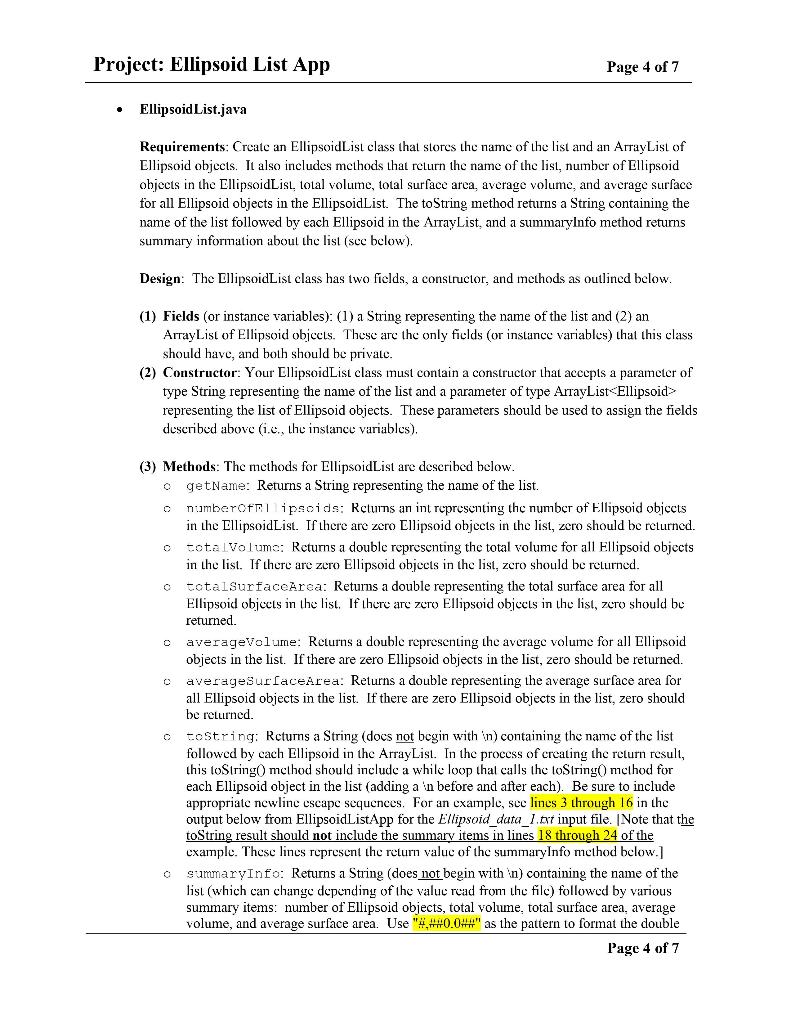
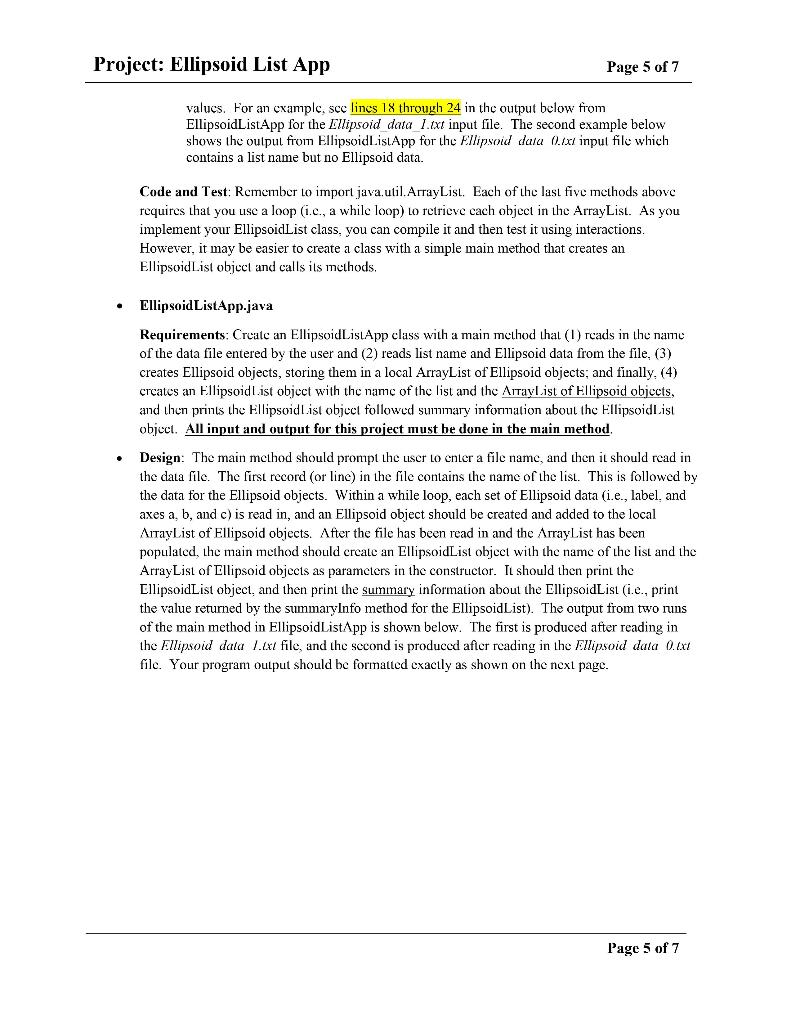
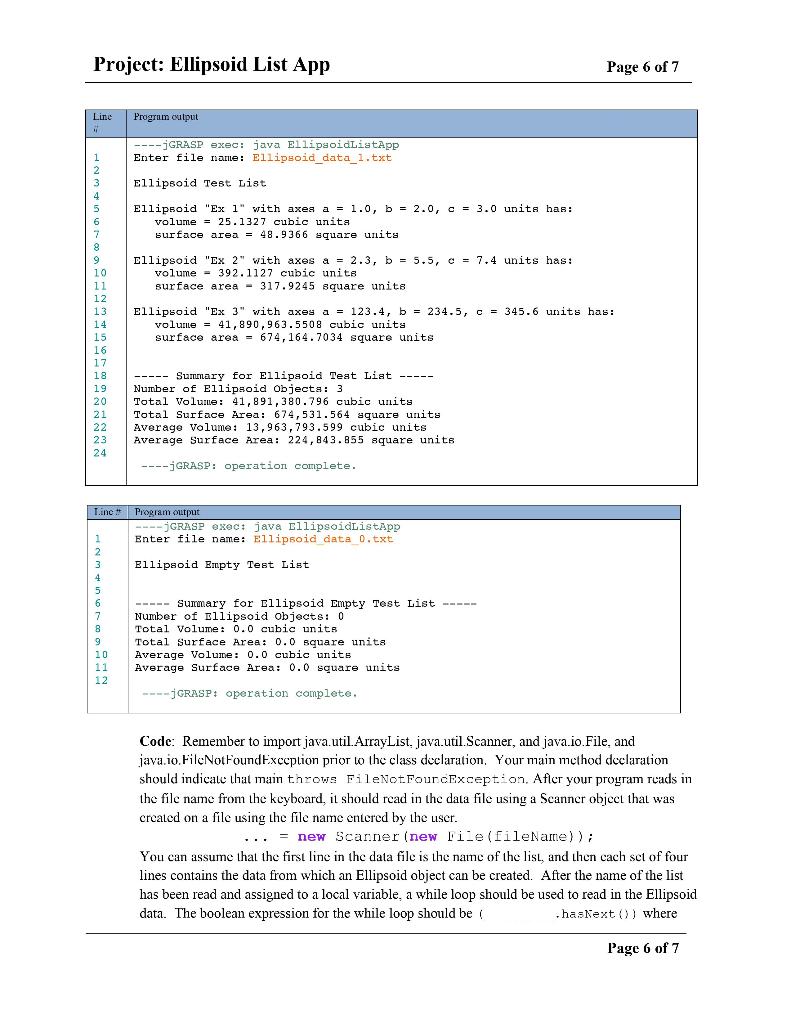
Project: Ellipsoid List App Page 3 of 7 c gete: Accepts no parameters and returns a double representing field b. sete: Accepts a double parameter and returns a boolean as follows. If the double is greater than zero, sets field b to the double passed in and returns true. Otherwise, the method returns false and does not set the field. getc: Accepts no parameters and returns a double representing field c. selC: Accepts a double parameter and returns a boolean as follows. If the double is greater than zero, sets field c to the double passed in and returns true. Otherwise, the mcthod returns false and does not set the field. cvolue: Accepts no parameters and returns the double value for the volume calculated using formula above and the values of axes fields a, b, c. surfaceArea: Accepts no parameters and returns the double value for the surface area calculated using formula above and the values of axes fields a, 5.c. c tostring: Returns a String containing the information about the Ellipsoid object formalled as shown below, including decimal formalling ("#,##0.0#*#") for the double values. Newling: lab cscape sequences should be used to achieve the proper layout. In addition to the field values (or corresponding "get" methods), the following methods should be used to compute appropriate values in the tos-ring method: volume () and surface rea (). Each line should have no trailing spaces (c.g., there should be no spaces before a newlinc (n) character), The Lostring value for exl, ex2, and exa respectively are shown below (the blank lines are not part of the los...ring values). Ellipsoid "Ex 1" with axes a = 1.0, b = 2.0, c = 3.0 units has: volume = 25.1327 cubic units surface area = 48.9366 square units Ellipsoid "Ex 2" with axes a = 2.3, b = 5.5, C = 7.4 units has: volume = 392.1127 cubic units surface area = 317.9245 square units Ellipsoid "Ex 3" with axes a = 123.4, b = 234.5, c = 345.6 units has: volume = 41,890,963.5508 cubic units surface area = 674,164.7034 square units Code and Test: As you implement your Ellipsoid class, you should compile it and then test it using interactions. For example, as soon you have implemented and successfully compiled the constructor, you should create instances of Ellipsoid in interactions (e.g., copy/paste the examples above on page 2). Remember that when you have an instance on the workbench, you can unfold it to see its values. You can also open a viewer canvas window and drag the instance from the Workbench tab to the canvas window. After you have implemented and compiled one or more methods, create an Ellipsoid object in interactions and invoke each of your methods on the object to make sure the methods are working as intended. You may find it useful to create a separate class with a main method that creates an instance of Ellipsoid then prints it out. This would be similar to the Ellipsoid App class from the previous project, cxcept that in the Ellipsoid App class you will read in the values and then create and print the object. Page 3 of 7 Project: Ellipsoid List App Page 4 of 7 Ellipsoid List.java Requirements: Create an EllipsoidList class that stores the name of the list and an ArrayList of Ellipsoid objects. It also includes methods that return the name of the list, number of Ellipsoid objects in the EllipsoidList, loual volume total surface arca, average volume, and average surface for all Ellipsoid objects in the EllipsoidList. The toString method returns a String containing the name of the list followed by each Ellipsoid in the ArrayList, and a summaryinfo method returns summary information about the list (see below). Design: The EllipsoidList class has two fields, a constructor, and methods as outlined below. (1) Fields (or instance variables): (1) a String representing the name of the list and (2) an ArrayList of Ellipsoid objects. These are the only fields (or instance variables) that this class should have, and both should be private. (2) Constructor: Your Ellipsoid List class must contain a constructor that accepts a parameter of type String representing the name of the list and a parameter of type ArrayList representing the list of Ellipsoid objects. These parameters should be used to assign the fields described above (1.c., the instance variables), o c (3) Methods: The methods for EllipsoidList are described below. getName: Returns a String representing the name of the list. numberoffi ipsoids: Returns an int representing the number of Ellipsoid objects in the EllipsoidList. If there are zero Ellipsoid objects in the list, zero should be returned. o totalvolums: Returns a double representing the total volume for all Ellipsoid objects in the list. If there are zero Ellipsoid objects in the list, zero should be returned. totalsurfaceArea: Returns a double representing the total surface area for all Ellipsoid objects in the list. If there are zero Ellipsoid objects in the list, zero should be returned. o averageVolume: Returns a double representing the average volume for all Ellipsoid objects in the list. If there are zero Ellipsoid objects in the list, zero should be returned. averageSurfaceArea: Returns a double representing the average surface area for all Ellipsoid objects in the list. If there are zero Ellipsoid objects in the list, zero should be returned. o tostring: Returns a String (docs not begin with (n) containing the name of the list followed by cach Ellipsoid in the ArrayList. In the process of creating the return result, this toString method should include a while loop thal calls the loString method for each Ellipsoid object in the list (adding a 'n before and after each). Be sure to include appropriate newline escape sequences. For an example, see lines 3 through 16 in the output below from EllipsoidListApp for the Ellipsoid_data_1.ext input file. Note that the toString result should not include the summary items in lines 18 through 24 of the cxample. These lines represent the return value of the summaryInfo method below.) summaryInfo: Returns a String (does not begin with n) containing the name of the list (which can change depending of the value read from the file) followed by various summary items: number of Ellipsoid objects, total volume, total surface area, average volume, and average surface area. Use "#4+0.0##" as the pattern to format the double Page 4 of 7 Project: Ellipsoid List App Page 5 of 7 valucs. For an example, scc lines 18 through 24 in the output below from EllipsoidListApp for the Ellipsoid data l.ext input file. The second example below shows the output from EllipsoidListApp for the Ellipsoid daru (.txt input file which contains a list name but no Ellipsoid data. Code and Test: Remember to import java.util.ArrayList. Each of the last five methods above requires that you use a loop (i.c., a while loop) Lo retrieve cach object in the ArrayList. As you implement your EllipsoidList class, you can compile it and then test it using interactions. However, it may be easier to create a class with a simple main method that creates an Ellipsoid List object and calls its methods. Ellipsoid ListApp.java Requirements: Create an EllipsoidListApp class with a main method that (1) roads in the name of the data file entered by the user and (2) reads list name and Ellipsoid data from the file, (3) creates Ellipsoid objects, storing them in a local ArrayList of Ellipsoid objects, and finally. (4) creates an Ellipsoidl.ist object with the name of the list and the Altaylist of Ellipsoid objects, and then prints the Ellipsoid List object followed summary information about the EllipsoidList object. All input and output for this project must be done in the main method, Design: The main method should prompt the user to enter a file name, and then it should read in the data file. The first record (or line) in the file contains the name of the list. This is followed by the data for the Ellipsoid objects. Within a while loop, each set of Ellipsoid data (i.e., label, and axes a, b, and c) is read in, and an Ellipsoid object should be created and added to the local AltayList of Ellipsoid objects. After the file has been read in and the ArrayList has been populated, the main method should create an EllipsoidList object with the name of the list and the ArrayList of Ellipsoid objects as parameters in the constructor. It should then print the EllipsoidList object, and then print the summary information about the EllipsoidList (i.e., print the value returned by the summaryInfo method for the EllipsoidList). The output from two runs of the main method in EllipsoidListApp is shown below. The first is produced after reading in the Ellipsoid data 1.lxt file, and the second is produced after reading in the Ellipsoid data 0.cxt file. Your program output should be formatted exactly as shown on the next page. Page 5 of 7 Project: Ellipsoid List App Page 6 of 7 Line Program output ----GRASP exec: java EllipsoidListApp Enter file name: Ellipsoid_data_1.txt 1 2 3 Ellipsoid Test List 6 Ellipsoid "Ex 1" with axea a = 1.0, b = 2.0, c = 3.0 units has: volume = 25.1327 cubic unita surface area = 48.9366 square units Ellipsoid "Ex 2" with axes a = 2.3, b = 5.5, c = 7.4 units has: volume = 392.1127 cubic unite surface area - 317.9245 square units Ellipsoid "Ex 3" with axes a = 123.4, b = 234.5, c = 345.6 units has: volurile = 41,890,963.5508 cubic units surface area = 674,164.7034 square units 8 9 10 11 12 13 14 15 16 17 18 19 20 21 22 23 24 ----- Summary for Ellipaoid Teat Liat ----- Number of Ellipsoid Objecta: 3 Total Volume: 41,891,380.796 cubic units Total Surface Area: 674,531.564 square units Average Volume: 13,963,793.599 cubic units Average Surface Area: 224,843.855 square units ---- GRASP: operation complete. Linc. Program output ---GRASP exec: java EllipsoidListApp Enter file name: Ellipsoid data 0.txt Ellipsoid Empty Test List 1 2 3 4 5 6 7 8 9 10 11 12 ----- Summary for Ellipsoid Empty Test List ----- Number of Ellipsoid objects: 0 Total Volume: 0.0 cubic units Total Surface Area: 0.0 square unita Average Volume: 0.0 cubic units Average Surface Area: 0.0 square units ----GRASP: operation complete. Code: Remember to import java.util.ArrayList, java.util.Scanner, and java.io.File, and java.io.FileNotFoundExceplion prior to the class declaration. Your main mcthod declaration should indicate that main throws FileNotFourcexception. After your program reads in the file name from the keyboard, it should read in the data file using a Scanner object that was created on a file using the file name entered by the liser. ... = new Scanner (new File(fileName)); You can assume that the first line in the data file is the name of the list, and then cach sct of four lines contains the data from which an Ellipsoid object can be created. After the name of the has been read and assigned to a local variable. a while loop should be used to read in the Ellipsoid data. The boolean expression for the while loop should be hastext()) where Page 6 of 7









 Study Help