Question: Im trying to create different 5 audit automation .sh scripts using bash nano. If you could explain the codes it would be really helpful! thanks!
Im trying to create different 5 audit automation .sh scripts using bash nano. If you could explain the codes it would be really helpful! thanks!
Each automation script should have these information: What is the script auditing? Audit title Is there a non-compliance? Yes/No - Non-compliance What is not compliant? - Details
----sample---- # .\itsma-p01-01.sh Audit title: There is only one root id Non-Compliance?: Yes Details: See below root:!:0:0::/:/usr/bin/bash jdoe:*:0:1:John Doe:/home/jdoe:/usr/bin/bash --------------------------------------------------
Simply put, it should say that there is a non-compliance when there is indeed one. It should keep silent when there is non.
-Automation scripts I need-
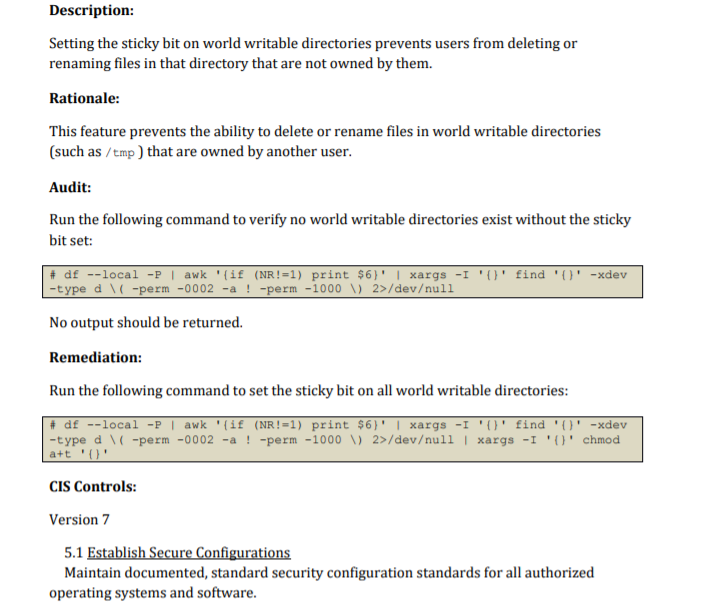
1.1.21 Ensure sticky bit is set on all world-writable directories
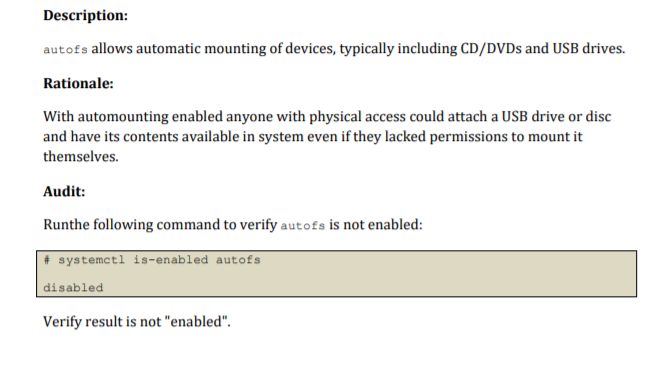
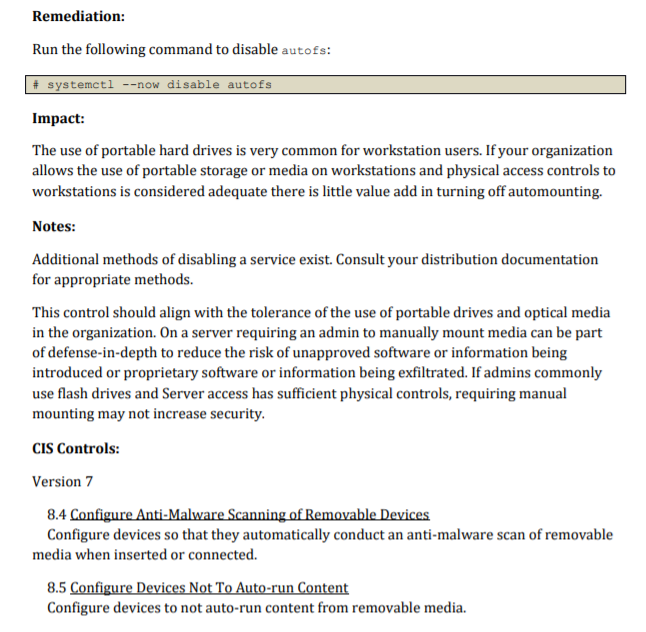
1.1.22 Disable Automounting
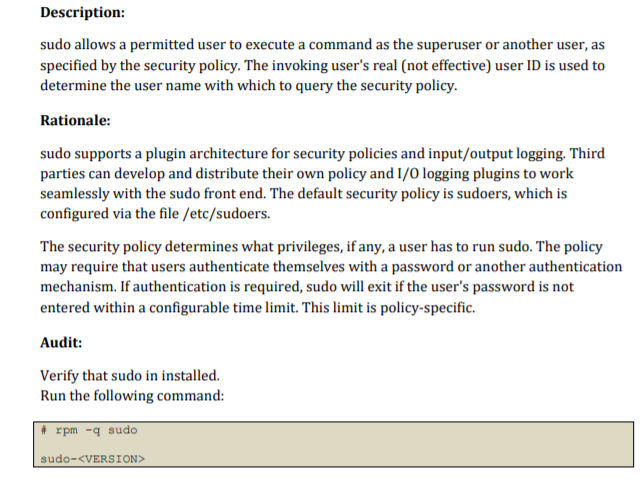
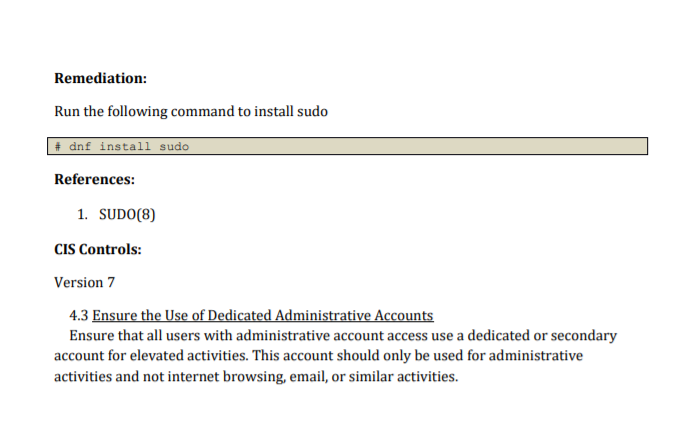
1.3.1 Ensure sudo is installed
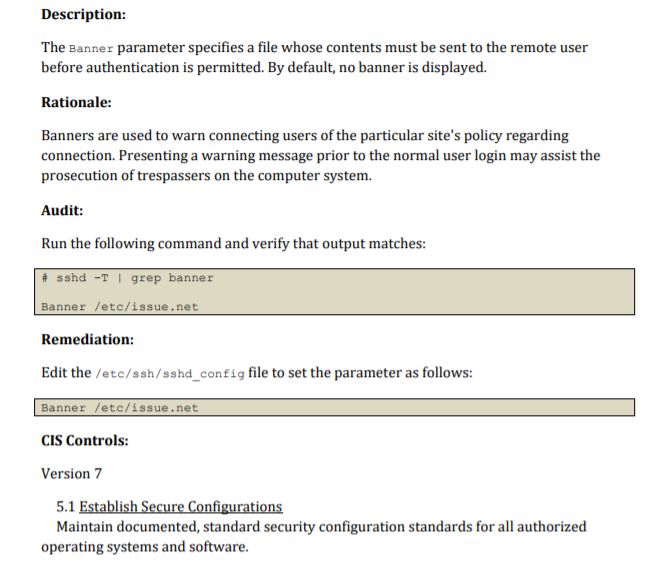
5.2.15 Ensure SSH warning banner is configured
6.2.20 Ensure all users home directories exist
(I only need the remediation portion in the script, audit can be used to confirm it works.)
--------------------------------------------------------------------------------------
1.1.21 Ensure sticky bit is set on all world-writable directories
1.1.22 Disable Automounting
1.3.1 Ensure sudo is installed
5.2.15 Ensure SSH warning banner is configured
6.2.20 Ensure all users home directories exist
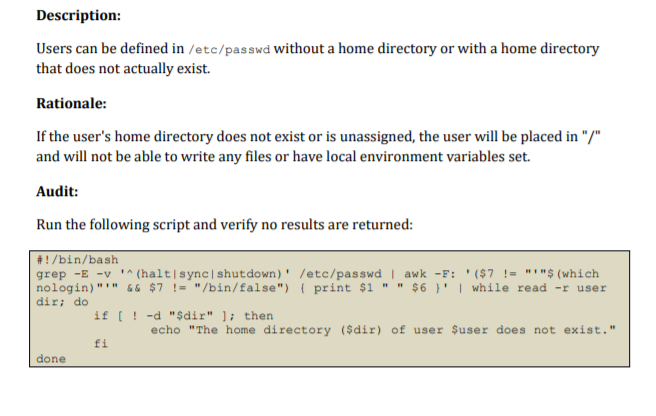
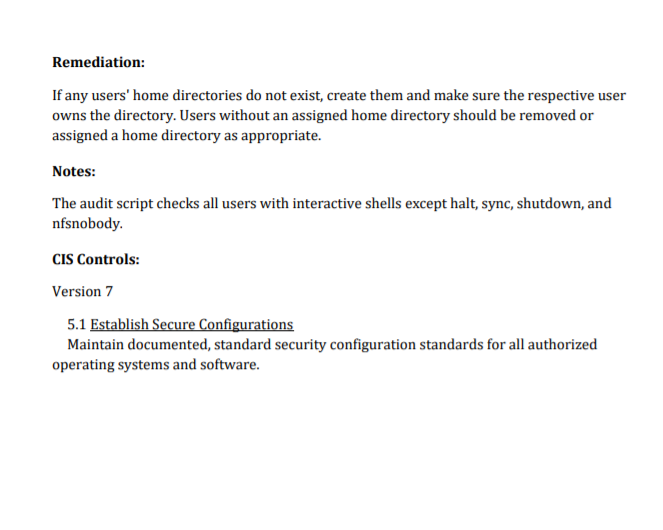
Description: Setting the sticky bit on world writable directories prevents users from deleting or renaming files in that directory that are not owned by them. Rationale: This feature prevents the ability to delete or rename files in world writable directories (such as /tmp) that are owned by another user. Audit: Run the following command to verify no world writable directories exist without the sticky bit set: # df --local -P | awk '{if (NR!=1) print $6)' | xargs -I '()' find 'O' -xdev -type d \ / -perm -0002 -a ! -perm -1000 V 2>/devull No output should be returned. Remediation: Run the following command to set the sticky bit on all world writable directories: # df --local - | awk '{if (NR!=1) print $6)' | xargs -I 'O' find 'O' -xdev -type d ( -perm -0002 -a ! -perm -1000 V) 2>/devull | xargs -I 'O' chmod a+t 'O' CIS Controls: Version 7 5.1 Establish Secure Configurations Maintain documented, standard security configuration standards for all authorized operating systems and software. Description: autofs allows automatic mounting of devices, typically including CD/DVDs and USB drives. Rationale: With automounting enabled anyone with physical access could attach a USB drive or disc and have its contents available in system even if they lacked permissions to mount it themselves. Audit: Runthe following command to verify autofs is not enabled: # systemctl is-enabled autofs disabled Verify result is not "enabled". Remediation: Run the following command to disable autofs: systemctl --now disable autofs Impact: The use of portable hard drives is very common for workstation users. If your organization allows the use of portable storage or media on workstations and physical access controls to workstations is considered adequate there is little value add in turning off automounting. Notes: Additional methods of disabling a service exist. Consult your distribution documentation for appropriate methods. This control should align with the tolerance of the use of portable drives and optical media in the organization. On a server requiring an admin to manually mount media can be part of defense-in-depth to reduce the risk of unapproved software or information being introduced or proprietary software or information being exfiltrated. If admins commonly use flash drives and Server access has sufficient physical controls, requiring manual mounting may not increase security. CIS Controls: Version 7 8.4 Configure Anti-Malware Scanning of Removable Devices Configure devices so that they automatically conduct an anti-malware scan of removable media when inserted or connected. 8.5 Configure Devices Not To Auto-run Content Configure devices to not auto-run content from removable media. Description: sudo allows a permitted user to execute a command as the superuser or another user, as specified by the security policy. The invoking user's real (not effective) user ID is used to determine the user name with which to query the security policy. Rationale: sudo supports a plugin architecture for security policies and input/output logging. Third parties can develop and distribute their own policy and 1/0 logging plugins to work seamlessly with the sudo front end. The default security policy is sudoers, which is configured via the file /etc/sudoers. The security policy determines what privileges, if any, a user has to run sudo. The policy may require that users authenticate themselves with a password or another authentication mechanism. If authentication is required, sudo will exit if the user's password is not entered within a configurable time limit. This limit is policy-specific. Audit: Verify that sudo in installed. Run the following command: # rpm -q sudo sudo- Remediation: Run the following command to install sudo # dnf install sudo References: 1. SUDO(8) CIS Controls: Version 7 4.3 Ensure the Use of Dedicated Administrative Accounts Ensure that all users with administrative account access use a dedicated or secondary account for elevated activities. This account should only be used for administrative activities and not internet browsing, email, or similar activities. Description: The Banner parameter specifies a file whose contents must be sent to the remote user before authentication is permitted. By default, no banner is displayed. Rationale: Banners are used to warn connecting users of the particular site's policy regarding connection. Presenting a warning message prior to the normal user login may assist the prosecution of trespassers on the computer system. Audit: Run the following command and verify that output matches: sshd -T | grep banner Banner /etc/issue.net Remediation: Edit the /etc/ssh/sshd_config file to set the parameter as follows: Banner /etc/issue.net CIS Controls: Version 7 5.1 Establish Secure Configurations Maintain documented, standard security configuration standards for all authorized operating systems and software. Description: Users can be defined in /etc/passwd without a home directory or with a home directory that does not actually exist. Rationale: If the user's home directory does not exist or is unassigned, the user will be placed in "/" and will not be able to write any files or have local environment variables set. Audit: Run the following script and verify no results are returned: #!/bin/bash grep -E -v (halt sync shutdown)' /etc/passwd | awk -F: '($7 != "$(which nologin)"'" && $7 != "/bin/false") { print $1 "" $6}' | while read -r user dir; do if [ ! -d "$dir" ]; then echo "The home directory ($dir) of user $user does not exist." fi done Remediation: If any users' home directories do not exist, create them and make sure the respective user owns the directory. Users without an assigned home directory should be removed or assigned a home directory as appropriate. Notes: The audit script checks all users with interactive shells except halt, sync, shutdown, and nfsnobody. CIS Controls: Version 7 5.1 Establish Secure Configurations Maintain documented, standard security configuration standards for all authorized operating systems and software. Description: Setting the sticky bit on world writable directories prevents users from deleting or renaming files in that directory that are not owned by them. Rationale: This feature prevents the ability to delete or rename files in world writable directories (such as /tmp) that are owned by another user. Audit: Run the following command to verify no world writable directories exist without the sticky bit set: # df --local -P | awk '{if (NR!=1) print $6)' | xargs -I '()' find 'O' -xdev -type d \ / -perm -0002 -a ! -perm -1000 V 2>/devull No output should be returned. Remediation: Run the following command to set the sticky bit on all world writable directories: # df --local - | awk '{if (NR!=1) print $6)' | xargs -I 'O' find 'O' -xdev -type d ( -perm -0002 -a ! -perm -1000 V) 2>/devull | xargs -I 'O' chmod a+t 'O' CIS Controls: Version 7 5.1 Establish Secure Configurations Maintain documented, standard security configuration standards for all authorized operating systems and software. Description: autofs allows automatic mounting of devices, typically including CD/DVDs and USB drives. Rationale: With automounting enabled anyone with physical access could attach a USB drive or disc and have its contents available in system even if they lacked permissions to mount it themselves. Audit: Runthe following command to verify autofs is not enabled: # systemctl is-enabled autofs disabled Verify result is not "enabled". Remediation: Run the following command to disable autofs: systemctl --now disable autofs Impact: The use of portable hard drives is very common for workstation users. If your organization allows the use of portable storage or media on workstations and physical access controls to workstations is considered adequate there is little value add in turning off automounting. Notes: Additional methods of disabling a service exist. Consult your distribution documentation for appropriate methods. This control should align with the tolerance of the use of portable drives and optical media in the organization. On a server requiring an admin to manually mount media can be part of defense-in-depth to reduce the risk of unapproved software or information being introduced or proprietary software or information being exfiltrated. If admins commonly use flash drives and Server access has sufficient physical controls, requiring manual mounting may not increase security. CIS Controls: Version 7 8.4 Configure Anti-Malware Scanning of Removable Devices Configure devices so that they automatically conduct an anti-malware scan of removable media when inserted or connected. 8.5 Configure Devices Not To Auto-run Content Configure devices to not auto-run content from removable media. Description: sudo allows a permitted user to execute a command as the superuser or another user, as specified by the security policy. The invoking user's real (not effective) user ID is used to determine the user name with which to query the security policy. Rationale: sudo supports a plugin architecture for security policies and input/output logging. Third parties can develop and distribute their own policy and 1/0 logging plugins to work seamlessly with the sudo front end. The default security policy is sudoers, which is configured via the file /etc/sudoers. The security policy determines what privileges, if any, a user has to run sudo. The policy may require that users authenticate themselves with a password or another authentication mechanism. If authentication is required, sudo will exit if the user's password is not entered within a configurable time limit. This limit is policy-specific. Audit: Verify that sudo in installed. Run the following command: # rpm -q sudo sudo- Remediation: Run the following command to install sudo # dnf install sudo References: 1. SUDO(8) CIS Controls: Version 7 4.3 Ensure the Use of Dedicated Administrative Accounts Ensure that all users with administrative account access use a dedicated or secondary account for elevated activities. This account should only be used for administrative activities and not internet browsing, email, or similar activities. Description: The Banner parameter specifies a file whose contents must be sent to the remote user before authentication is permitted. By default, no banner is displayed. Rationale: Banners are used to warn connecting users of the particular site's policy regarding connection. Presenting a warning message prior to the normal user login may assist the prosecution of trespassers on the computer system. Audit: Run the following command and verify that output matches: sshd -T | grep banner Banner /etc/issue.net Remediation: Edit the /etc/ssh/sshd_config file to set the parameter as follows: Banner /etc/issue.net CIS Controls: Version 7 5.1 Establish Secure Configurations Maintain documented, standard security configuration standards for all authorized operating systems and software. Description: Users can be defined in /etc/passwd without a home directory or with a home directory that does not actually exist. Rationale: If the user's home directory does not exist or is unassigned, the user will be placed in "/" and will not be able to write any files or have local environment variables set. Audit: Run the following script and verify no results are returned: #!/bin/bash grep -E -v (halt sync shutdown)' /etc/passwd | awk -F: '($7 != "$(which nologin)"'" && $7 != "/bin/false") { print $1 "" $6}' | while read -r user dir; do if [ ! -d "$dir" ]; then echo "The home directory ($dir) of user $user does not exist." fi done Remediation: If any users' home directories do not exist, create them and make sure the respective user owns the directory. Users without an assigned home directory should be removed or assigned a home directory as appropriate. Notes: The audit script checks all users with interactive shells except halt, sync, shutdown, and nfsnobody. CIS Controls: Version 7 5.1 Establish Secure Configurations Maintain documented, standard security configuration standards for all authorized operating systems and software









 Study Help