







Question: Need help creating a audit automation .sh scripts using bash. If you could explain the codes it would be really helpful! thanks! Each automation script
Need help creating a audit automation .sh scripts using bash. If you could explain the codes it would be really helpful! thanks!
Each automation script should have these information: What is the script auditing? Audit title Is there a non-compliance? Yes/No - Non-compliance What is not compliant? - Details
----sample info included in script---- # .\itsma-p01-01.sh Audit title: There is only one root id Non-Compliance?: Yes Details: See below root:!:0:0::/:/usr/bin/bash jdoe:*:0:1:John Doe:/home/jdoe:/usr/bin/bash --------------------------------------------------
---Sample audit automation---
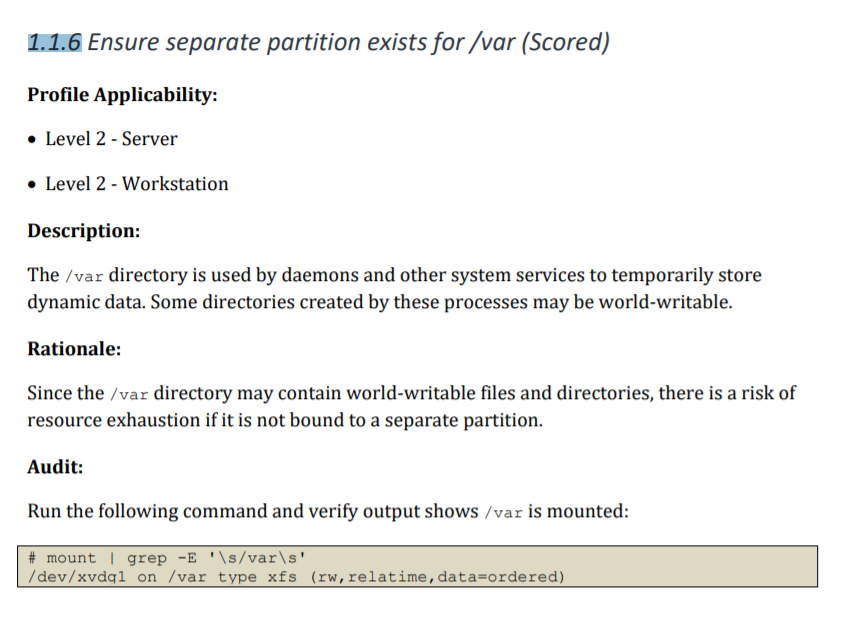
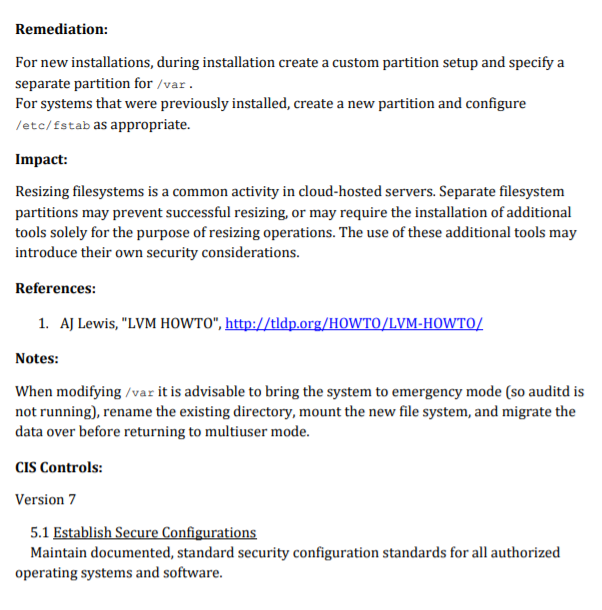
---Sample audit automation script---
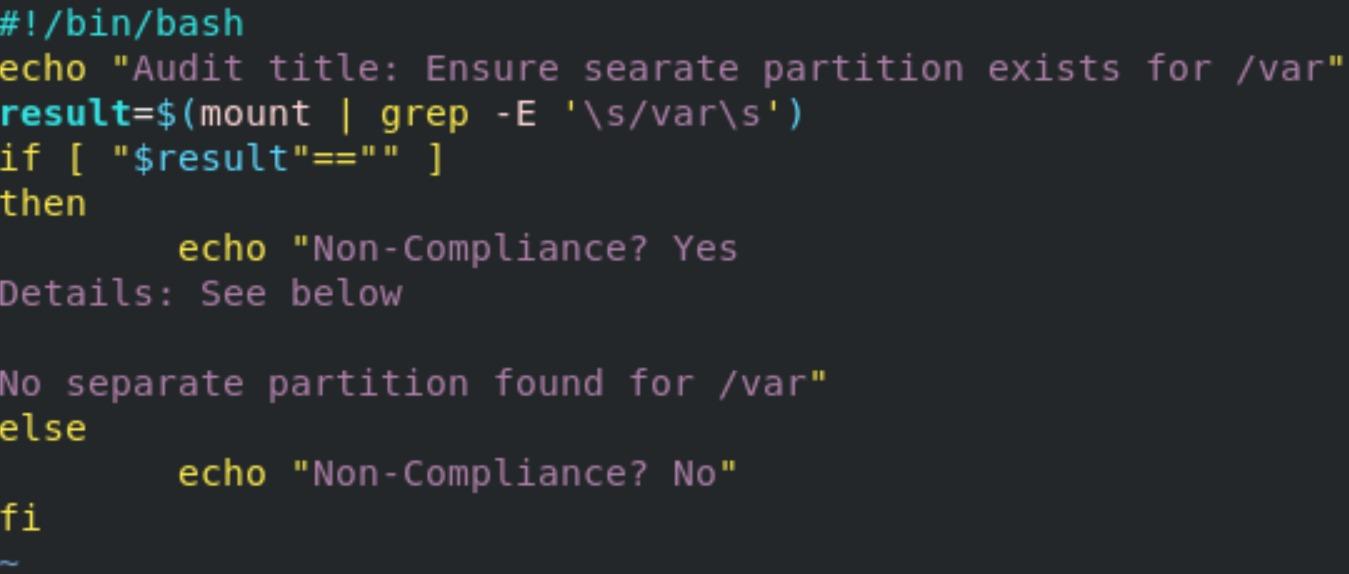
-Audit Automation script I need-
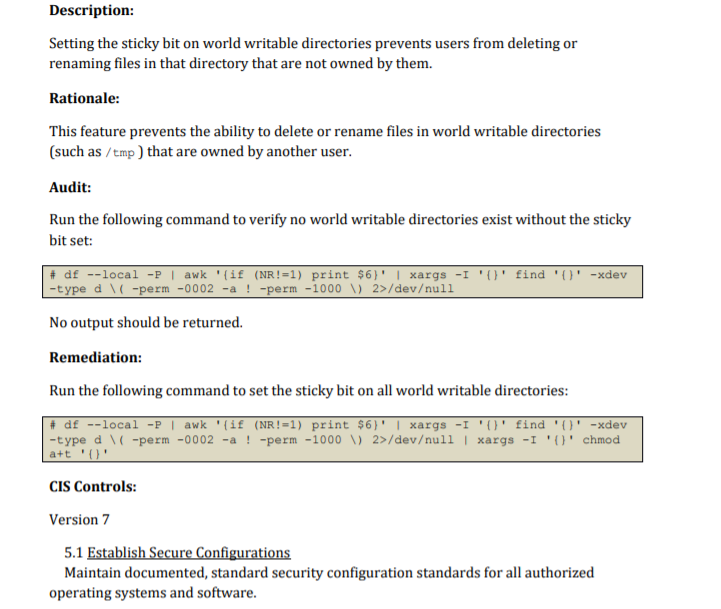
1.1.6 Ensure separate partition exists for/var (Scored) Profile Applicability: Level 2 - Server Level 2 - Workstation Description: The /var directory is used by daemons and other system services to temporarily store dynamic data. Some directories created by these processes may be world-writable. Rationale: Since the /var directory may contain world-writable files and directories, there is a risk of resource exhaustion if it is not bound to a separate partition. Audit: Run the following command and verify output shows /var is mounted: # mount | grep -E '\s/var\s' /dev/xvdgl on /var type xfs (rw, relatime, data=ordered) Remediation: For new installations, during installation create a custom partition setup and specify a separate partition for /var. For systems that were previously installed, create a new partition and configure /etc/fstab as appropriate. Impact: Resizing filesystems is a common activity in cloud-hosted servers. Separate filesystem partitions may prevent successful resizing, or may require the installation of additional tools solely for the purpose of resizing operations. The use of these additional tools may introduce their own security considerations. References: 1. AJ Lewis, "LVM HOWTO", http://tldp.org/HOWTO/LVM-HOWTO/ Notes: When modifying /var it is advisable to bring the system to emergency mode (so auditd is not running), rename the existing directory, mount the new file system, and migrate the data over before returning to multiuser mode. CIS Controls: Version 7 5.1 Establish Secure Configurations Maintain documented, standard security configuration standards for all authorized operating systems and software. #!/bin/bash echo "Audit title: Ensure searate partition exists for /var" result=$(mount | grep -E '\s/varis') if [ "$result"=="" ] then echo "Non-Compliance? Yes Details: See below No separate partition found for /var" else echo "Non-Compliance? No" fi Description: Setting the sticky bit on world writable directories prevents users from deleting or renaming files in that directory that are not owned by them. Rationale: This feature prevents the ability to delete or rename files in world writable directories (such as /tmp) that are owned by another user. Audit: Run the following command to verify no world writable directories exist without the sticky bit set: # df --local -P | awk '{if (NR!=1) print $6)' | xargs -I '()' find 'O' -xdev -type d \ / -perm -0002 -a ! -perm -1000 V 2>/devull No output should be returned. Remediation: Run the following command to set the sticky bit on all world writable directories: # df --local - | awk '{if (NR!=1) print $6)' | xargs -I 'O' find 'O' -xdev -type d ( -perm -0002 -a ! -perm -1000 V) 2>/devull | xargs -I 'O' chmod a+t 'O' CIS Controls: Version 7 5.1 Establish Secure Configurations Maintain documented, standard security configuration standards for all authorized operating systems and software
Step by Step Solution
There are 3 Steps involved in it

Get step-by-step solutions from verified subject matter experts
 Study Help