







Question: Images are large matrices where each pixel is a numerical value corresponding to a specific color. For grayscale images, 0 corresponds to black, while 255
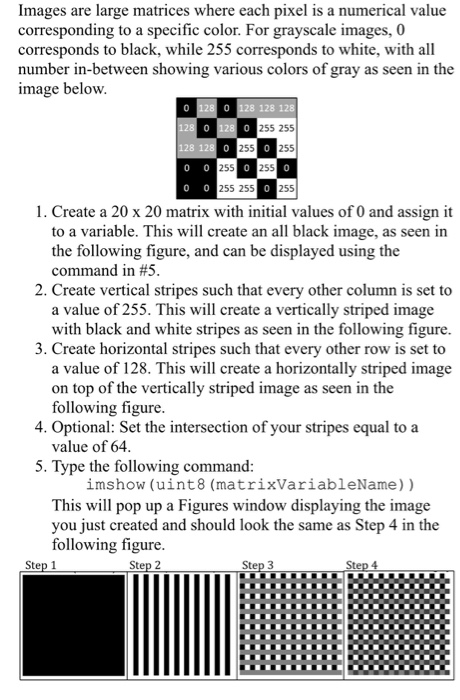
Images are large matrices where each pixel is a numerical value corresponding to a specific color. For grayscale images, 0 corresponds to black, while 255 corresponds to white, with all number in-between showing various colors of gray as seen in the image below 0 128 128 255 255 128 255 255 0 255 0 255 255 255 1. Create a 20 x 20 matrix with initial values of 0 and assign it to a variable. This will create an all black image, as seen in the following figure, and can be displayed using the command in #5 2. Create vertical stripes such that every other column is set to a value of 255. This will create a vertically striped image with black and white stripes as seen in the following figure 3. Create horizontal stripes such that every other row is set to a value of 128. This will create a horizontally striped image on top of the vertically striped image as seen in the following figure 4. Optional: Set the intersection of your stripes equal to a value of 64 5. Type the following command: imshow (uint8 (matrixVariableName)) This will pop up a Figures window displaying the image you just created and should look the same as Step 4 in the following figure Step 1
Step by Step Solution
There are 3 Steps involved in it

Get step-by-step solutions from verified subject matter experts
 Study Help