







Question: Implement a Java GUI multi-threaded application that computes a Fibonacci number. The expected screen shot of the application is shown below Application User Interface: A
Implement a Java GUI multi-threaded application that computes a Fibonacci number. The expected screen shot of the application is shown below
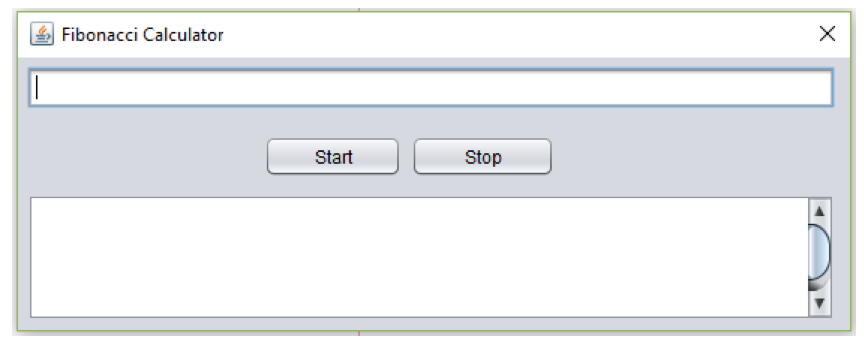
Application User Interface:
A JTextField control It accepts an integer number from the user for computing the Fibonacci value from this number.
A JButton control labelled as Start When the user presses this button, the application will make sure that a valid number is entered by the user before computing the Fibonacci value from this number. If the number entered is not specified or invalid (i.e., not an integer value), the user will be warned with a message dialog. Once the number entered is validated, the Fibonacci calculation using this number will begin. Refer to the section Calculating Fibonacci Number for further requirements.
A JButton control labelled as Stop When the user presses this button, the calculation of Fibonacci number will be stopped. The message, Calculation of Fibonacci number is terminated, will be displayed in the JTextArea control as described below.
A JTextArea control is used to display any messages as well as the Fibonacci calculation progress. The JTextArea control must be scrollable both horizontally and vertically.
Calculating Fibonacci Number:
Create a worker thread to compute the Fibonacci number.
The application must use recursion to calculate the Fibonacci number.
For each recursion call during the Fibonacci calculation, the application must display the current calculated value in the JTextArea control as shown above. In order for the messages to appear and the user will be able to see them, make sure to add a call to sleep for 1 second.
A mechanism to terminate this thread when the Stop button is pressed must be synchronized (i.e., protected for concurrent accesses)
The application must be able to handle large number and exceptions generated due to data overflow. The error messages must be presented in the JTextArea control before the calculation of the Fibonacci number is terminated.
Fibonacci Calculator Start Stop
Step by Step Solution
There are 3 Steps involved in it

Get step-by-step solutions from verified subject matter experts
 Study Help