







Question: Implement the crop() function in a1code.py. Use array slicing to crop the image. Implement the resize() function in a1code.py. 3 3. Implement the change_contrast() function
Implement the crop() function in a1code.py. Use array slicing to crop the image.
Implement the resize() function in a1code.py. 3
3. Implement the change_contrast() function in a1code.py. 4. Implement the greyscale() function in a1code.py.
5. Implement the binary() function in a1code.py.
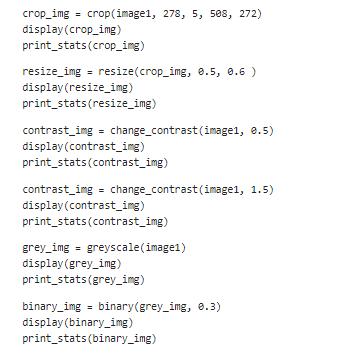
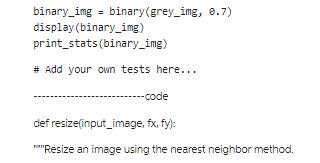
What do you observe when you change the threshold of the binary function?
Apply all these functions with different parameters on your own test images.
Not allowed to call the natural function.
i.e. for each output pixel, use the value of the nearest input pixel after scaling
Inputs:
input_image: RGB image stored as an array, with shape
`(image_height, image_width, 3)`.
fx (float): the resize scale on the original width.
fy (float): the resize scale on the original height.
Returns:
np.ndarray: Resized image, with shape `(image_height * fy, image_width * fx, 3)`.
### YOUR CODE HERE
return out
def change_contrast(image, factor):
"""Change the value of every pixel by following
x_n = factor * (x_p - 0.5) + 0.5
where x_n is the new value and x_p is the original value.
Assumes pixel values between 0.0 and 1.0
If you are using values 0-255, divided by 255.
Inputs:
image: numpy array of shape(image_height, image_width, 3).
factor (float): contrast adjustment
Returns:
out: numpy array of shape(image_height, image_width, 3).
"""
out = None
### YOUR CODE HERE
return out
def greyscale(input_image):
"""Convert a RGB image to greyscale.
A simple method is to take the average of R, G, B at each pixel.
Or you can look up more sophisticated methods online.
Inputs:
input_image: RGB image stored as an array, with shape
`(image_height, image_width, 3)`.
Returns:
np.ndarray: Greyscale image, with shape `(image_height, image_width)`.
"""
out = None
return out
def binary(grey_img, th):
"""Convert a greyscale image to a binary mask with a threshold.
x_n = 0, if x_p
x_n = 1, if x_p > th
Inputs:
input_image: Greyscale image stored as an array, with shape
`(image_height, image_width)`.
th (float): The threshold used for binarization, and the value range is 0 to 1
Returns:
np.ndarray: Binary mask, with shape `(image_height, image_width)`.
"""
out = None
crop_img= crop (image1, 278, 5, 508, 272) display (crop_img) print_stats (crop_img) resize_img = resize(crop_img, 0.5, 0.6 ) display (resize_img) print_stats (resize_img) contrast_img = change_contrast (image1, 0.5) display(contrast_img) print_stats (contrast_img) contrast_img= change_contrast (image1, 1.5) display (contrast_img) print_stats (contrast_img) grey_img = greyscale (image1) display (grey_img) print_stats (grey_img) binary_img= binary(grey_img, 0.3) display (binary_img) print_stats (binary_img)
Step by Step Solution
3.39 Rating (155 Votes )
There are 3 Steps involved in it

Get step-by-step solutions from verified subject matter experts
 Study Help