







Question: Implement the following program using java: 1. Implement the MyDate class (Figure 1. shows its UML diagram) Figure 1: UML diagram for the MyDate class.
Implement the following program using java: 1. Implement the MyDate class (Figure 1. shows its UML diagram)
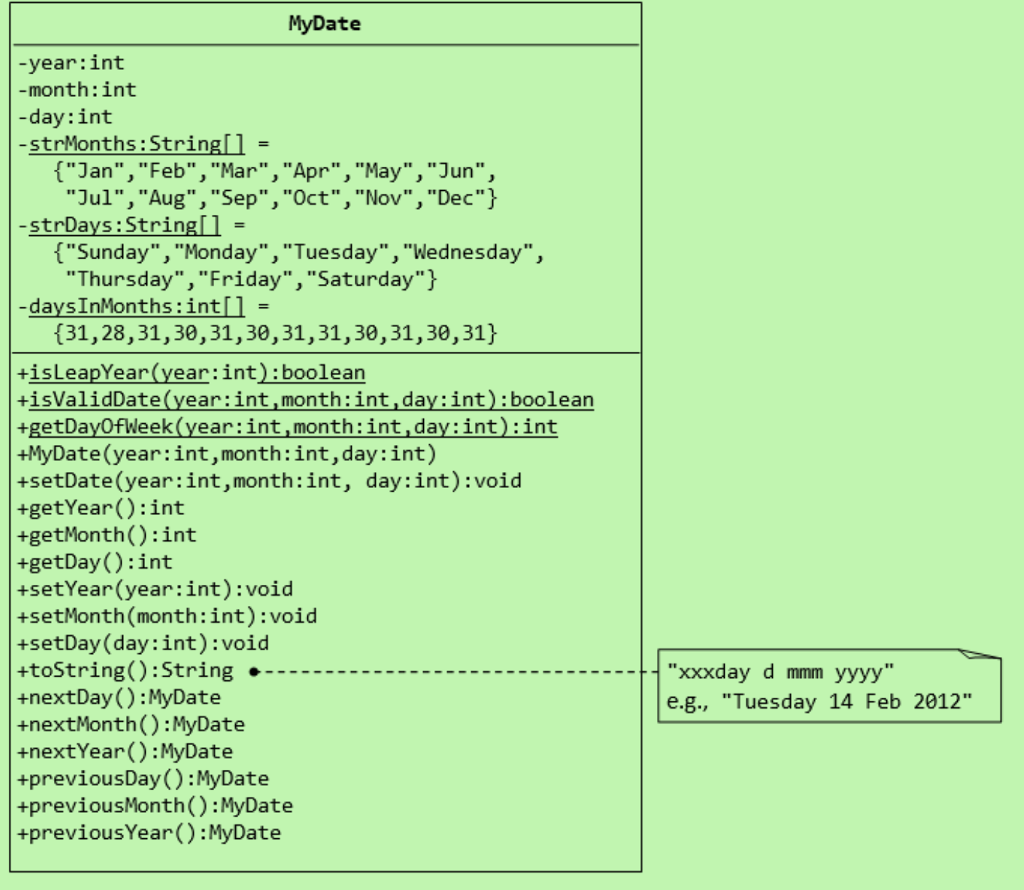
Figure 1: UML diagram for the MyDate class. The MyDate class contains the following private instance variables:
year (int): Between 1 to 9999. month (int): Between 1 (Jan) to 12 (Dec). day (int): Between 1 to 28293031, where the last day depends on the month and whether it is a leap year for Feb (2829).
It also contains the following private static variables (drawn with underlined in the class dia- gram):
strMonths (String[]), strDays (String[]), and dayInMonths (int[]): static variables, initialized as shown, which are used in the methods.
The MyDate class has the following public static methods (drawn with underlined in the class diagram):
isLeapYear(int year): returns true if the given year is a leap year. A year is a leap year if it is divisible by 4 but not by 100, or it is divisible by 400.
isValidDate(int year, int month, int day): returns true if the given year, month, and day constitute a valid date. Assume that year is between 1 and 9999, month is between 1 (Jan) to 12 (Dec) and day shall be between 1 and 28293031 depending on the month and whether it is a leap year on Feb.
getDayOfWeek(int year, int month, int day): returns the day of the week, where 0 for Sun, 1 for Mon, ..., 6 for Sat, for the given date. Assume that the date is valid. Research on Internet how to determine the day of the week.
The MyDate class has one constructor, which takes 3 parameters: year, month and day. It shall invoke setDate() method (to be described later) to set the instance variables.
The MyDate class has the following public methods:
setDate(int year, int month, int day): It shall invoke the static method isValidDate() to verify that the given year, month and day constitute a valid date. Otherwise, it shall throw an IllegalArgumentException with the message "Invalid year, month, or day!".
setYear(int year): It shall verify that the given year is between 1 and 9999. Otherwise, it shall throw an IllegalArgumentException with the message "Invalid year!".
setMonth(int month): It shall verify that the given month is between 1 and 12. Other- wise,itshallthrowanIllegalArgumentExceptionwiththemessage"Invalid month!".
setDay(int day): It shall verify that the given day is between 1 and dayMax, where dayMax depends on the month and whether it is a leap year for Feb. Otherwise, it shall throw an IllegalArgumentException with the message "Invalid month!".
getYear(), getMonth(), getDay(): return the value for the year, month and day, respectively.
toString(): returns a date string in the format "xxxday d mmm yyyy", e.g., "Tuesday 14 Feb 2012".
nextDay(): update this instance to the next day and return this instance. Take note that nextDay() for 31 Dec 2000 shall be 1 Jan 2001.
2
nextMonth(): update this instance to the next month and return this instance. Take note that nextMonth() for 31 Oct 2012 shall be 30 Nov 2012.
nextYear(): update this instance to the next year and return this instance. Take note that nextYear() for 29 Feb 2012 shall be 28 Feb 2013. Throw an IllegalStateException with the message "Year out of range!" if year > 9999.)
previousDay(), previousMonth(), previousYear(): similar to the above. 2. Write the code for testing the MyDate class (separate file containing the main method).
Use the following test statements to test the MyDate class:
MyDate d1 = new MyDate(2012, 2, 28);
System.out.println(d1); System.out.println(d1.nextDay()); System.out.println(d1.nextDay()); System.out.println(d1.nextMonth()); // Sunday 1 Apr 2012 System.out.println(d1.nextYear()); // Monday 1 Apr 2013
// Tuesday 28 Feb 2012 // Wednesday 29 Feb 2012 // Thursday 1 Mar 2012
MyDate d2 = new MyDate(2012, 1, 2); System.out.println(d2); System.out.println(d2.previousDay()); System.out.println(d2.previousDay()); System.out.println(d2.previousMonth()); // Wednesday 30 Nov 2011 System.out.println(d2.previousYear()); // Tuesday 30 Nov 2010
MyDate d3 = new MyDate(2012, 2, 29); System.out.println(d3.previousYear()); // Monday 28 Feb 2011
// MyDate d4 = new MyDate(2099, 11, 31); // Invalid year, month, or day! // MyDate d5 = new MyDate(2011, 2, 29); // Invalid year, month, or day!
Also, write a test code that tests the nextDay() in a loop, by printing the dates from 28 Dec 2011 to 2 Mar 2012.
MyDate -year:int month:int day:int -strMonths: Strin "Jan", "Feb","Mar" , "Apr" , "May", "Jun", "Jul", "Aug", "Sep", "Oct", "Nov", "Dec" -strDays:Strin "Sunday", "Monday","Tuesday", "Wednesday", "Thursday", "Friday", "Saturday" -days!nMonths: int = (31,28,31,30,31,30,31,31,30,31,30,31) isLeapYear (year:int:boolean +isValidDate(year:int,month:int,day:int):boolean +getDayOfWeek(year:int,month:int,day:int):int +MyDate(year:int,month:int,day:int) +setDate (year:int,month:int, day:int) void +getYear):int +getMonth():int +getDay():int +setYear(year:int):void +setMonth(month:int):void +setDay (day:int):void +toString() : String +nextDay ():MyDate +nextMonth() :MyDate +nextYear():MyDate +previousDay):MyDate +previousMonth):MyDate +previousYear():MyDate "xxxday d mmm yyyy" e0 e.g., "Tuesday 14 Feb 2012
Step by Step Solution
There are 3 Steps involved in it

Get step-by-step solutions from verified subject matter experts
 Study Help