







Question: import cv2 import matolotlib.pyplot as plt image1 = cv2.imread('image1.png') image2 = cv2. .imread('image2.png') Arithmetic Operations like Addition, Subtraction, and Bitwise Operations(AND, OR, NOT, XOR) can
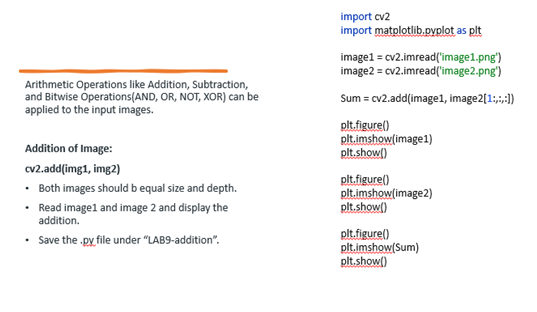

![XOR) can be applied to the input images. Addition of Image: Sum=cv2.add(image1,image2[1:,,;,[])](https://s3.amazonaws.com/si.experts.images/answers/2024/09/66e2958af1f1f_45066e2958a598f1.jpg)
import cv2 import matolotlib.pyplot as plt image1 = cv2.imread('image1.png') image2 = cv2. .imread('image2.png') Arithmetic Operations like Addition, Subtraction, and Bitwise Operations(AND, OR, NOT, XOR) can be applied to the input images. Addition of Image: Sum=cv2.add(image1,image2[1:,,;,[]) cv2.add(img1, img2) - Both images should b equal size and depth. plt,figure() plt.imshow(image1) plt.show() - Read image1 and image 2 and display the plt.figure() plt.imshow(image2) addition. - Save the -px file under "LAB9-addition". plt. show() plt.figure() plt.imshow(Sum) plt.show()
Step by Step Solution
There are 3 Steps involved in it
1 Expert Approved Answer
Step: 1 Unlock

Question Has Been Solved by an Expert!
Get step-by-step solutions from verified subject matter experts
Step: 2 Unlock
Step: 3 Unlock
 Study Help