







Question: import java.awt.*; import java.awt.event.*; import javax.swing.*; public class CExchange extends JFrame { private JLabel label1; private JLabel label2; private JComboBox box; private String[] currencies =
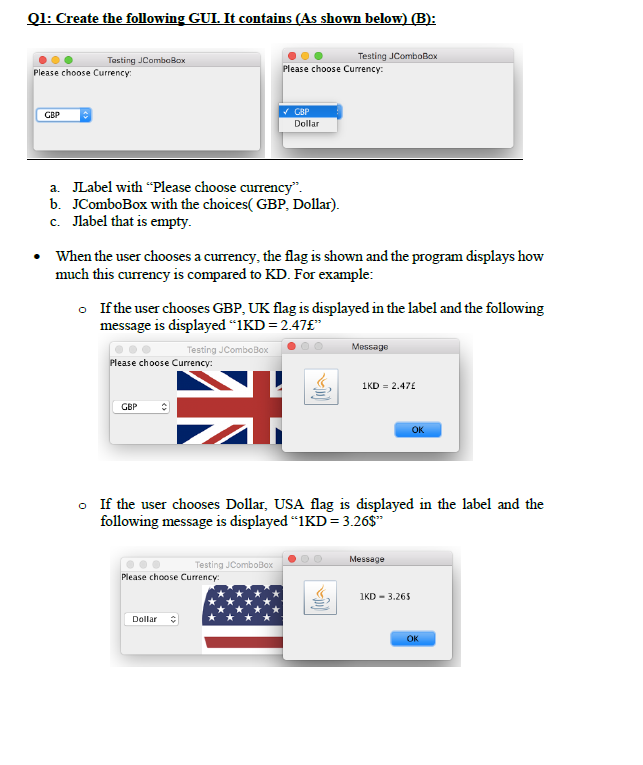
import java.awt.*; import java.awt.event.*; import javax.swing.*; public class CExchange extends JFrame { private JLabel label1; private JLabel label2; private JComboBox box; private String[] currencies = {"GBP", "Dollar"}; private Icon[] icons = {new ImageIcon(getClass().getResource("UK.png")), new ImageIcon(getClass().getResource("US.png"))}; public CExchange() { super("Testing JComboBox"); setLayout(new FlowLayout()); label1 = new JLabel("Please choose currency"); add(label1); box = new JComboBox(currencies); box.setMaximumRowCount(2); add(box); label2 = new JLabel(); add(label2); CExchangeHandler handler = new CExchangeHandler(); box.addActionListener(handler); } private class CExchangeHandler implements ActionListener{ @Override public void actionPerformed(ActionEvent event) { if(box.getSelectedIndex() == 0) { label2.setIcon(icons[0]); JOptionPane.showMessageDialog(null,"1KD = 2.47"); } if(box.getSelectedIndex() == 1) { label2.setIcon(icons[1]); JOptionPane.showMessageDialog(null,"1KD = 3.26$"); } } } }
Q1: Create the following GUI. It contains (As shown below) (B): Testing ComboBox Please choose Currency Testing ComboBox Please choose Currency: GBP CBP Dollar a. JLabel with Please choose currency". b. JComboBox with the choices( GBP, Dollar). c. Jlabel that is empty. When the user chooses a currency, the flag is shown and the program displays how much this currency is compared to KD. For example: If the user chooses GBP, UK flag is displayed in the label and the following message is displayed "1KD = 2.47" Testing JComboBox Message Please choose Currency: 1KD = 2.47 GBP IT OK o If the user chooses Dollar, USA flag is displayed in the label and the following message is displayed IKD = 3.26$" Message Testing ComboBox Please choose Currency IKD - 3.265 Dollar OK
Step by Step Solution
There are 3 Steps involved in it

Get step-by-step solutions from verified subject matter experts
 Study Help