







Question: Write a java program to simulate showing an NBA Team on a Basketball court. You also have to draw the basket ball court with the
Write a java program to simulate showing an NBA Team on a Basketball court. You also have to draw the basket ball court with the colors and shapes in the attached image. Here is an example of the screenshot when running the program:
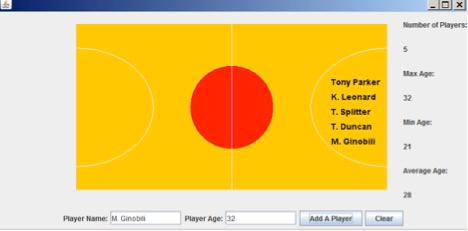
An example of the JFrame subclass with main method is also provided, all other neccessary classes will need to be written.
import java.awt.*;
import java.awt.event.*;
import javax.swing.*;
public class NBAPlayoff extends JFrame {
private JTextField txtName;
private JTextField txtAge;
private NBATeam spurs;
private NBAcourtPanel court;
private JLabel lMax, lMin, lAvg, lNum;
public NBAPlayoff(){
spurs=new NBATeam("Spurs");
court=new NBAcourtPanel(spurs);
add(court, BorderLayout.CENTER);
JLabel lMax0=new JLabel("Max Age:");
lMax=new JLabel("");
JLabel lMin0=new JLabel("Min Age:");
lMin=new JLabel("");
JLabel lAvg0=new JLabel("Average Age:");
lAvg=new JLabel("");
JLabel lNum0=new JLabel("Number of Players:");
lNum =new JLabel("");
JPanel rp=new JPanel(new GridLayout(8, 1)); //right panel
rp.add(lNum0);rp.add(lNum);rp.add(lMax0);rp.add(lMax);
rp.add(lMin0);rp.add(lMin);rp.add(lAvg0);rp.add(lAvg);
add(rp, BorderLayout.EAST);
JLabel l1=new JLabel("Player Name:");
txtName= new JTextField();
txtName.setPreferredSize(new Dimension(120,24));
JLabel l2=new JLabel("Player Age:");
txtAge= new JTextField();
txtAge.setPreferredSize(new Dimension(120,24));
JButton jbtAdd=new JButton("Add A Player");
jbtAdd.addActionListener(new ActionListener() {
public void actionPerformed(ActionEvent e) {
int age=Integer.parseInt(txtAge.getText());
spurs.addAPlayer(txtName.getText(), age);
lMax.setText(spurs.getMaxAge()+"");
lMin.setText(spurs.getMinAge()+"");
lAvg.setText(spurs.getAvgAge()+"");
lNum.setText(spurs.getNumOfPlayer()+"");
court.repaint();
}});
JButton jbtClear= new JButton("Clear");
jbtClear.addActionListener(new ActionListener() {
public void actionPerformed(ActionEvent e) {
txtName.setText("");
txtAge.setText("");
}});
JPanel pBot=new JPanel();
pBot.add(l1); pBot.add(txtName); pBot.add(l2);pBot.add(txtAge); pBot.add(jbtAdd);pBot.add(jbtClear);
add(pBot, BorderLayout.SOUTH);
}
public static void main(String[] args) {
NBAPlayoff frame = new NBAPlayoff();
frame.setDefaultCloseOperation(JFrame.EXIT_ON_CLOSE);
frame.setLocationRelativeTo(null);
frame.setSize(800, 400);
frame.setVisible(true);
}
}
Number of Players: Max Age Tony Parker K. Leonared T. Splitter T. Duncan M. Ginobili 32 Min Age Age 21 Average Age 28 Player Name: MGinobill Player Age Add A Player Clear
Step by Step Solution
There are 3 Steps involved in it

Get step-by-step solutions from verified subject matter experts
 Study Help