







Question: import java.io.*; import java.util.*; public class Apple { static final int INITIAL_CAPACITY = 10; public static void main (String[] args) throws Exception { // ALWAYS
import java.io.*;
import java.util.*;
public class Apple
{
static final int INITIAL_CAPACITY = 10;
public static void main (String[] args) throws Exception
{
// ALWAYS TEST FIRST TO VERIFY USER PUT REQUIRED INPUT FILE NAME ON THE COMMAND LINE
if (args.length
{
System.out.println(" usage: C:\\> java Apple "); // i.e. C:\> java Apple dictionary.txt
System.exit(0);
}
int[] histogram = new int[0]; // histogram[i] == # of words of length n
/* array of String to store the words from the dictionary.
We use BufferedReader (not Scanner). With each word read in, examine it's length and update word length frequency histogram accordingly.
*/
String[] wordList = new String[INITIAL_CAPACITY];
int wordCount = 0;
BufferedReader infile = new BufferedReader( new FileReader(args[0]) );
while ( infile.ready() )
{
String word = infile.readLine();
// # # # # # DO NOT WRITE/MODIFY ANYTHING ABOVE THIS LINE # # # # #
// test to see if list is full. If needed do an up size
if (wordCount == wordList.length)
{
wordList = upSizeArr(wordList);
}
// now you may safely append word onto list and incr count
String newWord = infile.readLine();
wordList[wordCount++] = newWord;
// look at the word length and see if the histogram length is AT LEAST
// word length + 1. If not, you must upsize histogram to be EXACTLY word length + 1
// now you can increment the counter in the histogram for this word's length
int wordLength = word.length();
if (word.length() > histogram.length)
histogram = upSizeHisto(histogram, wordLength);
histogram[word.length()]++;
// # # # # # DO NOT WRITE/MODIFY ANYTHING BELOW THIS LINE # # # # #
} //END WHILE INFILE READY
infile.close();
wordList = trimArr( wordList, wordCount );
System.out.println( "After final trim: wordList length: " + wordList.length + " wordCount: " + wordCount );
// PRINT WORD LENGTH FREQ HISTOGRAM
for ( int i = 0; i
System.out.format("words of length %2d %d ", i,histogram[i] );
} // END main
// YOU MUST CORRECTLY COPY THE STRING REFS FROM THE OLD ARR TO THE NEW ARR
static String[] upSizeArr( String[] fullArr )
{
String upSizeArr[] = new String[fullArr.length * 2];
System.arraycopy(fullArr, 0, upSizeArr, 0, fullArr.length);
return upSizeArr; // just to make it complie you change as needed
}
static String[] trimArr( String[] oldArr, int count )
{
String[] newArr = new String[count];
System.arraycopy(oldArr, 0, newArr, 0, count);
return newArr; // just to make it complie you change as needed
}
// YOU MUST CORRECTLY COPY THE COUNTS FROM OLD HISTO TO NEW HISTO
static int[] upSizeHisto( int[] oldArr, int newLength )
{
int[] newArr = new int[newLength];
System.arraycopy(oldArr, 0, newArr, 0, oldArr.length);
return newArr; // just to make it complie you change as needed
}
} // END CLASS Apple
Need help keep getting out bound expception 10 on line 54 : histogram[word.length()]++;
sample output if it helps :
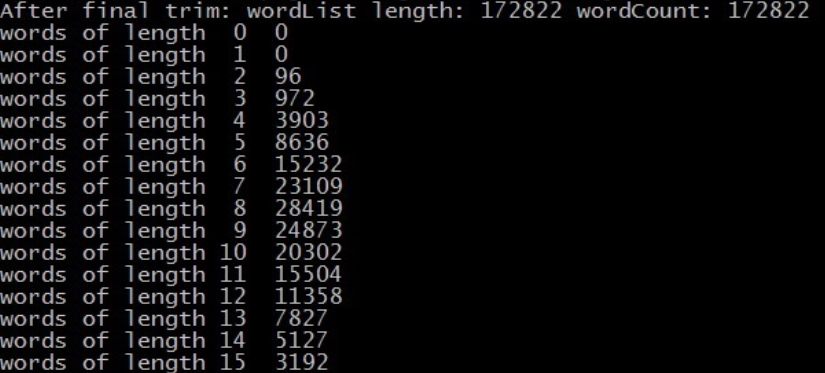
After final trim: wordList length: 172822 wordcount: 172822 words of length 0 0 words of length 1 words of length 2 96 words of length 3 972 words of ength 4 3903 words of length 5 8636 words of ength 6 15232 words of length 7 23109 words of ength 8 28419 words of length 9 24873 words of length 10 20302 words of length 11 15504 words of length 12 11358 words of length 13 7827 words of length 14 5127 words of length 15 3192
Step by Step Solution
There are 3 Steps involved in it

Get step-by-step solutions from verified subject matter experts
 Study Help