Question: import java.text.DecimalFormat; public class PictureBlur { private static final double[][] PICTURE = {{ 1.2, 1.3, 4.5, 6.0, 2.7 }, { 1.7, 3.3, 4.4, 10.5, 17.0
import java.text.DecimalFormat; public class PictureBlur { private static final double[][] PICTURE = {{ 1.2, 1.3, 4.5, 6.0, 2.7 }, { 1.7, 3.3, 4.4, 10.5, 17.0 }, { 1.1, 4.5, 2.1, 25.3, 9.2 }, { 1.0, 9.5, 8.3, 2.9, 2.1 }}; private static final double[][] RESULT = {{ 1.57, 2.44, 4.6, 6.73, 7.48 }, { 1.98, 2.87, 5.97, 10.37, 12.01 }, { 2.63, 4.09, 7.48, 11.4, 11.58 }, { 3.3, 5.73, 7.67, 7.86, 6.43 }}; private static double[][] blur(double[][] picture) { } private static String printArray(double[][] picture) { DecimalFormat f = new DecimalFormat("0.00"); String output = ""; for (int row = 0; row private static double[][] blur(double[][] picture) { } i have actually to code inside this part to make it work. what blurring method should I use?
following is the question detail:
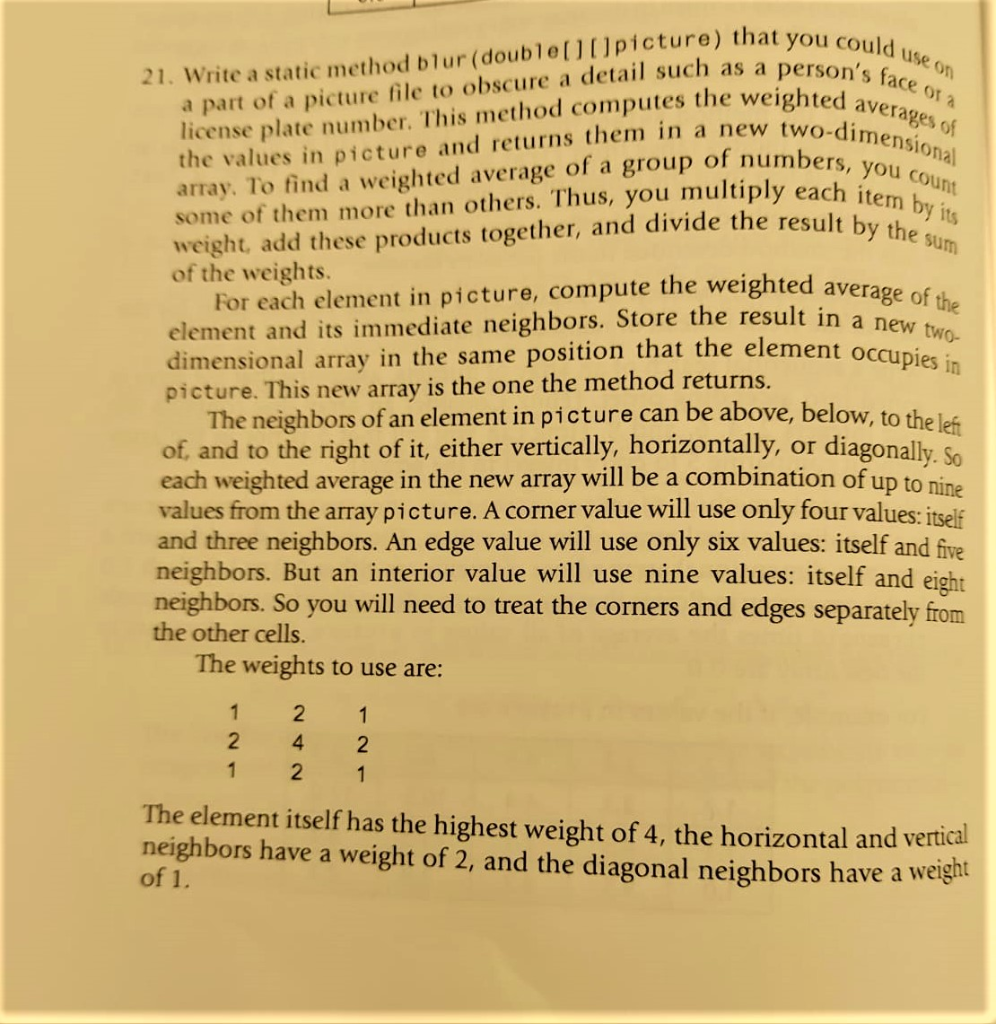
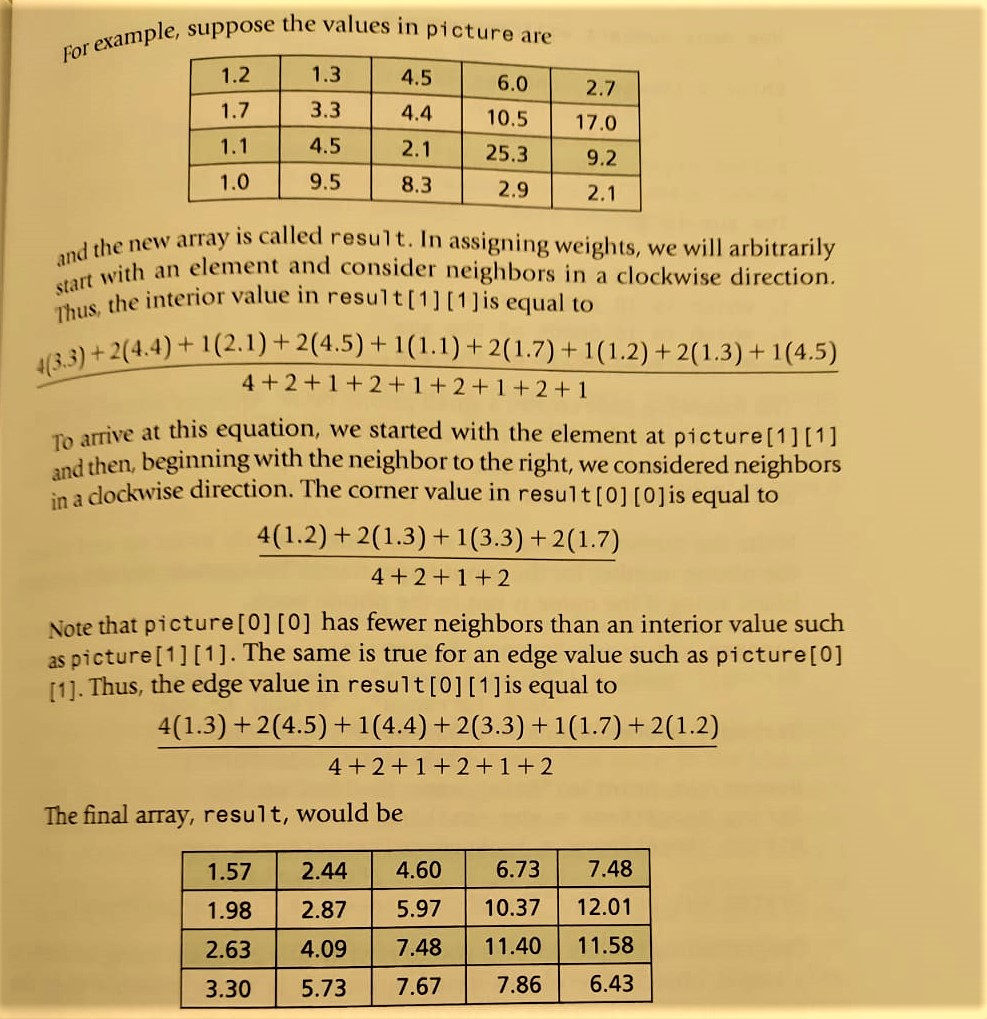
ou could use on in's face ora ohted averages of two-dimensional imbers, you count ach item by its osult by the sum reighted average of the ut in a new two- 21. Write a static method blur (double([picture) that you com a part of a picture file to obscure a detail such as a pers license plate number. This method computes the weighte the values in picture and returns them in a new two-dir array. To find a weighted average of a group of numbers, v some of them more than others. Thus, you multiply each ito weight, add these products together, and divide the result by of the weights. For each element in picture, compute the weighted averao element and its immediate neighbors. Store the result in a na dimensional array in the same position that the element oco picture. This new array is the one the method returns. The neighbors of an element in picture can be above, below, to the le of, and to the right of it, either vertically, horizontally, or diagonally 5 each weighted average in the new array will be a combination of up to nino values from the array picture. A corner value will use only four values: itself and three neighbors. An edge value will use only six values: itself and five neighbors. But an interior value will use nine values: itself and eight neighbors. So you will need to treat the corners and edges separately from the other cells. The weights to use are: 1 2 1 2 4 2 1 2 1 The element itself has the highest weight of 4, the horizontal and vertical neighbors have a weight of 2, and the diagonal neighbors have a weight of 1. For example, sup nple, suppose the values in picture are 1.2 1. 3 4.5 6.0 1.7 3.3 4.4 10.5 1.1 4.5 2.1 25.3 1.0 9.5 8.3 2.9 2.7 17.0 9.2 2.1 and the new arra start with an el Thus, the interior value 4(3:3)+2(4.4) +102 a new array is called result. In assigning weights, we will arbitrarily ith an element and consider neighbors in a clockwise direction. e the interior value in result[1][1] is equal to +2(4.4) + 1(2.1) + 2(4.5) + 1(1.1) +2(1.7)+1(1.2) +2(1.3) +1(4.5) 4+2+1+2+1+2+1 +2 +1 arrive at this equation, we started with the element at picture[1][1] then, beginning with the neighbor to the right, we considered neighbors in a dockwise direction. The corner value in result[O] (Ojis equal to 4(1.2) +2(1.3) +1(3.3) +2(1.7) 4+2 +1 +2 Note that picture[0][0] has fewer neighbors than an interior value such as picture[1][1]. The same is true for an edge value such as picture[0] [1]. Thus, the edge value in result[0][1] is equal to 4(1.3) +2(4.5)+1(4.4) +2(3.3) +1(1.7) + 2(1.2) 4+2+1+2+1+2 The final array, result, would be 1.572.44 4.606.73 7.48 1.98 2.875.97 10.3712.01 2.634.09 7.48 11.40 11.58 3.30 5.737.67 7.866.43 ou could use on in's face ora ohted averages of two-dimensional imbers, you count ach item by its osult by the sum reighted average of the ut in a new two- 21. Write a static method blur (double([picture) that you com a part of a picture file to obscure a detail such as a pers license plate number. This method computes the weighte the values in picture and returns them in a new two-dir array. To find a weighted average of a group of numbers, v some of them more than others. Thus, you multiply each ito weight, add these products together, and divide the result by of the weights. For each element in picture, compute the weighted averao element and its immediate neighbors. Store the result in a na dimensional array in the same position that the element oco picture. This new array is the one the method returns. The neighbors of an element in picture can be above, below, to the le of, and to the right of it, either vertically, horizontally, or diagonally 5 each weighted average in the new array will be a combination of up to nino values from the array picture. A corner value will use only four values: itself and three neighbors. An edge value will use only six values: itself and five neighbors. But an interior value will use nine values: itself and eight neighbors. So you will need to treat the corners and edges separately from the other cells. The weights to use are: 1 2 1 2 4 2 1 2 1 The element itself has the highest weight of 4, the horizontal and vertical neighbors have a weight of 2, and the diagonal neighbors have a weight of 1. For example, sup nple, suppose the values in picture are 1.2 1. 3 4.5 6.0 1.7 3.3 4.4 10.5 1.1 4.5 2.1 25.3 1.0 9.5 8.3 2.9 2.7 17.0 9.2 2.1 and the new arra start with an el Thus, the interior value 4(3:3)+2(4.4) +102 a new array is called result. In assigning weights, we will arbitrarily ith an element and consider neighbors in a clockwise direction. e the interior value in result[1][1] is equal to +2(4.4) + 1(2.1) + 2(4.5) + 1(1.1) +2(1.7)+1(1.2) +2(1.3) +1(4.5) 4+2+1+2+1+2+1 +2 +1 arrive at this equation, we started with the element at picture[1][1] then, beginning with the neighbor to the right, we considered neighbors in a dockwise direction. The corner value in result[O] (Ojis equal to 4(1.2) +2(1.3) +1(3.3) +2(1.7) 4+2 +1 +2 Note that picture[0][0] has fewer neighbors than an interior value such as picture[1][1]. The same is true for an edge value such as picture[0] [1]. Thus, the edge value in result[0][1] is equal to 4(1.3) +2(4.5)+1(4.4) +2(3.3) +1(1.7) + 2(1.2) 4+2+1+2+1+2 The final array, result, would be 1.572.44 4.606.73 7.48 1.98 2.875.97 10.3712.01 2.634.09 7.48 11.40 11.58 3.30 5.737.67 7.866.43









 Study Help