







Question: import java.util.HashMap; import java.util.Scanner; / / Class to represent a user class User { private String email; private String password; / / Constructor to initialize
import java.util.HashMap;
import java.util.Scanner;
Class to represent a user
class User
private String email;
private String password;
Constructor to initialize a User object
public UserString email, String password
this.email email;
this.password password;
Getter method to retrieve the email
public String getEmail
return email;
Getter method to retrieve the password
public String getPassword
return password;
public class LoginSystem
HashMap to store user records with email as key
private static HashMap users new HashMap;
private static Scanner scanner new ScannerSystemin;
public static void mainString args
Main menu loop
while true
System.out.printlnWelcome to the Login System";
System.out.println Sign Up;
System.out.println Login";
System.out.println Exit";
System.out.printEnter your choice: ;
int choice scanner.nextInt;
if choice
signUpUser;
else if choice
loginUser;
break; Exit loop after successful login
else if choice
System.out.printlnExiting;
break;
else
System.out.printlnInvalid choice. Please try again.";
scanner.close;
Method to handle user sign up
private static void signUpUser
System.out.printEnter your email: ;
String email scanner.next;
System.out.printEnter your password: ;
String password scanner.next;
Check if the email already exists
if userscontainsKeyemail
System.out.printlnAccount already exists. Please try logging in;
else
Create a new user and add to HashMap
User newUser new Useremail password;
users.putemail newUser;
System.out.printlnAccount created successfully!";
Method to handle user login
private static void loginUser
System.out.printEnter your email: ;
String email scanner.next;
System.out.printEnter your password: ;
String password scanner.next;
Check if the user exists and password matches
if userscontainsKeyemail
User user users.getemail;
if usergetPasswordequalspassword
System.out.printlnLogin successful!";
System.out.printlnWelcome user.getEmail;
else
System.out.printlnIncorrect password. Please try again.";
loginUser; Allow retrying login after incorrect password
else
System.out.printlnUser not found. Please sign up first.";
signUpUser; Allow signing up if user doesn't exist
loginUser; Allow retrying login after signing up
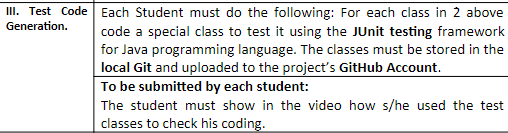
this is my code and in the picture what i want to do
Step by Step Solution
There are 3 Steps involved in it
1 Expert Approved Answer
Step: 1 Unlock

Question Has Been Solved by an Expert!
Get step-by-step solutions from verified subject matter experts
Step: 2 Unlock
Step: 3 Unlock
 Study Help