







Question: import { useState } from react; import .ewProduct.css; import { storage } from ../../firebase; import { getStorage, ref, uploadBytesResumable, getDownloadURL } from firebase/storage; export default
import { useState } from "react";
import ".ewProduct.css";
import { storage } from "../../firebase";
import { getStorage, ref, uploadBytesResumable, getDownloadURL } from "firebase/storage";
export default function NewProduct() {
const [movie, setMovie] = useState(null);
const [img, setImg] = useState(null);
const [imgTitle, setImgTitle] = useState(null);
const [imgSm, setImgSm] = useState(null);
const [trailer, setTrailer] = useState(null);
const [video, setVideo] = useState(null);
const [uploaded, setUploaded] = useState(0);
const handleChange = (e) => {
const value = e.target.value;
setMovie({ ...movie, [e.target.name]: value });
};
const upload = (items) => {
items.forEach((item) => {
const fileName = new Date().getTime() + item.label + item.file.name;
const storageRef = ref(storage, `/items/${fileName}`)
const uploadTask = uploadBytesResumable(storageRef, item);
uploadTask.on(
"state_changed",
(snapshot) => {
const progress =
(snapshot.bytesTransferred / snapshot.totalBytes) * 100;
console.log("Upload is" + progress + " % done.");
},
(err) => {
console.log(err);
},
() => {
getDownloadURL(uploadTask.snapshot.ref).then((downloadURL) => {
setMovie((prevState) => {
return { ...prevState, [item.label]: downloadURL };
});
setUploaded((prev) => prev + 1);
});
}
);
});
};
const handleUpload = (e) => {
e.preventDefault();
upload([
{ file: img, lable: "img" },
{ file: imgTitle, lable: "imgTitle" },
{ file: imgSm, lable: "imgSm" },
{ file: trailer, lable: "trailer" },
{ file: video, lable: "video" },
]);
};
console.log(movie);
return (
New Movie
);
}
I am following a tutorial trying to get the downloadURL from firebase and setting them as properties in my move object, but it returns me undefined.
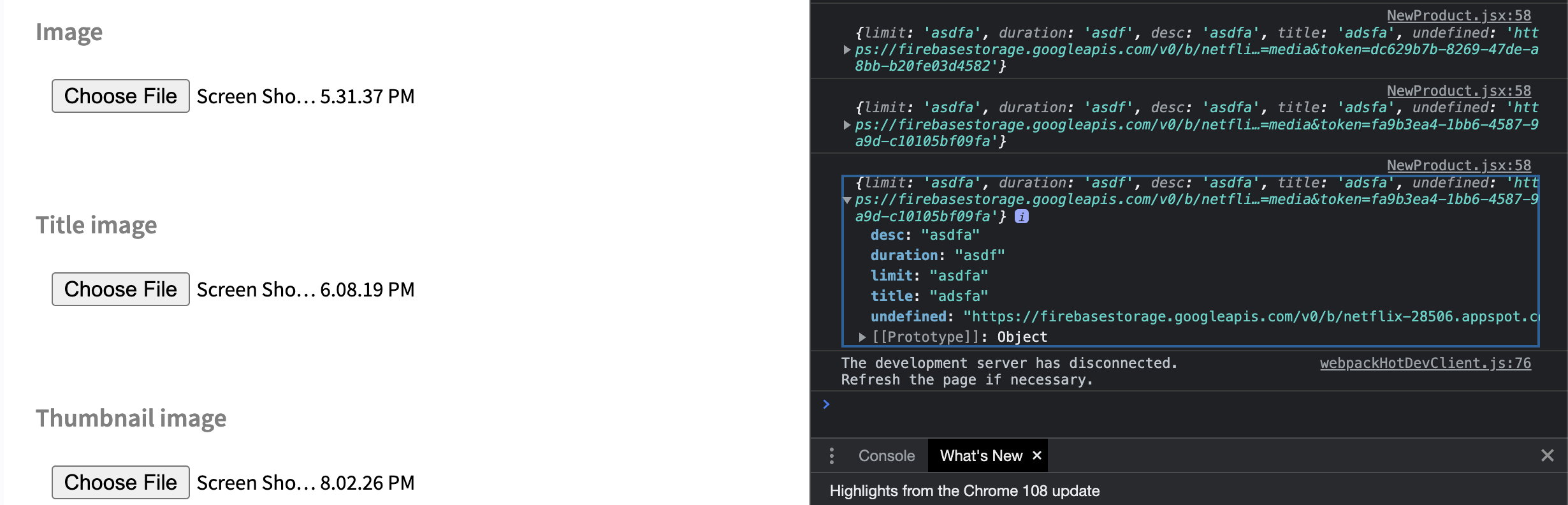 this is what it shows in my console (I uploaded 5 different files (img, imgTitle, imgSm, trailer, video), but it only retrives one link from the firebase and it sets the name of that property to "undefined" when it's suppose to return 5 different property names.
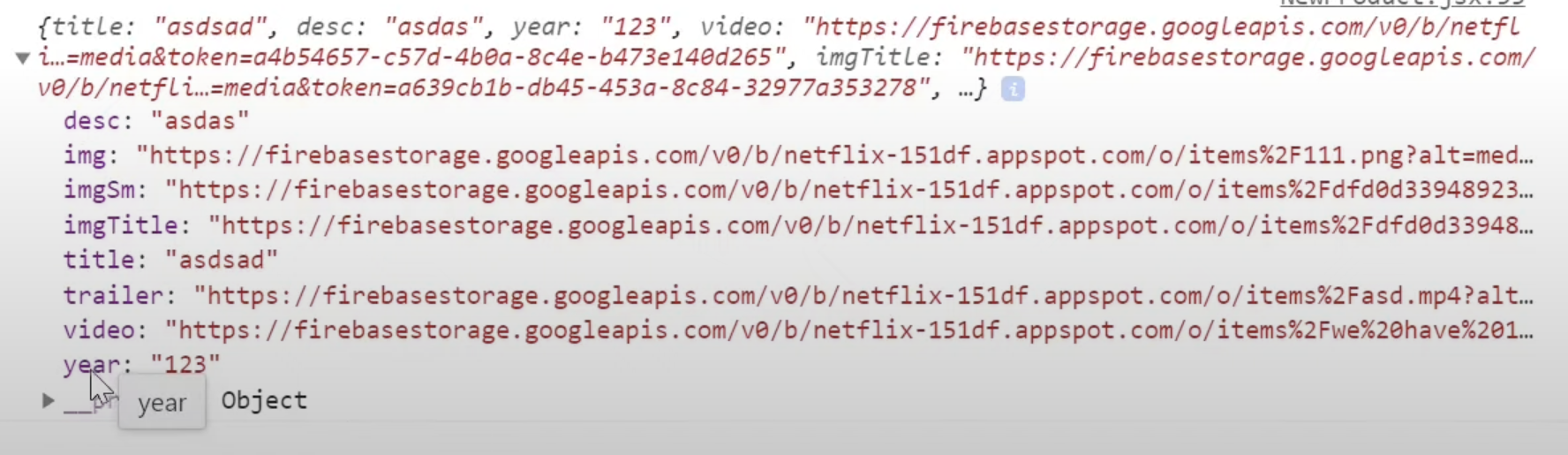 this is what it's suppose to show in the console based on the tutorial i was following.
How should I fix my code to return the tutorial output?
Image NewProduct, jsX: 58 Screen Sho... 5.31.37 PM \{limit: 'asdfa', duration: 'asdf', desc: 'asdfa', title: 'adsfa', undefined: 'ht the - ps:// firebasestorage. googleapis. com/v0/bet fli...=meditoken=dc629b7b-8269-47de-a 8bbb20fe03d4582} \{limit: 'asdfa', duration: 'asdf', desc: 'asdfa', title: 'adsfa', undefined: 'htt ps: // firebasestorage. googleapis. com/v0/betfli..=media\&token=fa9b3ea4-1bb6-4587-9 a9d-c10105bf09fa'\} Title image The development server has disconnected. Refresh the page if necessary. Thumbnail image Screen Sho... 8.02.26 PM Highlights from the Chrome 108 update \{title: "asdsad", desc: "asdas", year: "123", video: "https://firebasestorage.googleapis.com/v0/betfl i...=media\&token =a4b54657c57d4ba8c4eb473e14d265, imgTitle: "https://firebasestorage.googleapis.com/ v/b/ netfli...=media\&token =a639cb1bdb45453a8c8432977a353278 ", .... desc: "asdas" img: "https://firebasestorage.googleapis. com/v /b/ netflix-151df. appspot.com/o/items\%2F111. png?alt=med... title: "asdsad" trailer: "https://firebasestorage.googleapis.com/v / /betflix-151df.appspot. com/o/items\% 2Fasd.mp4?alt... video: "https://firebasestorage.googleapis.com/v / betflix-151df.appspot.com/o/items\%2Fwe\%20have\%201... year: "123" year object
Step by Step Solution
There are 3 Steps involved in it

Get step-by-step solutions from verified subject matter experts
 Study Help