







Question: In a previous assigrment, Excel wrote a Macro for you by recording your actions. The language the Macro was written in was Visual Basic, or
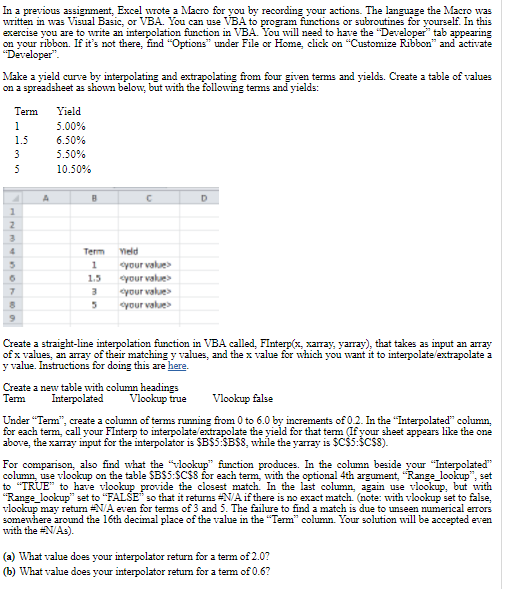
In a previous assigrment, Excel wrote a Macro for you by recording your actions. The language the Macro was written in was Visual Basic, or VBA. You can use VBA to program functions or subroutines for yourself. In this exercise you are to write an interpolation function in VBA. You will need to have the Developer" tab appearing on your ribbon. If it's not there, find "Options" under File or Home, click on "Customize Ribbon and activate Developer" Make a yield curve by interpolating and extrapolating from four given terms and yields. Create a table of values on a spreadsheet as shown below, but with the following terms and yields: Term 1 1.3 Yield 5.00% 6.50% 5.50% 10.50% 3 5 A B D 2 3 OOON 6 7 Term 1 1.5 3 5 Vield your values your value your value> your value Create a straight-line interpolation function in VBA called. Finterp(x, xarray, yarray), that takes as input an array of x values, an array of their matching y values, and the x value for which you want it to interpolate/extrapolate a y value. Instructions for doing this are here Create a new table with column headings Term Interpolated Vlookup true Vlookup false Under "Term", create a column of terms running from 0 to 6.0 by increments of 0.2. In the "Interpolated column, for each term call your FInterp to interpolate extrapolate the yield for that term (If your sheet appears like the one above, the xarray input for the interpolator is $B$5:$B$8, while the yarray is $C$5:$C$8). For comparison, also find what the lookup" function produces. In the column beside your "Interpolated" column, use vlookup on the table SBSS:SC$8 for each term with the optional 4th argument, "Range_lookup", set to "TRUE", to have vlookup provide the closest match. In the last column, again use vlookup, but with "Range_lookup" set to "FALSE so that it returns A if there is no exact match note: with vlookup set to false, vlookup may retum NA even for terms of 3 and 5. The failure to find a match is due to unseen numerical errors somewhere around the 16th decimal place of the value in the "Term" column. Your solution will be accepted even with the NAs). (a) What value does your interpolator return for a term of 2.07 (b) What value does your interpolator retum for a term of 0.6? a In a previous assigrment, Excel wrote a Macro for you by recording your actions. The language the Macro was written in was Visual Basic, or VBA. You can use VBA to program functions or subroutines for yourself. In this exercise you are to write an interpolation function in VBA. You will need to have the Developer" tab appearing on your ribbon. If it's not there, find "Options" under File or Home, click on "Customize Ribbon and activate Developer" Make a yield curve by interpolating and extrapolating from four given terms and yields. Create a table of values on a spreadsheet as shown below, but with the following terms and yields: Term 1 1.3 Yield 5.00% 6.50% 5.50% 10.50% 3 5 A B D 2 3 OOON 6 7 Term 1 1.5 3 5 Vield your values your value your value> your value Create a straight-line interpolation function in VBA called. Finterp(x, xarray, yarray), that takes as input an array of x values, an array of their matching y values, and the x value for which you want it to interpolate/extrapolate a y value. Instructions for doing this are here Create a new table with column headings Term Interpolated Vlookup true Vlookup false Under "Term", create a column of terms running from 0 to 6.0 by increments of 0.2. In the "Interpolated column, for each term call your FInterp to interpolate extrapolate the yield for that term (If your sheet appears like the one above, the xarray input for the interpolator is $B$5:$B$8, while the yarray is $C$5:$C$8). For comparison, also find what the lookup" function produces. In the column beside your "Interpolated" column, use vlookup on the table SBSS:SC$8 for each term with the optional 4th argument, "Range_lookup", set to "TRUE", to have vlookup provide the closest match. In the last column, again use vlookup, but with "Range_lookup" set to "FALSE so that it returns A if there is no exact match note: with vlookup set to false, vlookup may retum NA even for terms of 3 and 5. The failure to find a match is due to unseen numerical errors somewhere around the 16th decimal place of the value in the "Term" column. Your solution will be accepted even with the NAs). (a) What value does your interpolator return for a term of 2.07 (b) What value does your interpolator retum for a term of 0.6? a
Step by Step Solution
There are 3 Steps involved in it

Get step-by-step solutions from verified subject matter experts
 Study Help