







Question: In C#: Add two classes to the Inventory Maintenance app that inherit the InventoryItem class. Then, you'll add code to the forms to provide for
In C#:
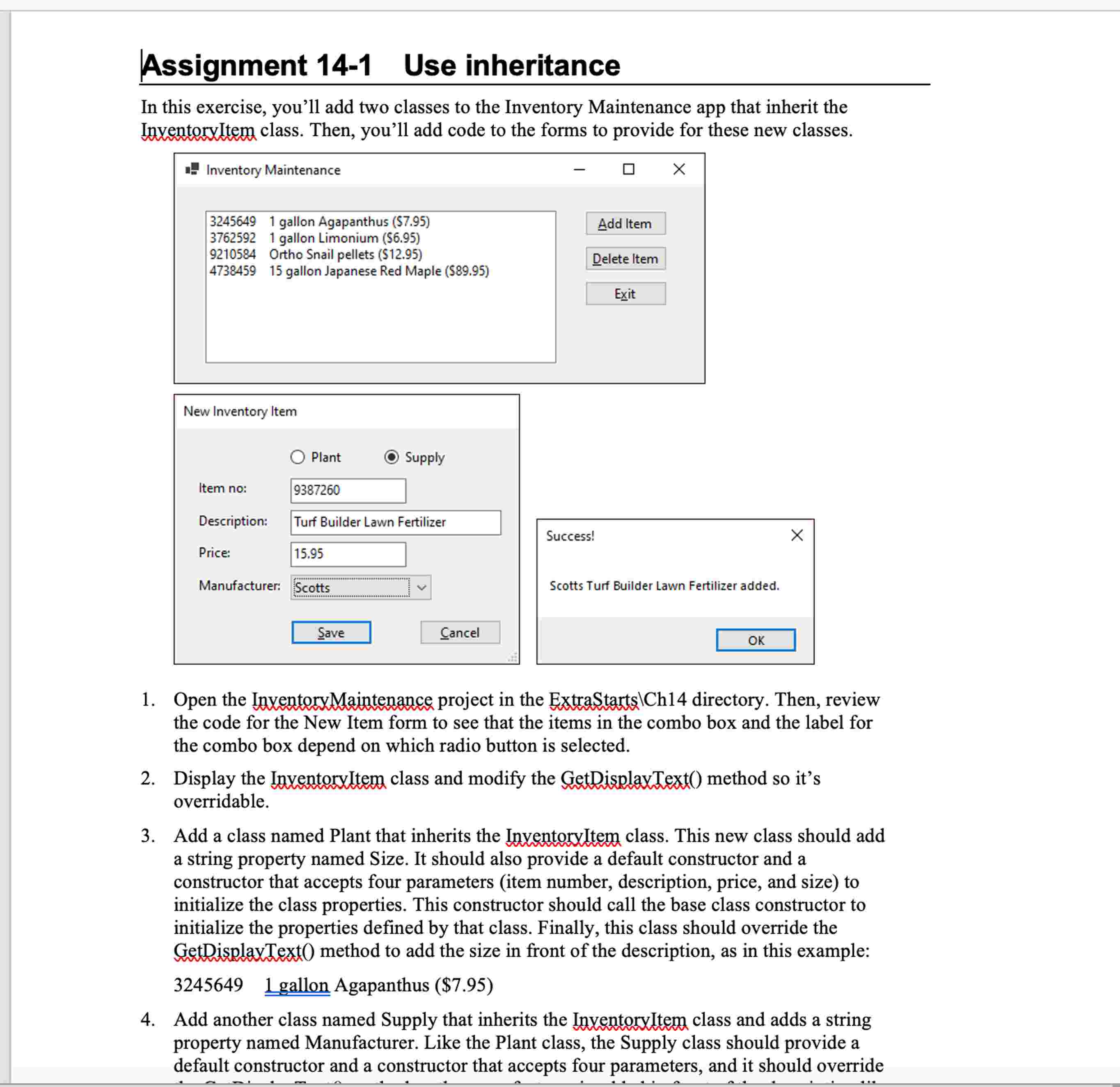
Add two classes to the Inventory Maintenance app that inherit the InventoryItem class. Then, you'll add code to the forms to provide for these new classes.
Open the InventoryMaintenance project in the ExtraStartsCh directory. Then, review
the code for the New Item form to see that the items in the combo box and the label for the combo box depend on which radio button is selected.
Display the InventoryItem class and modify the GetDisplayText method so its overridable.
Add a class named Plant that inherits the InventoryItem class. This new class should add a string property named Size. It should also provide a default constructor and a constructor that accepts four parameters item number, description, price, and size to initialize the class properties. This constructor should call the base class constructor to
initialize the properties defined by that class. Finally, this class should override the GetDisplayText method to add the size in front of the description, as in this example:
gallon Agapanthus $
Add another class named Supply that inherits the InventoryItem class and adds a string property named Manufacturer. Like the Plant class, the Supply class should provide a default constructor and a constructor that accepts four parameters, and it should override the GetDisplayText method so the manufacturer is added in front of the description like this: Ortho Snail pellets $
Modify the event handler for the Click event of the Save button on the New Item form so it creates a new item of the appropriate type using the data entered by the user.
Modify the event handler for the Click event of the Add button on the Inventory Maintenance form so it displays a dialog indicating that the item has been added successfully, as shown above. The message should use the Size and Description properties for a Plant object, and the Manufacturer and Description properties for a
Supply object.
Test the app by adding at least one of each type of inventory item
Thank you I will give a good rating to whoever helps :)
Step by Step Solution
There are 3 Steps involved in it
1 Expert Approved Answer
Step: 1 Unlock

Question Has Been Solved by an Expert!
Get step-by-step solutions from verified subject matter experts
Step: 2 Unlock
Step: 3 Unlock
 Study Help