







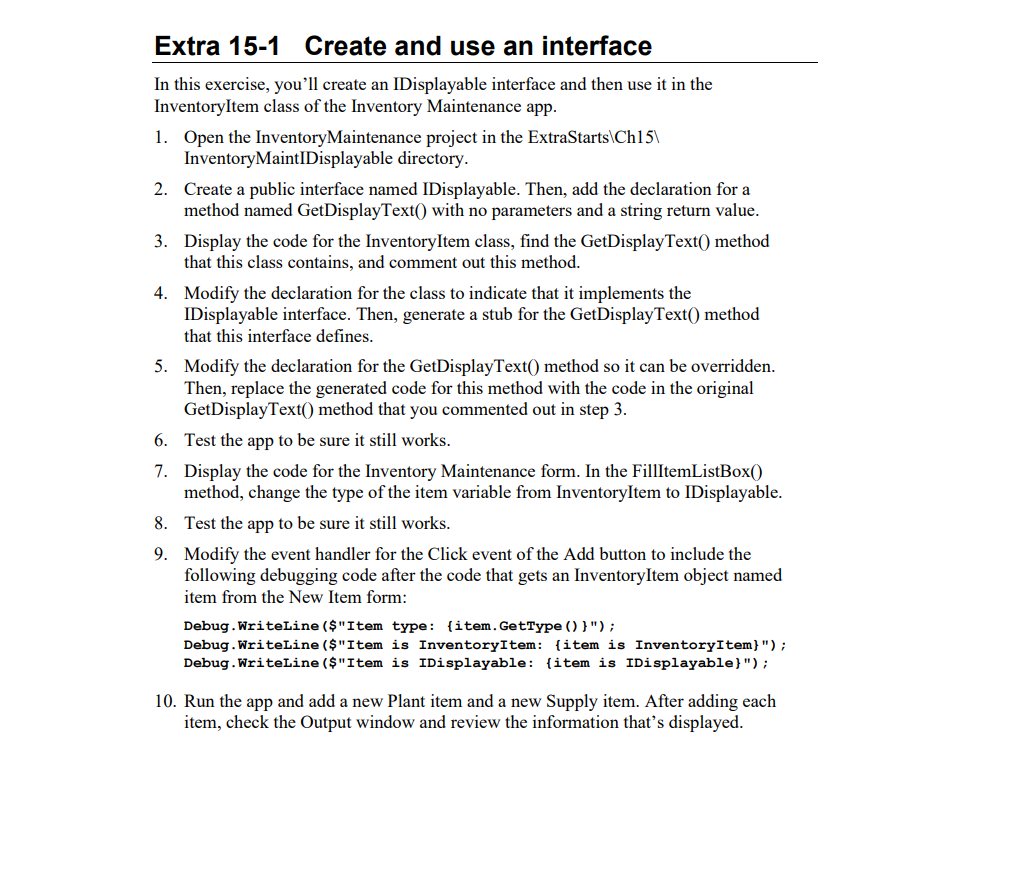
Question: Please Answer In C# . Extra 1 5 - 1 Create and use an interface In this exercise, you'll create an IDisplayable interface and then
Please Answer In C# Extra Create and use an interface
In this exercise, you'll create an IDisplayable interface and then use it in the
InventoryItem class of the Inventory Maintenance app.
Open the InventoryMaintenance project in the ExtraStarts Chp
InventoryMaintIDisplayable directory.
Create a public interface named IDisplayable. Then, add the declaration for a
method named GetDisplayText with no parameters and a string return value.
Display the code for the InventoryItem class, find the GetDisplayText method
that this class contains, and comment out this method.
Modify the declaration for the class to indicate that it implements the
IDisplayable interface. Then, generate a stub for the GetDisplayText method
that this interface defines.
Modify the declaration for the GetDisplayText method so it can be overridden.
Then, replace the generated code for this method with the code in the original
GetDisplayText method that you commented out in step
Test the app to be sure it still works.
Display the code for the Inventory Maintenance form. In the FillItemListBox
method, change the type of the item variable from InventoryItem to IDisplayable.
Test the app to be sure it still works.
Modify the event handler for the Click event of the Add button to include the
following debugging code after the code that gets an InventoryItem object named
item from the New Item form:
Debug.Writeline $"Item type: itemGetType ;
Debug.WriteLine$"Item is InventoryItem: item is InventoryItem;
Debug.WriteLine$"Item is IDisplayable: item is IDisplayable;
Run the app and add a new Plant item and a new Supply item. After adding each item, check the Output window and review the information that's displayed. Here is the code I have so far starting with the main page then including the Inventory item class. using System.Diagnostics;
namespace InventoryMaintenance
public partial class frmInventoryMaint : Form
public frmInventoryMaint
InitializeComponent;
private InventoryItemList items new;
private void frmInventoryMaintLoadobject sender EventArgs e
items.Changed new InventoryItemList.ChangeHandlerHandleChange;
items.Fill;
FillItemListBox;
private void FillItemListBox
IDisplayable item GetSelectedItem;
ListBox.Items.AdditemGetDisplayText;
lstItems.Items.Clear;
for int i ; i items.Count; i
item itemsi;
lstItems.Items.AdditemGetDisplayText;
private void btnAddClickobject sender EventArgs e
IDisplayable item GetNewItem;
frmNewItem newItemForm new;
InventoryItem item newItemForm.GetNewItem;
if item null
items item;
Debug.WriteLine$"Item type: itemGetType;
Debug.WriteLine$"Item is InventoryItem: item is InventoryItem;
Debug.WriteLine$"Item is IDisplayable: item is IDisplayable;
private void btnDeleteClickobject sender EventArgs e
int i lstItems.SelectedIndex;
if i
MessageBox.ShowPlease select an item to delete.", No item selected";
else
InventoryItem item itemsi;
string message $"Are you sure you want to delete itemDescription;
DialogResult result
MessageBox.Showmessage "Confirm Delete",
MessageBoxButtons.YesNo;
if result DialogResult.Yes
items item;
private void HandleChangeInventoryItemList invItems
invItems.Save;
FillItemListBox;
private void btnExitClickobject sender EventArgs e
this.Close;
now the inventory item class using System.Reflection.Metadata.Ecma;
namespace InventoryMaintenance
public class InventoryItem : IDisplayable
public InventoryItem
public InventoryItemint itemNo, string description, decimal price
ItemNo itemNo;
Description description;
Price price;
public int ItemNo get; set;
public string Description get; set; ;
public decimal Price get; set;
public virtual string GetDisplayText $ItemNoDescriptionPrice:c;
public virtual string GetDisplayText
return "Display text for inventory item";
Step by Step Solution
There are 3 Steps involved in it
1 Expert Approved Answer
Step: 1 Unlock

Question Has Been Solved by an Expert!
Get step-by-step solutions from verified subject matter experts
Step: 2 Unlock
Step: 3 Unlock
 Study Help