







Question: in c++ complete code then run its & screenshoot 8.1 Working with the Linear Search Bring in program linear_search.cpp from the Lab 8 folder. This
in c++ complete code then run its & screenshoot
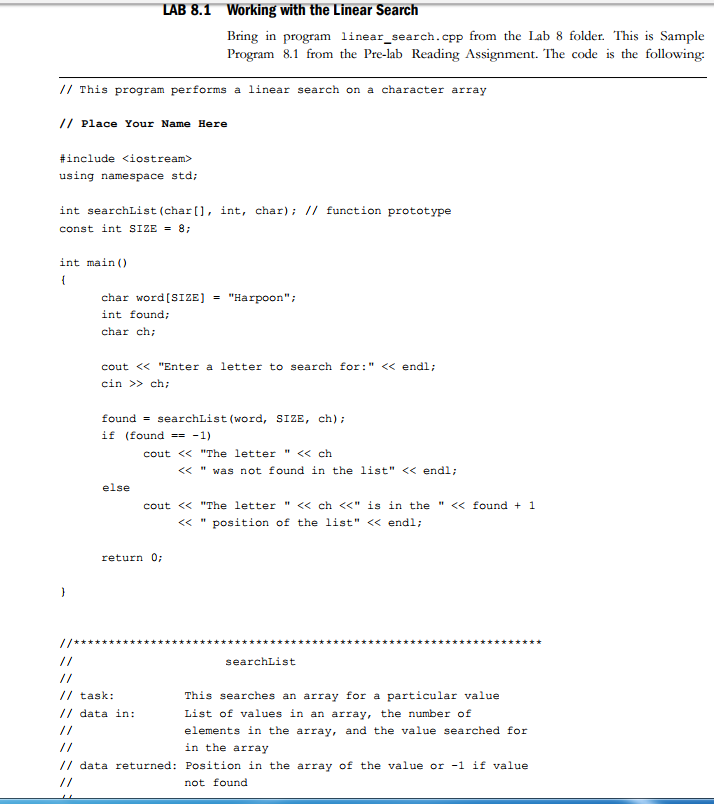
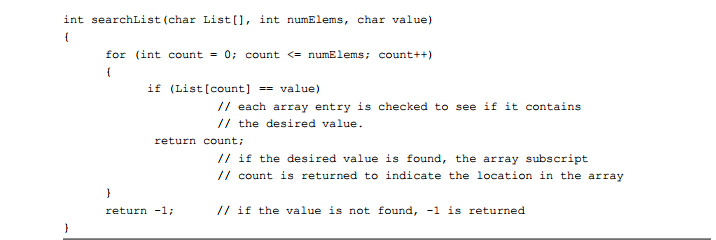
8.1 Working with the Linear Search Bring in program linear_search.cpp from the Lab 8 folder. This is Sample Program 8.1 from the Pre-lab Reading Assignment. The code is the following // This program performs a linear search on a character array /I Place Your Name Here #include
Step by Step Solution
There are 3 Steps involved in it
1 Expert Approved Answer
Step: 1 Unlock

Question Has Been Solved by an Expert!
Get step-by-step solutions from verified subject matter experts
Step: 2 Unlock
Step: 3 Unlock
 Study Help