







Question: IN C or C++ or JAVA The project will simulate a simple computer system consisting of a CPU and Memory. The CPU and Memory will
IN C or C++ or JAVA
The project will simulate a simple computer system consisting of a CPU and Memory.
The CPU and Memory will be simulated by separate processes that communicate.
Memory will contain one program that the CPU will execute and then the simulation will end.
home / study / engineering / computer science / computer science questions and answers / in java simulate a simple computer system consisting of a cpu and memory. the cpu and memory ...
Question: In Java simulate a simple computer system consisting of a CPU and Memory. The CPU and Memory will...
In Java simulate a simple computer system consisting of a CPU and Memory.
The CPU and Memory will be simulated by separate processes that communicate.
You must use the Runtime exec method to create processes and streams for communication.
CPU
It will have these registers: PC, SP, IR, AC, X, Y.
It will support the instructions shown on the next page of this document.
It will run the user program at address 0.
Instructions are fetched into the IR from memory. The operand can be fetched into a local variable.
Each instruction should be executed before the next instruction is fetched.
The user stack resides at the end of user memory and grows down toward address 0.
The system stack resides at the end of system memory and grows down toward address 0.
There is no hardware enforcement of stack size.
The program ends when the End instruction is executed. The 2 processes should end at that time.
The user program cannot access system memory (exits with error message).
Memory
It will consist of 2000 integer entries, 0-999 for the user program, 1000-1999 for system code.
It will support two operations:
read(address) - returns the value at the address
write(address, data) - writes the data to the address
Memory will initialize itself by reading a program file.
Timer
A timer will interrupt the processor after every X instructions, where X is a command-line parameter.
Interrupt processing
There are two forms of interrupts: the timer and a system call using the int instruction.
The stack is switched to the system stack.
SP and PC registers should be saved on the system stack. (The handler may save additional registers).
A timer interrupt should cause execution at address 1000.
The int instruction should cause execution at address 1500.
Interrupts should be disabled during interrupt processing to avoid nested execution.
The iret instruction returns from an interrupt.
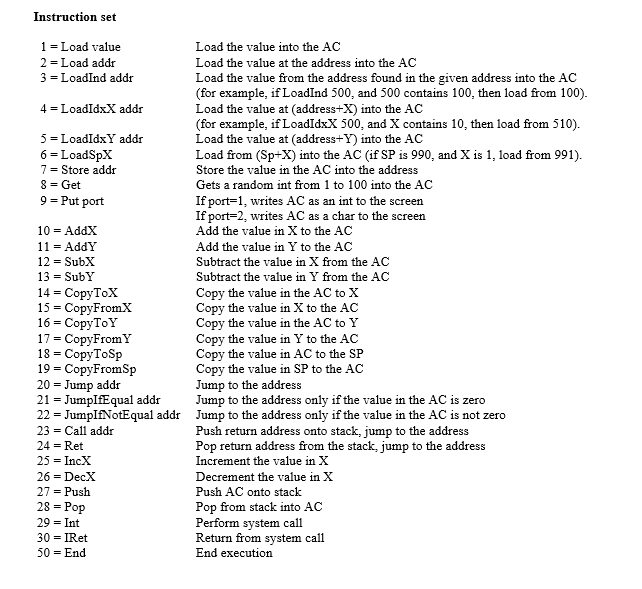
Instruction set Load the value into the AGC Load the value at the address into the AC Load the value from the address found in the given address into the AC (for example, if LoadInd 500, and 500 contains 100, then load from 100). Load the value at (address+X) into the AGC (for example, if LoadIdxX 500, and X contains 10, then load from 510). Load the value at (address+Y) into the AGC Load from (Sp+X) into the AC (if SP is 990, and X is 1, load from 991). Store the value in the AC into the address Gets a random int from 1 to 100 into the AC If port=1, writes AC as an int to the screen If port-2, writes AC as a char to the screen Add the value in X to the AC Add the value in Y to the AC Subtract the value in X from the AC Subtract the value in Y from the AC Copy the value in the AC to X Copy the value in X to the AC Copy the value in the AC to Y Copy the value in Y to the AC Copy the value in AC to the SP Copy the value in SP to the AC Jump to the address 1 = Load value 2 Load addr 3 = Load!nd addr 4 = Load!dxX addr 5 = Load!dxY addr 6 LoadSpX 7 = Store addr 8 = Get 9-Put port 11 = AddY 12 = SubX 13 = SubY 14-Copy-TeX 15-Copy:FromX 16- CopyToY 17 = Copy:FromY 18 = CopyToSp 19 -CopyFromSp 20 - Jump addr 21 -JumplfEqual addrJump to the address only if the value in the AC is zero 22 -JumpIfNotEqual addr Jump to the address only if the value in the AC is not zero 23 = Call addr 24 Ret 25 = Inc. 26 = DecX 27 = Push 28-Pop 29 Int 30 = IRet 50 = End Push return address onto stack, jump to the address Pop return address from the stack, jump to the address Increment the value in X Decrement the value in X Push AC onto stack Pop from stack into AOC Perform system call Return from system call End execution Instruction set Load the value into the AGC Load the value at the address into the AC Load the value from the address found in the given address into the AC (for example, if LoadInd 500, and 500 contains 100, then load from 100). Load the value at (address+X) into the AGC (for example, if LoadIdxX 500, and X contains 10, then load from 510). Load the value at (address+Y) into the AGC Load from (Sp+X) into the AC (if SP is 990, and X is 1, load from 991). Store the value in the AC into the address Gets a random int from 1 to 100 into the AC If port=1, writes AC as an int to the screen If port-2, writes AC as a char to the screen Add the value in X to the AC Add the value in Y to the AC Subtract the value in X from the AC Subtract the value in Y from the AC Copy the value in the AC to X Copy the value in X to the AC Copy the value in the AC to Y Copy the value in Y to the AC Copy the value in AC to the SP Copy the value in SP to the AC Jump to the address 1 = Load value 2 Load addr 3 = Load!nd addr 4 = Load!dxX addr 5 = Load!dxY addr 6 LoadSpX 7 = Store addr 8 = Get 9-Put port 11 = AddY 12 = SubX 13 = SubY 14-Copy-TeX 15-Copy:FromX 16- CopyToY 17 = Copy:FromY 18 = CopyToSp 19 -CopyFromSp 20 - Jump addr 21 -JumplfEqual addrJump to the address only if the value in the AC is zero 22 -JumpIfNotEqual addr Jump to the address only if the value in the AC is not zero 23 = Call addr 24 Ret 25 = Inc. 26 = DecX 27 = Push 28-Pop 29 Int 30 = IRet 50 = End Push return address onto stack, jump to the address Pop return address from the stack, jump to the address Increment the value in X Decrement the value in X Push AC onto stack Pop from stack into AOC Perform system call Return from system call End execution
Step by Step Solution
There are 3 Steps involved in it

Get step-by-step solutions from verified subject matter experts
 Study Help