







Question: > In C++ please OUTPUT: Base Code: #include using namespace std; int main(int argc, char const *argv[]) { // TODO: Declare and initialize a const
> In C++ please
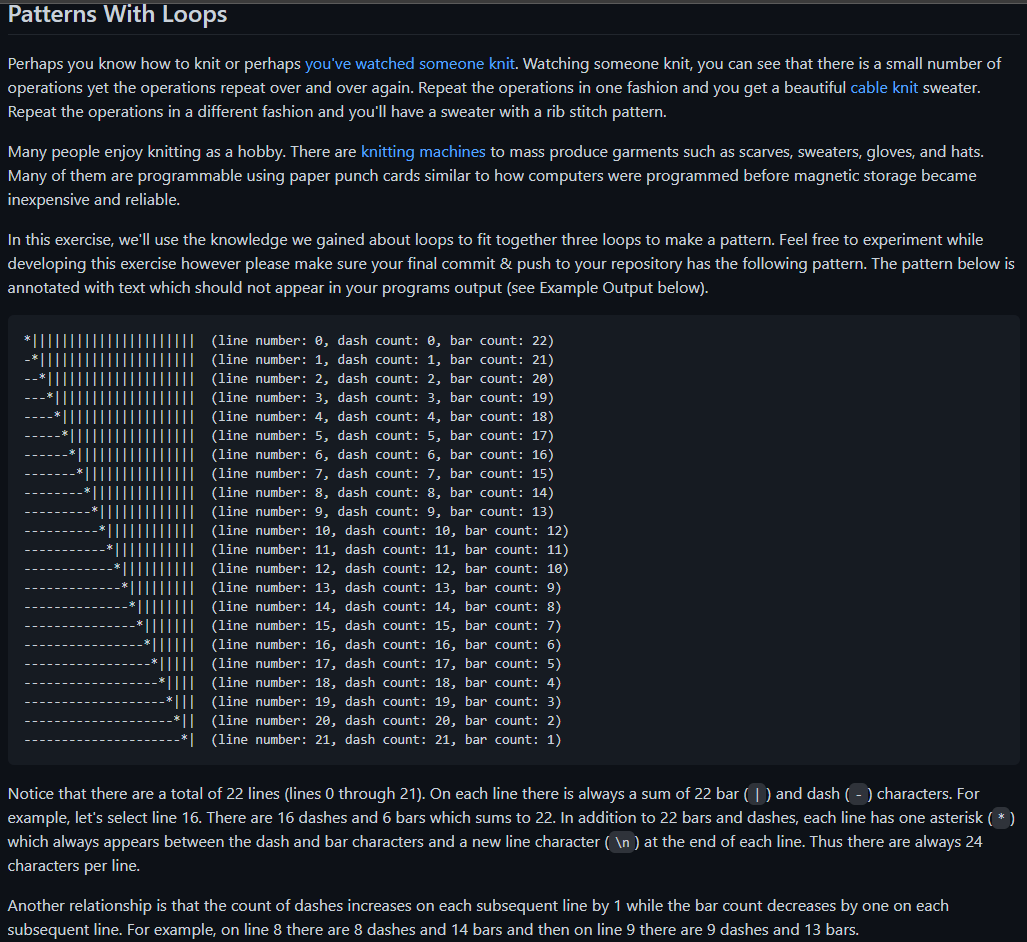
OUTPUT:
![main(int argc, char const *argv[]) { // TODO: Declare and initialize a](https://dsd5zvtm8ll6.cloudfront.net/si.experts.images/questions/2024/09/66f3120ae19d8_89866f3120a8baa0.jpg)
Base Code:
#include
using namespace std;
int main(int argc, char const *argv[]) {
// TODO: Declare and initialize a const integer named counter max (max for
// maximum). Initialize it to 22.
// TODO: Write an outer loop which starts from 0 and goes up to the counter
// max.
// TODO: Write an inner loop which starts from the current line number and
// counts down to zero. Make sure that this loop is inside the outer loop.
// TODO: Print an asterisk.
// TODO: Write another inner loop which starts from the current line number
// and counts up to the counter max. Make sure that this loop is inside the
// outer loop but outside the first inner loop.
// TODO: print a new line character
return 0;
}
Patterns With Loops Perhaps you know how to knit or perhaps you've watched someone knit. Watching someone knit, you can see that there is a small number of operations yet the operations repeat over and over again. Repeat the operations in one fashion and you get a beautiful cable knit sweater. Repeat the operations in a different fashion and you'll have a sweater with a rib stitch pattern. Many people enjoy knitting as a hobby. There are knitting machines to mass produce garments such as scarves, sweaters, gloves, and hats. Many of them are programmable using paper punch cards similar to how computers were programmed before magnetic storage became inexpensive and reliable. In this exercise, we'll use the knowledge we gained about loops to fit together three loops to make a pattern. Feel free to experiment while developing this exercise however please make sure your final commit & push to your repository has the following pattern. The pattern below is annotated with text which should not appear in your programs output (see Example Output below). TITIL (line number: @, dash count: 0, bar count: 22) (line number: 1, dash count: 1, bar count: 21) (line number: 2, dash count: 2, bar count: 20) (line number: 3, dash count: 3, bar count: 19) III (line number: 4, dash count: 4, bar count: 18) III (line number: 5, dash count: 5, bar count: 17) (line number: 6, dash count: 6, bar count: 16) (line number: 7, dash count: 7, bar count: 15) (line number: 8, dash count: 8, bar count: 14) (line number: 9, dash count: 9, bar count: 13) (line number: 10, dash count: 10, bar count: 12) (line number: 11, dash count: 11, bar count: 11) (line number: 12, dash count: 12, bar count: 10) (line number: 13, dash count: 13, bar count: 9) III (line number: 14, dash count: 14, bar count: 8) (line number: 15, dash count: 15, bar count: 7) (line number: 16, dash count: 16, bar count: 6) (line number: 17, dash count: 17, bar count: 5) *II|| (line number: 18, dash count: 18, bar count: 4) -*||| (line number: 19, dash count: 19, bar count: 3) *|| (line number: 20, dash count: 20, bar count: 2) * (line number: 21, dash count: 21, bar count: 1) Notice that there are a total of 22 lines (lines 0 through 21). On each line there is always a sum of 22 bar ( 1 ) and dash ( - ) characters. For example, let's select line 16. There are 16 dashes and 6 bars which sums to 22. In addition to 22 bars and dashes, each line has one asterisk (*) which always appears between the dash and bar characters and a new line character ( ) at the end of each line. Thus there are always 24 characters per line. Another relationship is that the count of dashes increases on each subsequent line by 1 while the bar count decreases by one on each subsequent line. For example, on line 8 there are 8 dashes and 14 bars and then on line 9 there are 9 dashes and 13 bars. $ ./pattern *
Step by Step Solution
There are 3 Steps involved in it

Get step-by-step solutions from verified subject matter experts
 Study Help