







Question: IN C PROGRAMMING LANGUAGE STARTER CODE: FUNCTION DEFINITIONS TO FILL: typedef struct car { char make[20]; char model[30]; char color [25); char trim[15]; double basePrice;
IN C PROGRAMMING LANGUAGE
STARTER CODE:
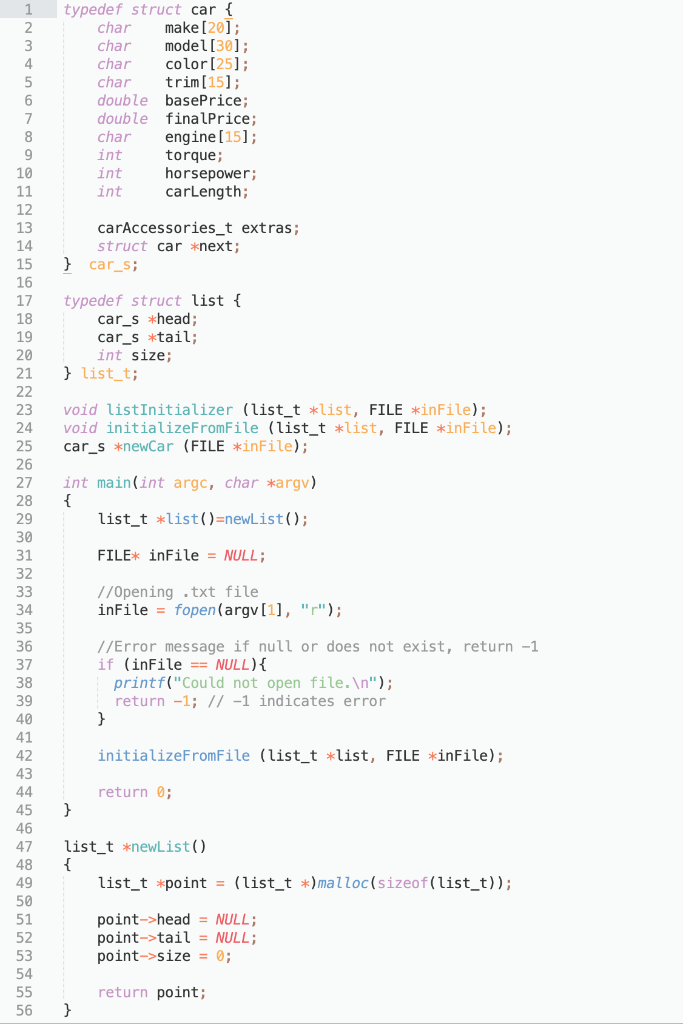
FUNCTION DEFINITIONS TO FILL:
![car { char make[20]; char model[30]; char color [25); char trim[15]; double](https://dsd5zvtm8ll6.cloudfront.net/si.experts.images/questions/2024/09/66f393f1352e7_15266f393f0b16ab.jpg)
typedef struct car { char make[20]; char model[30]; char color [25); char trim[15]; double basePrice; double finalPrice; char engine[15]; int torque; int horsepower; int carLength; carAccessories_t extras; struct car *next; } car_s; typedef struct list { car_s *head; car_s *tail; int size; } list_t; void listInitializer (list_t *list, FILE *inFile); void initializeFromFile (list_t *list, FILE *inFile); car_s *newCar (FILE *inFile); 1 2 3 4 5 6 7 8 9 10 11 12 13 14 15 16 17 18 19 20 21 22 23 24 25 26 27 28 29 30 31 32 33 34 35 36 37 38 39 40 41 42 43 44 45 46 47 48 49 50 51 52 53 54 55 56 int main(int argc, char *argv) { list_t *list()=newList(); FILE* inFile = NULL; //Opening .txt file inFile = fopen(argv[1], ""); //Error message if null or does not exist, return -1 if (inFile == NULL) { printf("Could not open file. "); return -1; // -1 indicates error } initializeFromFile (list_t *list, FILE *inFile); return; } list_t *newList() { list_t *point = (list_t *)malloc(sizeof(list_t)); point->head = NULL; point->tail = NULL; point->size = 0; return point; } void listInitializer (list_t *list, FILE *inFile); - This function is called from initializeFromFile(): This funtion calls newcar () to create and initialize a new car from the file which it then adds to the end of the list. This function also increments the list size for each car added. void initializeFromFile (list_t *list, FILE *inFile); -Calls the listInitializer() function, which sends the input file pointer (the file specified at command-line and opened in int main(int argc, char *argv) ) -Calls listInitializer () in a loop until the end of the file car s *newCar (FILE *inFile); Called by the listInitializer () function. Creates and initializes a car node from the input file pointer passed in. Returns a pointer to the car that was just created. new typedef struct car { char make[20]; char model[30]; char color [25); char trim[15]; double basePrice; double finalPrice; char engine[15]; int torque; int horsepower; int carLength; carAccessories_t extras; struct car *next; } car_s; typedef struct list { car_s *head; car_s *tail; int size; } list_t; void listInitializer (list_t *list, FILE *inFile); void initializeFromFile (list_t *list, FILE *inFile); car_s *newCar (FILE *inFile); 1 2 3 4 5 6 7 8 9 10 11 12 13 14 15 16 17 18 19 20 21 22 23 24 25 26 27 28 29 30 31 32 33 34 35 36 37 38 39 40 41 42 43 44 45 46 47 48 49 50 51 52 53 54 55 56 int main(int argc, char *argv) { list_t *list()=newList(); FILE* inFile = NULL; //Opening .txt file inFile = fopen(argv[1], ""); //Error message if null or does not exist, return -1 if (inFile == NULL) { printf("Could not open file. "); return -1; // -1 indicates error } initializeFromFile (list_t *list, FILE *inFile); return; } list_t *newList() { list_t *point = (list_t *)malloc(sizeof(list_t)); point->head = NULL; point->tail = NULL; point->size = 0; return point; } void listInitializer (list_t *list, FILE *inFile); - This function is called from initializeFromFile(): This funtion calls newcar () to create and initialize a new car from the file which it then adds to the end of the list. This function also increments the list size for each car added. void initializeFromFile (list_t *list, FILE *inFile); -Calls the listInitializer() function, which sends the input file pointer (the file specified at command-line and opened in int main(int argc, char *argv) ) -Calls listInitializer () in a loop until the end of the file car s *newCar (FILE *inFile); Called by the listInitializer () function. Creates and initializes a car node from the input file pointer passed in. Returns a pointer to the car that was just created. new
Step by Step Solution
There are 3 Steps involved in it

Get step-by-step solutions from verified subject matter experts
 Study Help