





Question: IN C# using System; using System.Collections.Generic; namespace ConsoleApplication1 { class OurQueue : IEnumerable { private int front, end, size; private T[] myArray; public OurQueue(int capacity

IN C#IN C# using System; using System.Collections.Generic; namespace ConsoleApplication1 { class OurQueue :
using System; using System.Collections.Generic;

namespace ConsoleApplication1 { class OurQueue : IEnumerable { private int front, end, size; private T[] myArray; public OurQueue(int capacity = 10) { myArray = new T[capacity]; } public void Clear() { front = 0; end = 0; size = 0; } public bool IsEmpty() { return size == 0; } public T Dequeue() { size--; T data = myArray[front]; Increment(ref front); return data; } public void Enqueue(T newItem) { if (this.size

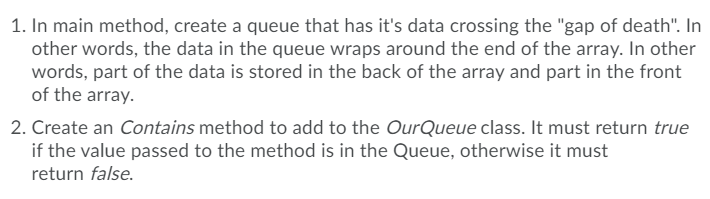
public IEnumerator GetEnumerator() { int position = front; for (int i = 0; i 1. In main method, create a queue that has it's data crossing the "gap of death". In other words, the data in the queue wraps around the end of the array. In other words, part of the data is stored in the back of the array and part in the front of the array. 2. Create an Contains method to add to the OurQueue class. It must return true if the value passed to the method is in the Queue, otherwise it must return false. 1. In main method, create a queue that has it's data crossing the "gap of death". In other words, the data in the queue wraps around the end of the array. In other words, part of the data is stored in the back of the array and part in the front of the array. 2. Create an Contains method to add to the OurQueue class. It must return true if the value passed to the method is in the Queue, otherwise it must return false

Step by Step Solution

There are 3 Steps involved in it

1 Expert Approved Answer
Step: 1 Unlock blur-text-image
Question Has Been Solved by an Expert!

Get step-by-step solutions from verified subject matter experts

Step: 2 Unlock
Step: 3 Unlock

Students Have Also Explored These Related Databases Questions!