







Question: In c++ uSITig namespace Stu, enum CommandType MoveLeft, MoveRight, MoveForward, MoveBackward /your code int main() commander.AddCommand (MoveLeft); commander.AddCommand (MoveRight); commander.UndoCommand ) commander.UndoCommand (): commander.UndoCommand )
In c++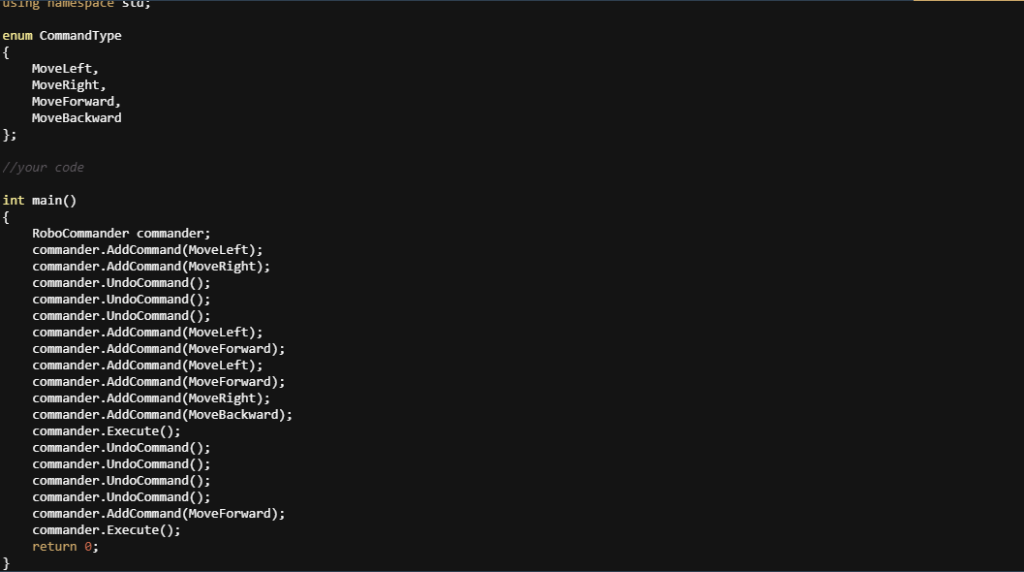
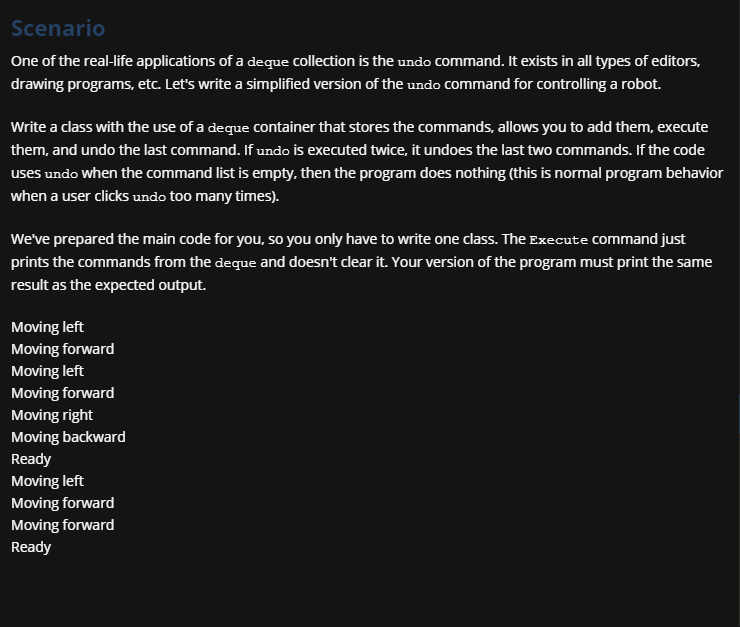
uSITig namespace Stu, enum CommandType MoveLeft, MoveRight, MoveForward, MoveBackward /your code int main() commander.AddCommand (MoveLeft); commander.AddCommand (MoveRight); commander.UndoCommand ) commander.UndoCommand (): commander.UndoCommand ) commander.AddCommand (MoveLeft); commander.AddCommand (MoveForward); commander.AddCommand (MoveLeft); commander.AddCommand (MoveForward); commander.AddCommand (MoveRight); commander.AddCommand (MoveBackward); commander.Execute () commander.UndoCommand ) commander.UndoCommand): commander.UndoCommand ) commander.UndoCommand): commander.AddCommand (MoveForward); commander.Execute) return e: Scenario One of the real-life applications of a deque collection is the undo command. It exists in all types of editors, drawing programs, etc. Let's write a simplified version of the undo command for controlling a robot. Write a class with the use of a deque container that stores the commands, allows you to add them, execute them, and undo the last command. If undo is executed twice, it undoes the last two commands. If the code uses undo when the command list is empty, then the program does nothing (this is normal program behavior when a user clicks undo too many times). We've prepared the main code for you, so you only have to write one class. The Execute command just prints the commands from the deque and doesn't clear it. Your version of the program must print the same result as the expected output Moving left Moving forward Moving left Moving forward Moving right Moving backward Ready Moving left Moving forward Moving forward Ready uSITig namespace Stu, enum CommandType MoveLeft, MoveRight, MoveForward, MoveBackward /your code int main() commander.AddCommand (MoveLeft); commander.AddCommand (MoveRight); commander.UndoCommand ) commander.UndoCommand (): commander.UndoCommand ) commander.AddCommand (MoveLeft); commander.AddCommand (MoveForward); commander.AddCommand (MoveLeft); commander.AddCommand (MoveForward); commander.AddCommand (MoveRight); commander.AddCommand (MoveBackward); commander.Execute () commander.UndoCommand ) commander.UndoCommand): commander.UndoCommand ) commander.UndoCommand): commander.AddCommand (MoveForward); commander.Execute) return e: Scenario One of the real-life applications of a deque collection is the undo command. It exists in all types of editors, drawing programs, etc. Let's write a simplified version of the undo command for controlling a robot. Write a class with the use of a deque container that stores the commands, allows you to add them, execute them, and undo the last command. If undo is executed twice, it undoes the last two commands. If the code uses undo when the command list is empty, then the program does nothing (this is normal program behavior when a user clicks undo too many times). We've prepared the main code for you, so you only have to write one class. The Execute command just prints the commands from the deque and doesn't clear it. Your version of the program must print the same result as the expected output Moving left Moving forward Moving left Moving forward Moving right Moving backward Ready Moving left Moving forward Moving forward Ready
Step by Step Solution
There are 3 Steps involved in it

Get step-by-step solutions from verified subject matter experts
 Study Help