







Question: In Cell B6, use a function to calculate the amount of money borrowed for this home loan. In Cell B10, calculate the monthly payment for
| In Cell B6, use a function to calculate the amount of money borrowed for this home loan. In Cell B10, calculate the monthly payment for this home. HINT: Remember that the interest rate is an annual rate! Make sure to use the minus sign ( - ) to change your answer to a positive number. In Cell B11, calculate the Total Amount Paid for the home. HINT: Dont forget your Down Payment in your Total Cost! In Cell B12, calculate the Cost of Financing. HINT: If you know the Total Cost and you know the Price, it should be easy to calculate the Total Cost of Financing! Repeat these four steps in K6, K10:K12. It is surprising what happens when the interest rates change!
|
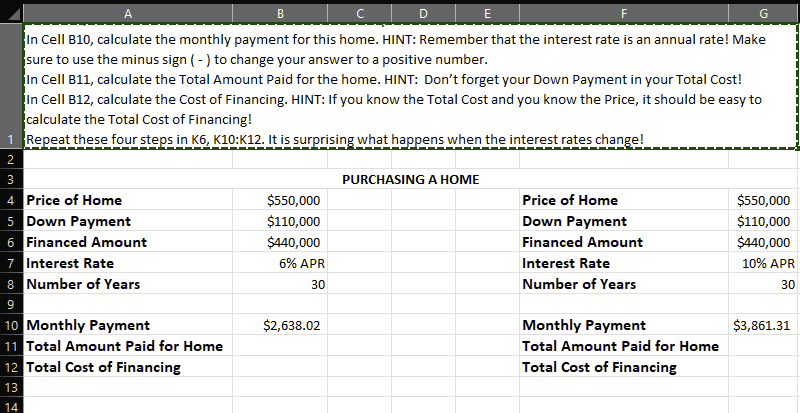
In Cell B10, calculate the monthly payment for this home. HINT: Remember that the interest rate is an annual rate! Make sure to use the minus sign ( - ) to change your answer to a positive number. In Cell B11, calculate the Total Amount Paid for the home. HINT: Don't forget your Down Payment in your Total Cost! In Cell B12, calculate the Cost of Financing. HINT: If you know the Total Cost and you know the Price, it should be easy to calculate the Total Cost of Financing! Repeat these four steps in K6, K10:K12. It is surprising what happens when the interest rates change! In Cell B10, calculate the monthly payment for this home. HINT: Remember that the interest rate is an annual rate! Make sure to use the minus sign ( - ) to change your answer to a positive number. In Cell B11, calculate the Total Amount Paid for the home. HINT: Don't forget your Down Payment in your Total Cost! In Cell B12, calculate the Cost of Financing. HINT: If you know the Total Cost and you know the Price, it should be easy to calculate the Total Cost of Financing! Repeat these four steps in K6, K10:K12. It is surprising what happens when the interest rates change
Step by Step Solution
There are 3 Steps involved in it

Get step-by-step solutions from verified subject matter experts
 Study Help