







Question: In cell F4, enter a formula using a nested IF function, to calculate the Bonus Amount using the following function arguments: enter D4=3 as the
In cell F4, enter a formula using a nested IF function, to calculate the Bonus Amount using the following function arguments: enter D4=3 as the Logical_test argument, enter E4*.1 as the Value_if_true argument, and enter IF(D4=2, E4*.05,0) as the Value_if_false argument.
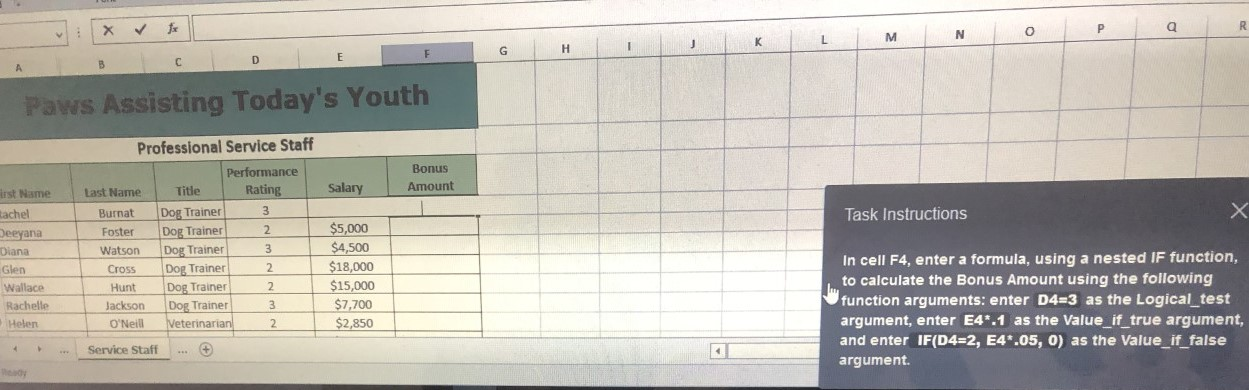
P a R V N M L K 1 H G F E D C B Paws Assisting Today's Youth Bonus Amount Salary irst Name tachel Task Instructions Deeyana Professional Service Staff Performance Last Name Title Rating Burnat Dog Trainer 3 Foster Dog Trainer 2 Watson Dog Trainer 3 Cross Dog Trainer 2 Hunt Dog Trainer 2 Jackson Dog Trainer 3 O'Neill Veterinarian 2 Diana Glen Wallace Rachelle Helen $5,000 $4,500 $18,000 $15,000 $7,700 $2,850 In cell F4, enter a formula, using a nested IF function, to calculate the Bonus Amount using the following function arguments: enter D4=3 as the Logical_test argument, enter E4*.1 as the Value_if_true argument, and enter IF(D4=2, E4*.05, 0) as the Value_if_false argument. 4 Service Staff
Step by Step Solution
There are 3 Steps involved in it

Get step-by-step solutions from verified subject matter experts
 Study Help