







Question: In cell H7, create a formula that uses the NETWORKDAYS function to calculate the number of working days between the dates in cells H5 and
- In cell H7, create a formula that uses the NETWORKDAYS function to calculate the number of working days between the dates in cells H5 and H6. Leave the Holidays argument blank.
- Use the values in the range B12:C12 to extend the incremented percentages to the range D12:H12.
- Use the values in the range A13:A14 to extend the list of years to the range A15:A17.
- In cell B13, create a formula without a function using absolute references that subtracts the values of cells B5and B7 from cell B6 and then multiplies the result by cell B8. Copy the formula from cell B13 to the range C13:H13.
- In cell B14, create a formula without using a function that adds 1 to the value in cell B12 and then multiplies the result by the value in cell B13. In this formula, use a mixed reference for cell B12 by including an absolute reference to row 12. Copy the formula from cell B14 to the range B15:B17 and then copy the formulas from the range B14:B17 to the range C14:H17.
- Delete row 19.
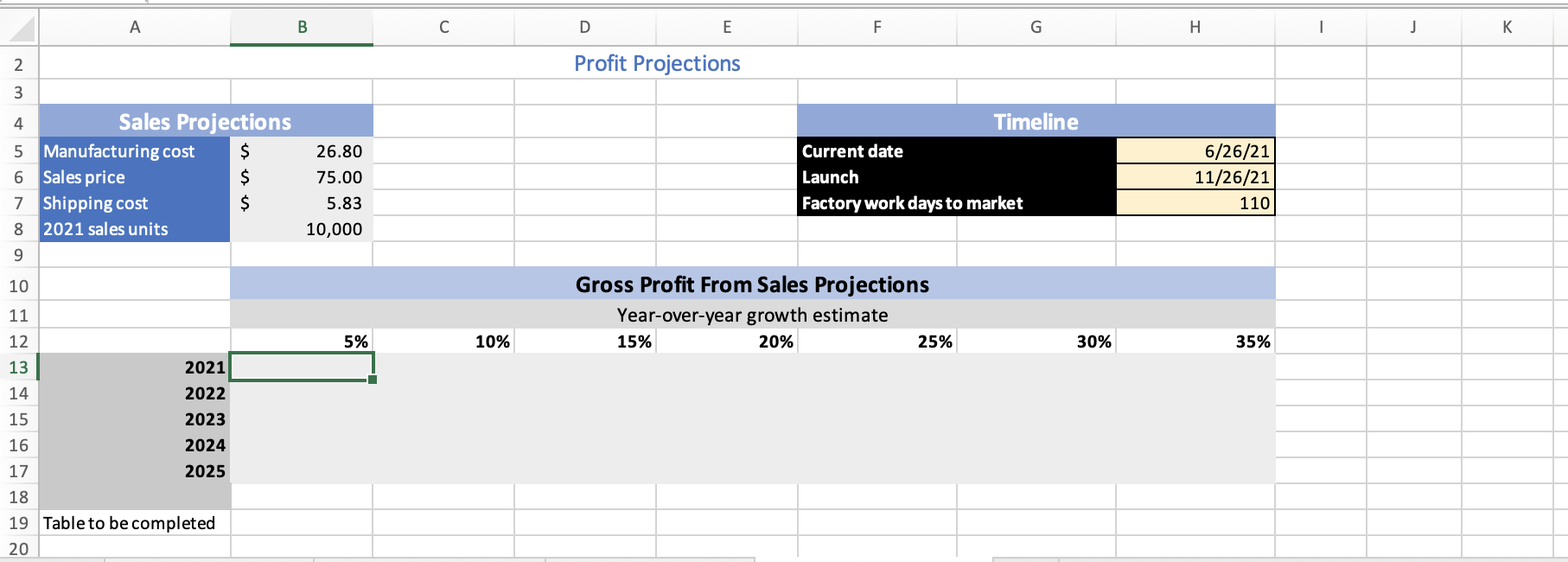
A B D E F. G H I j Profit Projections Timeline 3 4 Sales Projections 5 Manufacturing cost $ 6 Sales price $ 7 Shipping cost $ 8 2021 sales units 26.80 75.00 5.83 10,000 Current date Launch Factory work days to market 6/26/21 11/26/21 110 9 10 11 Gross Profit From Sales Projections Year-over-year growth estimate 15% 20% 25% 5% 10% 30% 35% 12 13 2021 14 2022 15 2023 16 2024 17 2025 18 19 Table to be completed 20
Step by Step Solution
There are 3 Steps involved in it
1 Expert Approved Answer
Step: 1 Unlock

Question Has Been Solved by an Expert!
Get step-by-step solutions from verified subject matter experts
Step: 2 Unlock
Step: 3 Unlock
 Study Help