



Question: In cells F6:F13, add a VLOOKUP function that returns the raise recommendationHigh, Standard, or Lowfor each employee by exactly matching the Name in column A
In cells F6:F13, add a VLOOKUP function that returns the raise recommendationHigh, Standard, or Lowfor each employee by exactly matching the Name in column A in the range you named Evaluations. Be sure to use exact match criteria.
In cells G6:G13, add a VLOOKUP function that returns the starting raise percentage based on the ranges in the Standard Raise table in cells A16:B19 and the number of years employed in column E.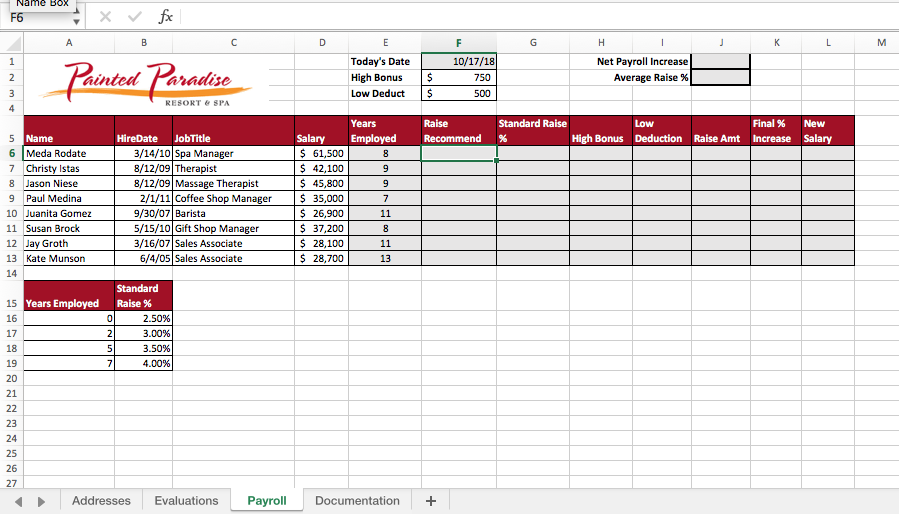
Today's Date 10/17/18 ainted aradise Net Payroll Increase Average Raise % High Bonus S Low Deduct 750 500 Years Raise Standard Raise Final 96 New Name HireDate JobTitle SalaryEmployed High Bonus Deduction Raise Amt Increase Salary /14/10 Spa Manager 8/12/09 Therapist 8/12/09 Massage Therapist 6 Meda Rodate 7 Christy Istas 8 Jason Niese 9 Paul Medina 10 Juanita Gomez 11 Susan Brock 12 Jay Groth 13 Kate Munson 61,500 $ 42,100 45,800 35,000 $26,900 $37,200 $ 28,100 $28,700 2/1/11 Coffee Shop Manager 9/30/07 Barista 5/15/10 Gift Shop Manager 3/16/07 Sales Associate 6/4/05 Sales Associate 13 Standard Years Employed Raise % 15 16 17 18 19 20 21 2.50% 3.00% 3.50% 4.00% 23 24 25 26 Addresses Evaluations Payo Documentation+
Step by Step Solution
There are 3 Steps involved in it

Get step-by-step solutions from verified subject matter experts