







Question: In eclipse project Task 04: Write and test a program t04.py : that asks the user to enter an integer that represents the date in
In eclipse project
Task 04: Write and test a program t04.py :
that asks the user to enter an integer that represents the date in the YYYYMMDD format and then displays the date in the format DD/MM/YYYY. You may assume that the user will always enter a valid date. You must use integer division and modulus, and NOT strings, to extract the date parts.
Sample run of the program
Enter a date in the format YYYYMMDD: 20170527
27/05/2017
**** Question was previously answered, but my output for the second line appears as 27/5/2017, I need it to appear has 27/05/2017, how do I put a 0 in front of the 5. I've included a picture of my work.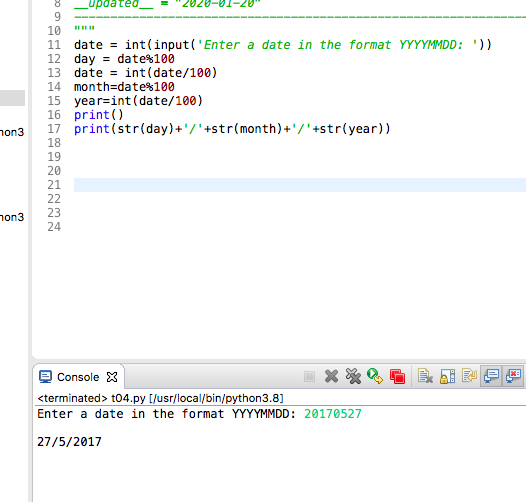
8 _updated__ = "2020-01-20" 10 11 date = int(input('Enter a date in the format YYYYMMDD: ')) 12 day = date%100 13 date = int(date/100) 14 month=date%100 15 year=int(date/100) 16 print() 17 print(str(day)+'/' +str(month)+'/' +str(year)) hon3 19 ANAS hon3 G E P 9 Console X X
Step by Step Solution
There are 3 Steps involved in it

Get step-by-step solutions from verified subject matter experts
 Study Help