







Question: In EXCEL Coding: When user selects an Account Managers name and a Product Category from the two combo boxes, and clicks on Click here to
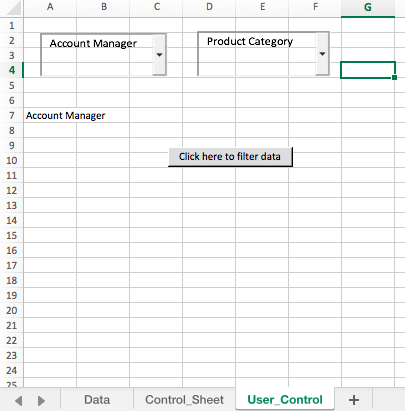
In EXCEL Coding:
When user selects an Account Managers name and a Product Category from the two combo boxes, and clicks on Click here to filter data button, the code should go to Data sheet and filter the dataset based on the combination of Account Manager and Product Category chosen.
Build these into your code:
Use IF statements in the coding:
If a user clicks the button without selecting the Account Manager, the Message Box (Msgbox) should display Choose an Account Manager from the first combo box then stop executing the code (Use Exit Sub)
If a user clicks the button without selecting the Product Category, the Message Box should display Choose a Product Category from the second combo box and stop executing the code.
Only declare two variables ex Dim AccountManager as String
You will only need two lines of filtering code; one that filters on the Account Manager criteria and another line of code that filters on the Product Category criteria
Once the data is filtered, a message box must display a message to the user. This message must include the Account Managers name and the Product Category on which the data is filtered.
Product Category 2Account Manager 7 Account Manager Click here to filter data 10 14 16 17 18 20 21 24 75 Data Control_Sheet User Control + Product Category 2Account Manager 7 Account Manager Click here to filter data 10 14 16 17 18 20 21 24 75 Data Control_Sheet User Control +
Step by Step Solution
There are 3 Steps involved in it

Get step-by-step solutions from verified subject matter experts
 Study Help