







Question: In Html javascript Make sure that the HTML. has a drop down list ( dashed, dotted, solid). The two buttons create table 10x10 and Randomize.
In Html javascript Make sure that the HTML. has a drop down list ( dashed, dotted, solid).
The two buttons "create table 10x10 and
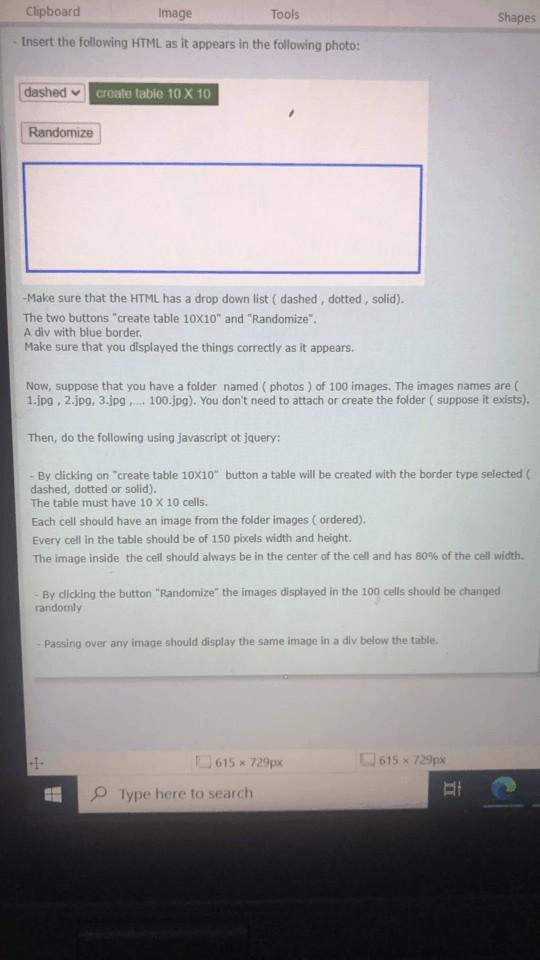
"Randomize".
A div with blue border.
Make sure that you displayed the things correctly as it appears.
Now, suppose that you have a folder named ( photos ) of 100 images. The images names are ( 1.jpg, 2.jpg, 3.jpg 100.jpg), You don't need to attach or create the folder ( suppose it exists).
Then, do the following using javascript or jquery:
By clicking on create table 10X10 button a table will be created with the border type selected (
dashed, dotted or solid).
The table must have 10 x 10 cells.
Each cell should have an image from the folder images ( ordered). Every cell In the table should be of 150 pixels width and height:
The image inside the cell should always be in the center of the cell and has 90% of the coll width.
By clicking the button "Randomize the images displayed in the 100 cells should be changed
randomly
- Passing over any image should display the same image in a div below the table.
Shapes Clipboard Image Tools - Insert the following HTML as it appears in the following photo: dashed create table 10 x 10 Randomize -Make sure that the HTML has a drop down list ( dashed, dotted, solid). The two buttons "create table 10X10" and "Randomize". A div with blue border, Make sure that you displayed the things correctly as it appears. Now, suppose that you have a folder named (photos) of 100 images. The images names are 1.jpg 2.jpg 3.jpg 100.jpg). You don't need to attach or create the folder ( suppose it exists). Then, do the following using javascript ot jquery: By clicking on create table 10x10" button a table will be created with the border type selected dashed, dotted or solid). The table must have 10 x 10 cells. Each cell should have an image from the folder images ordered). Every cell in the table should be of 150 pixels width and height. The image inside the cell should always be in the center of the cell and has 80% of the cell width By clicking the button "Randomize" the images displayed in the 100 cells should be changed randomly Passing over any image should display the same image in a div below the table. 615 x 729px 615 * 729px Type here to search
Step by Step Solution
There are 3 Steps involved in it

Get step-by-step solutions from verified subject matter experts
 Study Help