







Question: In J 16 : Use the product code breakdown provided at the top of the worksheet as a guide to create appropriate nested functions to
In J16: Use the product code breakdown provided at the top of the worksheet as a guide to create appropriate nested functions to complete the following:
If the product is Black or Stainless Steel, Microwave or Stove, 240 V or Premium insert the product Quantity, otherwise the cell should be blank. Copy the function down to the other cells in the column.
In cell J14 use the appropriate function to calculate the total from the results. Format comma style, 0 decimal.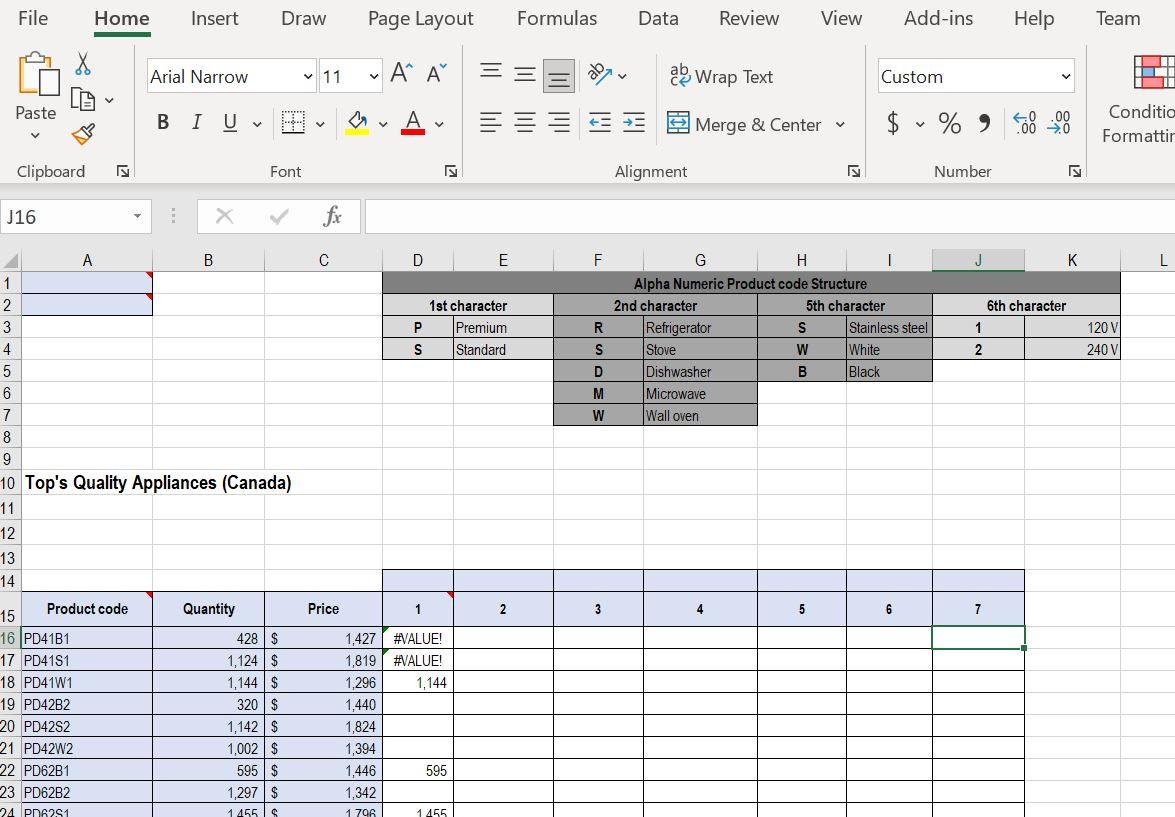
File Home Insert Draw Page Layout Formulas Data Review View Add-ins Help Team X Arial Narrow v 11 v ' ' ale Wrap Text Custom V Paste Av Merge & Center V $ %O Conditio Formattir Clipboard IN Font IN Alignment IN Number IN J16 B D E F L 6th character 1st character Premium Standard P S 1 R S D G H Alpha Numeric Product code Structure 2nd character 5th character Refrigerator S Stainless steel Stove W White Dishwasher B Black Microwave Wall oven 120 V 240 V 2 M W 1 2 3 4 5 6 7 8 9 10 Top's Quality Appliances (Canada) 11 12 13 14 Quantity Price 1 2 3 4 5 6 7 Product code 15 16 PD41B1 17 PD4151 18 PD41W1 19 PD42B2 20 PD4282 21 PD42W2 22 PD62B1 23 PD62B2 24 P06251 428$ 1,124 $ 1,144$ 320$ 1,142 $ 1,002 $ 595$ 1,297$ 1455$ 1,427 #VALUE! 1,819 #VALUE! 1,296 1,144 1,440 1,824 1,394 1,446 595 1,342 1 796 1455
Step by Step Solution
There are 3 Steps involved in it

Get step-by-step solutions from verified subject matter experts
 Study Help