







Question: (IN JAVA): 1.) How are you able to put quotation marks around two words outputted from a java program? (I want my code to represent
(IN JAVA):
1.) How are you able to put quotation marks around two words outputted from a java program? (I want my code to represent the desired sample output image down below)
-------- I have coded this so far --------------
import java.util.Scanner;
public class Main {
public static void main(String[] args) { Scanner sc = new Scanner(System.in);
System.out.println("Next enter two words:"); String word1 = sc.nextLine(); String word2 = sc.nextLine(); System.out.println("You entered " + word1 + " and " + word2);
--------------------------------------
So this works! I just am not sure how to make it so there are double quotes surrounding the strings word1 and word2.
2.) How are you able to output multiple words (like shown in the image below)? I have tried using the variable string just like I did in the code above, but it will only output the first word of the sentence! Please help
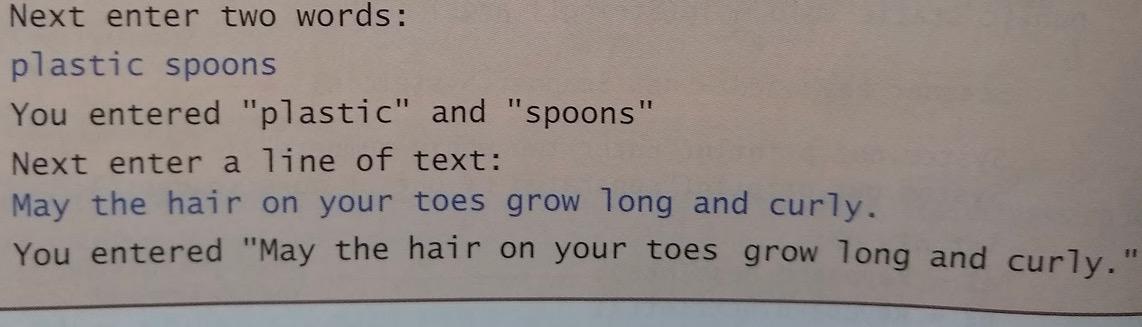
Next enter two words: plastic spoons You entered "plastic" and "spoons" Next enter a line of text: May the hair on your toes grow long and curly. You entered "May the hair on your toes grow long and curly
Step by Step Solution
There are 3 Steps involved in it

Get step-by-step solutions from verified subject matter experts
 Study Help