







Question: In Java, create a GUI called NumbersGUI (by extending JFrame as shown in the lecture). The NumbersGUI should have a GridLayout of three rows and
In Java, create a GUI called NumbersGUI (by extending JFrame as shown in the lecture). The NumbersGUI should have a GridLayout of three rows and three columns. For the numbers 1 to 100, fill the numbers into the cells of the GridLayout so that the first cell (top left or cell [1,1]) contains those numbers that are evenly divisible by 2. Cell [1,2] those that are evenly divisible by 3, cell [1,3] those that are evenly divisible by 4, cell [2,1] those that are evenly divisible by 5, and so forth. Obviously, one number may appear in more than one cell. For example, here are the cells filled in with the numbers 1 to 10: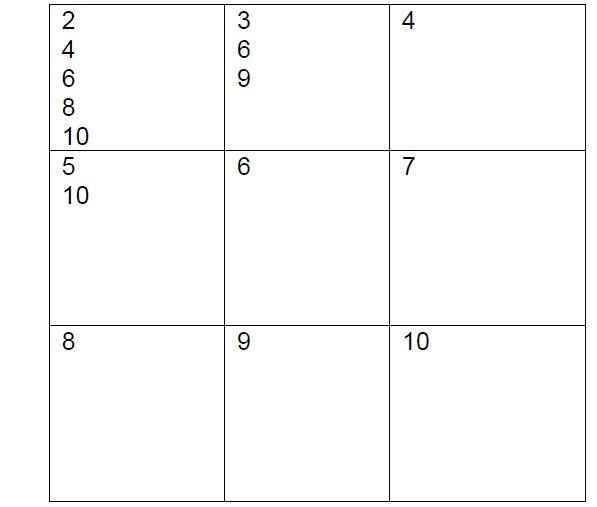
4 O O w 2 4 6 8 10 5 10 co 7 8 9 10
Step by Step Solution
There are 3 Steps involved in it

Get step-by-step solutions from verified subject matter experts
 Study Help