







Question: Java - please help me to fix my code and with explain Create a GUI called NumbersGUI (by extending JFrame as shown in lecture). The
Java - please help me to fix my code and with explain
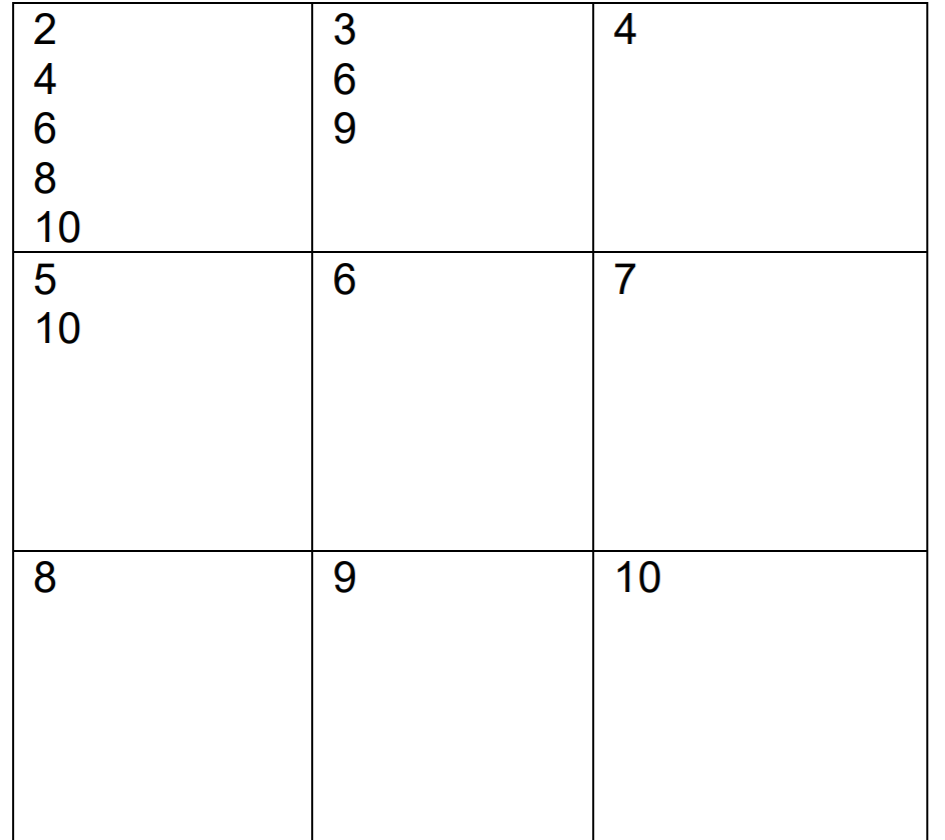
Create a GUI called NumbersGUI (by extending JFrame as shown in lecture). The NumbersGUI should have a GridLayout of three rows and three columns. For the numbers 1 to 100, fill the numbers into the cells of the GridLayout so that the first cell (top left or cell [1,1]) contains those numbers that are evenly divisible by 2. Cell [1,2] those that are evenly divisible by 3, cell [1,3] those that are evenly divisible by 4, cell [2,1] those that are evenly divisible by 5 and so forth. Obviously, one number may appear in more than one cell. For example, here are the cells filled in with the numbers 1 to 10:
Project 1.java
public class Project 1 { public static void main(String[] args) { NumbersGUI Numbers = new NumbersGUI(); Numbers.printNumberstoNumbersGUI(Number); } }
NumbersGUI.java
import java.awt.GridLayout; import java.awt.TextArea; import javax.swing.*;
public class NumbersGUI extends JFrame { public NumbersGUI() { setDefaultCloseOperation(JFrame.EXIT_ON_CLOSE); setLayout(new GridLayout(3, 3)); setSize(200, 200);
public static void printNumberstoNumbersGUI (NumbersGUI Num) { for (int i = 2; i
for (int j = 1; j 4 3 6 9 2 4 6 8 10 5 10 6 7 8 9 10
Step by Step Solution
There are 3 Steps involved in it

Get step-by-step solutions from verified subject matter experts
 Study Help