







Question: IN JAVA Create a JComboBox with two options: Celsius to Fahrenheit and Fahrenheit to Celsius . Use a text field to accept a double that
IN JAVA
Create a JComboBox with two options: Celsius to Fahrenheit and Fahrenheit to Celsius.
Use a text field to accept a double that represents the amount of the temperature.
Test the user input number to ensure that it is a double.
Create two methods for the temperature conversions:
Use DegreesC = 5(degreesF - 32)/9; for the conversion from Celsius to Fahrenheit.
Use DegreesF = (9(degreesC)/5) + 32; for the conversion from Fahrenheit to Celsius.
Use an uneditable text field to show the converted temperature.
Display a label that describes the converted temperature type.
Have the cursor come back to the temperature entry field.
See the GUI format below.
| Use parseDouble to convert the input to a double for use in the calculation. |
2.2. GUI Format
Use the component layout shown below for this program. Your design may vary from the one below, but should flow logically and be intuitive.
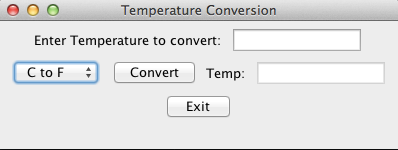
| Use the default FlowLayout manager for the GUI component arrangement. Using the default layout manager will not require a layout statement. However, it is a good idea to include the layout statement anyway, as a clear signal as to what type of layout is being used. |
| Use an inner class for the listener. |
Temperature Conversion Enter Temperature to convert: C to F Convert Temp Exit
Step by Step Solution
There are 3 Steps involved in it

Get step-by-step solutions from verified subject matter experts
 Study Help