Question: In JAVA. I. Given an array of unsorted integers, for example 99 371 ? 5 12 33, write a program that performs an Insertion Sort
In JAVA. 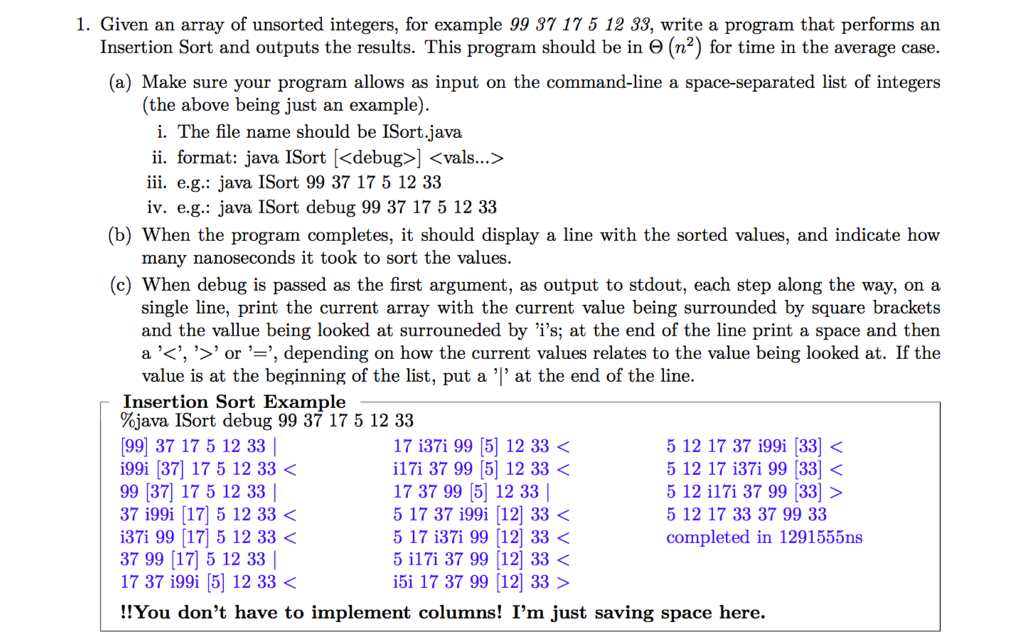
I. Given an array of unsorted integers, for example 99 371 ? 5 12 33, write a program that performs an Insertion Sort and outputs the results. This program should be in e (n2) for time in the average case (a) Make sure your program allows as input on the command-line a space-separated list of integers (the above being just an example). i. The file name should be ISort.java ii. format: java ISort [] iii. e.g.: java ISort 99 37 17 5 12 33 iv. e.g.: java ISort debug 99 37 17 5 12 33 (b) When the program completes, it should display a line with the sorted values, and indicate how many nanoseconds it took to sort the values (c) When debug is passed as the first argument, as output to stdout, each step along the way, on a single line, print the current array with the current value being surrounded by square brackets and the vallue being looked at surrouneded by 'i's; at the end of the line print a space and then a ,, or , , depending on how the current values relates to the value being looked at. If the value is at the beginning of the list, put a '|' at the end of the line Insertion Sort Example %java !Sort debug 99 37 17 5 12 33 99) 37 17 5 12 33 | i99i [37] 17 5 12 33 5 12 17 37 i99i [33] 5 12 17 33 37 99 33 completed in 1291555ns I. Given an array of unsorted integers, for example 99 371 ? 5 12 33, write a program that performs an Insertion Sort and outputs the results. This program should be in e (n2) for time in the average case (a) Make sure your program allows as input on the command-line a space-separated list of integers (the above being just an example). i. The file name should be ISort.java ii. format: java ISort [] iii. e.g.: java ISort 99 37 17 5 12 33 iv. e.g.: java ISort debug 99 37 17 5 12 33 (b) When the program completes, it should display a line with the sorted values, and indicate how many nanoseconds it took to sort the values (c) When debug is passed as the first argument, as output to stdout, each step along the way, on a single line, print the current array with the current value being surrounded by square brackets and the vallue being looked at surrouneded by 'i's; at the end of the line print a space and then a ,, or , , depending on how the current values relates to the value being looked at. If the value is at the beginning of the list, put a '|' at the end of the line Insertion Sort Example %java !Sort debug 99 37 17 5 12 33 99) 37 17 5 12 33 | i99i [37] 17 5 12 33 5 12 17 37 i99i [33] 5 12 17 33 37 99 33 completed in 1291555ns









 Study Help