







Question: in Java, I ' m stuck on figuring out how to make the program so that that the user types the commands ' a '
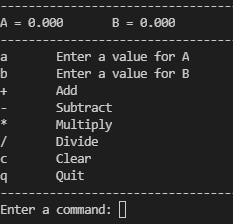
in Java, Im stuck on figuring out how to make the program so that that the user types the commands a and b and the program stores those as decimal values. In the photo, there is an interface which Id like the menu to display and the to be replaced with the user input.
Enter a value for A
Enter a value for B
This is what I have thus far:
import java.util.Scanner;
public class App
public static void mainString args
Scanner scan new ScannerSystemin;
Character command ;
loop until user quits
while command q
printMenu;
System.out.printEnter a command: ;
command menuGetCommandscan;
executeCommandscan command;
if command a
System.out.printlnEnter a number: ;
double numA scan.nextDouble;
if numA
System.out.printfA numA;
printMenu;
if command b
System.out.printlnEnter a number: ;
double numB scan.nextDouble;
printMenu;
System.out.printfB numB;
scan.close;
menu functions
private static void printMenuLine
System.out.println
;
private static void printMenuCommandCharacter command, String desc
System.out.printfsts
command, desc;
prints the menu
public static void printMenu
printMenuLine;
System.out.printlnChavviCalc;
printMenuLine;
System.out.printlnA B ;
printMenuLine;
printMenuCommanda "Enter a value for A;
printMenuCommandb "Enter a value for B;
printMenuCommand "Add";
printMenuCommand "Subtract";
printMenuCommand "Multiply";
printMenuCommand "Divide";
printMenuCommandc "Clear";
printMenuCommandq "Quit";
printMenuLine;
get first character from input
private static Character menuGetCommandScanner scan
Character command ;
String rawInput scan.nextLine;
if rawInputlength
rawInput rawInput.toLowerCase;
command rawInput.charAt;
return command;
calculator functions
private static Boolean executeCommandScanner scan, Character command
Boolean success true;
switch command
case q:
System.out.printlnThank you for using Chavvi Calc";
break;
case ab:
break;
default:
System.out.printlnERROR: Unknown commmand";
success false;
return success;
Step by Step Solution
There are 3 Steps involved in it
1 Expert Approved Answer
Step: 1 Unlock

Question Has Been Solved by an Expert!
Get step-by-step solutions from verified subject matter experts
Step: 2 Unlock
Step: 3 Unlock
 Study Help