







Question: IN JAVA Nonogram v.2 11 11 11 21 11 12 PY By now, you have completed certain design and code components for Nonogram. Your task
IN JAVA
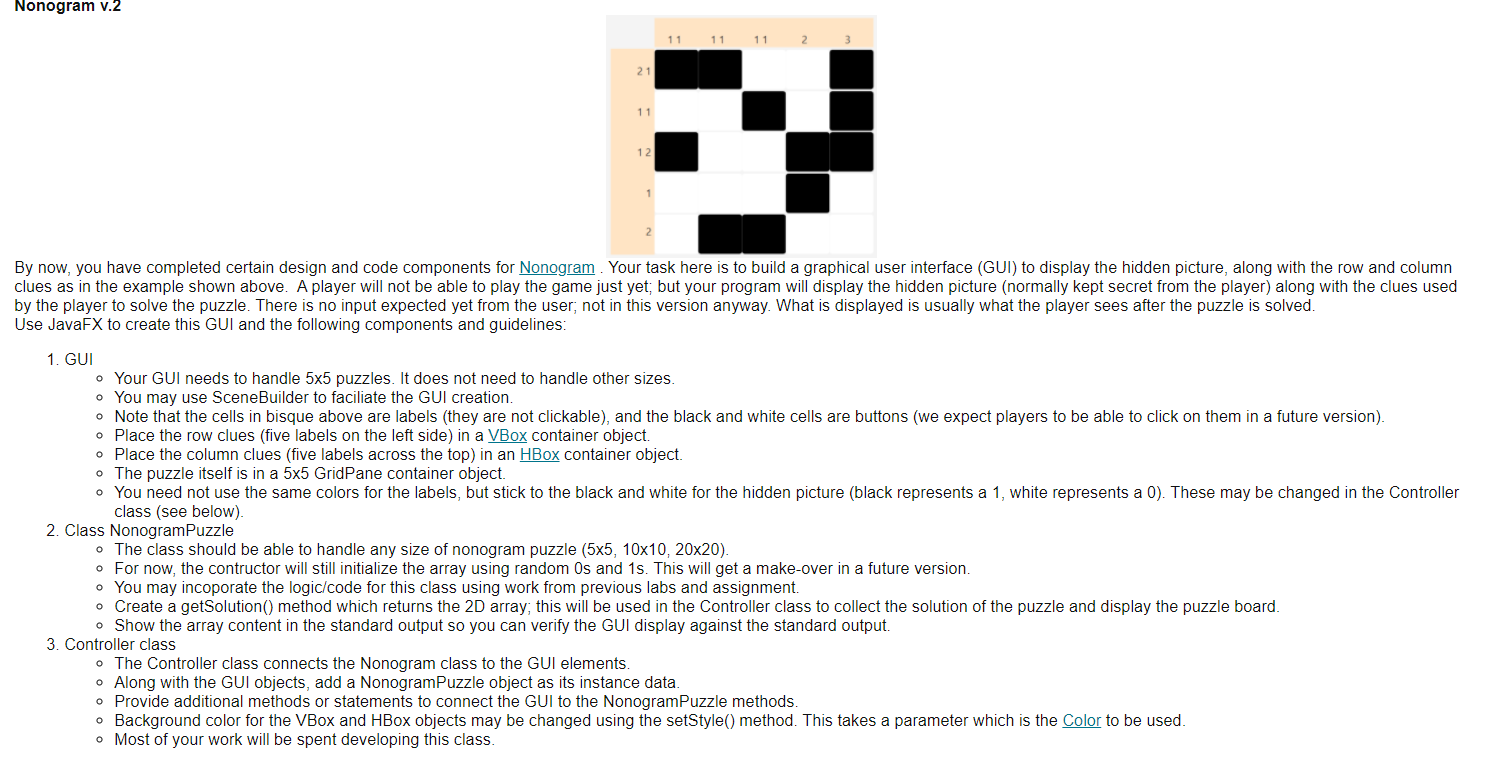
Nonogram v.2 11 11 11 21 11 12 PY By now, you have completed certain design and code components for Nonogram. Your task here is to build a graphical user interface (GUI) to display the hidden picture, along with the row and column clues as in the example shown above. A player will not be able to play the game just yet; but your program will display the hidden picture (normally kept secret from the player) along with the clues used by the player to solve the puzzle. There is no input expected yet from the user, not in this version anyway. What is displayed is usually what the player sees after the puzzle is solved. Use JavaFX to create this GUI and the following components and guidelines: 1. GUI o Your GUI needs to handle 5x5 puzzles. It does not need to handle other sizes o You may use Scene Builder to faciliate the GUI creation. o Note that the cells in bisque above are labels (they are not clickable), and the black and white cells are buttons (we expect players to be able to click on them in a future version) o Place the row clues (five labels on the left side) in a VBox container object. . Place the column clues (five labels across the top) in an HBox container object. o The puzzle itself is in a 5x5 GridPane container object. You need not use the same colors for the labels, but stick to the black and white for the hidden picture (black represents a 1, white represents a 0). These may be changed in the Controller class (see below). 2. Class NonogramPuzzle The class should be able to handle any size of nonogram puzzle (5x5, 10x10,20x20). o For now, the contructor will still initialize the array using random Os and 1s. This will get a make-over in a future version. . You may incoporate the logic/code for this class using work from previous labs and assignment. o Create a getSolution() method which returns the 2D array, this will be used in the Controller class to collect the solution of the puzzle and display the puzzle board. o Show the array content in the standard output so you can verify the GUI display against the standard output. 3. Controller class o The Controller class connects the Nonogram class to the GUI elements. o Along with the GUI objects, add a NonogramPuzzle object as its instance data o Provide additional methods or statements to connect the GUI to the NonogramPuzzle methods. o Background color for the VBox and HBox objects may be changed using the setStyle() method. This takes a parameter which is the Color to be used. o Most of your work will be spent developing this class. Nonogram v.2 11 11 11 21 11 12 PY By now, you have completed certain design and code components for Nonogram. Your task here is to build a graphical user interface (GUI) to display the hidden picture, along with the row and column clues as in the example shown above. A player will not be able to play the game just yet; but your program will display the hidden picture (normally kept secret from the player) along with the clues used by the player to solve the puzzle. There is no input expected yet from the user, not in this version anyway. What is displayed is usually what the player sees after the puzzle is solved. Use JavaFX to create this GUI and the following components and guidelines: 1. GUI o Your GUI needs to handle 5x5 puzzles. It does not need to handle other sizes o You may use Scene Builder to faciliate the GUI creation. o Note that the cells in bisque above are labels (they are not clickable), and the black and white cells are buttons (we expect players to be able to click on them in a future version) o Place the row clues (five labels on the left side) in a VBox container object. . Place the column clues (five labels across the top) in an HBox container object. o The puzzle itself is in a 5x5 GridPane container object. You need not use the same colors for the labels, but stick to the black and white for the hidden picture (black represents a 1, white represents a 0). These may be changed in the Controller class (see below). 2. Class NonogramPuzzle The class should be able to handle any size of nonogram puzzle (5x5, 10x10,20x20). o For now, the contructor will still initialize the array using random Os and 1s. This will get a make-over in a future version. . You may incoporate the logic/code for this class using work from previous labs and assignment. o Create a getSolution() method which returns the 2D array, this will be used in the Controller class to collect the solution of the puzzle and display the puzzle board. o Show the array content in the standard output so you can verify the GUI display against the standard output. 3. Controller class o The Controller class connects the Nonogram class to the GUI elements. o Along with the GUI objects, add a NonogramPuzzle object as its instance data o Provide additional methods or statements to connect the GUI to the NonogramPuzzle methods. o Background color for the VBox and HBox objects may be changed using the setStyle() method. This takes a parameter which is the Color to be used. o Most of your work will be spent developing this class
Step by Step Solution
There are 3 Steps involved in it

Get step-by-step solutions from verified subject matter experts
 Study Help