







Question: In java please Assignment: Developing a Receipt System Problem Statement Create a receipt system that allows users to: Input multiple receipts: Users should be able
In java please
Assignment: Developing a Receipt System
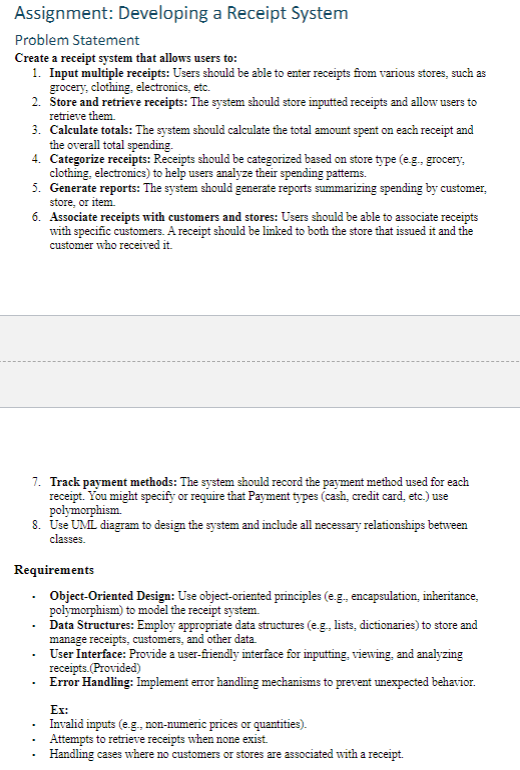
Problem Statement
Create a receipt system that allows users to:
Input multiple receipts: Users should be able to enter receipts from various stores, such as
grocery, clothing, electronics, etc.
Store and retrieve receipts: The system should store inputted receipts and allow users to
retrieve them.
Calculate totals: The system should calculate the total amount spent on each receipt and
the overall total spending.
Categorize receipts: Receipts should be categorized based on store type eg grocery,
clothing, electronics to help users analyze their spending pattems.
Generate reports: The system should generate reports summarizing spending by customer,
store, or item.
Associate receipts with customers and stores: Users should be able to associate receipts
with specific customers. A receipt should be linked to both the store that issued it and the
customer who received it
Track payment methods: The system should record the payment method used for each
receipt. You might specify or require that Payment types cash credit card, etc. use
polymorphism.
Use UML diagram to design the system and include all necessary relationships between
classes.
Requirements
ObjectOriented Design: Use objectoriented principles eg encapsulation, inheritance,
polymorphism to model the receipt system.
Data Structures: Employ appropriate data structures eg lists, dictionaries to store and
manage receipts, customers, and other data.
User Interface: Provide a userfriendly interface for inputting, viewing, and analyzing
receipts.Provided
Error Handling: Implement error handling mechanisms to prevent unexpected behavior.
Ex:
Invalid inputs eg nonnumeric prices or quantities
Attempts to retrieve receipts when none exist.
Handling cases where no customers or stores are associated with a receipt.
Additional Considerations
Tax Calculation: Incorporate tax calculations based on the user's location or specific tax
rates.
import java.util.ArrayList;
import java.util.Scanner;
public class ReceiptSystem
public static void mainString args
Scanner scanner new ScannerSystemin;
Create a list to store receipts
ArrayList receipts new ArrayList;
Create a list to store customers
ArrayList customers new ArrayList;
Create a list to store stores
ArrayList stores new ArrayList;
Main loop to interact with the user
while true
System.out.println Add Receipt";
System.out.println View Receipts";
System.out.println Generate Reports";
System.out.println Exit";
system.out.printEnter your choice: ;
int choice scanner.nextInt;
switch choice
case :
Add a receipt
Receipt receipt new Receipt;
System.out.printlnEnter store name: ;
string storeName scanner.next;
check if the store is already exists before add it
Store store findStoreByNamestores storeName;
if store null
store new storestoreName;
stores.addstore;
receipt.setstorestore;
System.out.printlnEnter customer name: ;
string customerName scanner.next;
check if the customer is already exists before add it
Customer customer findCustomerByNamecustomers
customerName;
if customer null
customer new CustomercustomerName;
customers.addcustomer;
receipt.setcustomercustomer;
Add items to the receipt
while true
System.out.printlnEnter item name or 'done' to finish:
String itemName scanner.next;
if itemNameequalsdone
break;
System.out.printlnEnter item price: ;
double price scanner.nextDouble;
System.out.printlnEnter item quantity: ;
int quantity scanner.nextInt;
Item item new ItemitemName price, quantity;
receipt.addItemitem;
calculate total and add receipt to lists
receipt.calculateTotal;
receipts.addreceipt;
store.addReceiptreceipt;
customer.addReceiptreceipt;
break;
case :
View receipts
system.out.printlnView receipts by:;
System.out.println Customer";
system.out.println Store";
System.out.printEnter your choice: ;
int viewChoice scanner.nextInt;
if viewChoice
System.out.printEnter customer name: ;
String customerNameToView scanner.next;
customer customerToView findCustomerByNamecustomers
customerNameToView;
if customerToView null
customerToView.viewReceipts;
else
System.out.printlnCustomer not found.";
else if viewChoice
System.out.printEnter store name: ;
String storeNameToView scanner.next;
Store storeToView findStoreByNamestores
storeNameToView;
if storeToView null
storeToView.viewReceipts;
else
System.out.printlnStore not found.";
break;
case :
Generate reports
Implement report generation methods here
break;
case :
Exit
System.out.printlnExiting;
system.exit;
Helper methods
private static Customer findCustomerByNameArrayList customers,
String name
Implement the customrt search method
return null;
private static Store findStoreByNameArrayList stores, String name
Implement the store search
Step by Step Solution
There are 3 Steps involved in it
1 Expert Approved Answer
Step: 1 Unlock

Question Has Been Solved by an Expert!
Get step-by-step solutions from verified subject matter experts
Step: 2 Unlock
Step: 3 Unlock
 Study Help