







Question: In javascript html and css, I am making a tower defense game, I have some code but how do I edit it so it can
In javascript html and css, I am making a tower defense game, I have some code but how do I edit it so it can take my enemy element and make it move following this example:
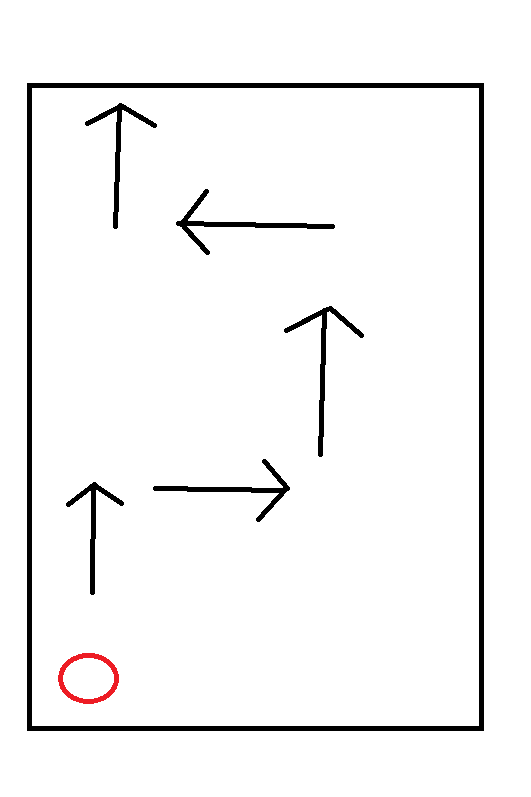
Here is my enemy code:
#enemy {
width: 30px:
height: 30px:
border: 30%:
}
and here is my code that I need edited so it includes my enemy and follows the right path:
canvas {
border: 1px solid black;
}
const canvas = document.getElementById("myCanvas");
const ctx = canvas.getContext("2d");
// Define the path to follow
const path = [
{x: 0, y: 200},
{x: 200, y: 200},
{x: 300, y: 300},
{x: 600, y: 200},
{x: 800, y: 300}
];
// Define the shape to move
const shape = {
x: 0,
y: 300,
width: 20,
height: 20
};
// Define the speed at which to move the shape
const speed = 2;
// Define a function to update the shape's position
function update() {
// Check if the shape is at the end of the path
if (shape.x >= path[path.length - 1].x) {
// Reset the shape's position to the start of the path
shape.x = path[0].x;
shape.y = path[0].y;
} else {
// Move the shape along the path
for (let i = 0; i
const p1 = path[i];
const p2 = path[i + 1];
if (shape.x >= p1.x && shape.x
const slope = (p2.y - p1.y) / (p2.x - p1.x);
shape.x += speed;
shape.y = slope * (shape.x - p1.x) + p1.y;
break;
}
}
}
}
// Define a function to draw the shape on the canvas
function draw() {
ctx.clearRect(0, 0, canvas.width, canvas.height);
ctx.fillStyle = "red";
ctx.fillRect(shape.x, shape.y, shape.width, shape.height);
}
// Define the game loop
function gameLoop() {
update();
draw();
window.requestAnimationFrame(gameLoop);
}
// Start the game loop
gameLoop();
Transcribed image text
Step by Step Solution
There are 3 Steps involved in it

Get step-by-step solutions from verified subject matter experts
 Study Help