







Question: In K14: Use the VIN # code breakdown provided at the top of the worksheet as a guide to create appropriate nested functions to complete
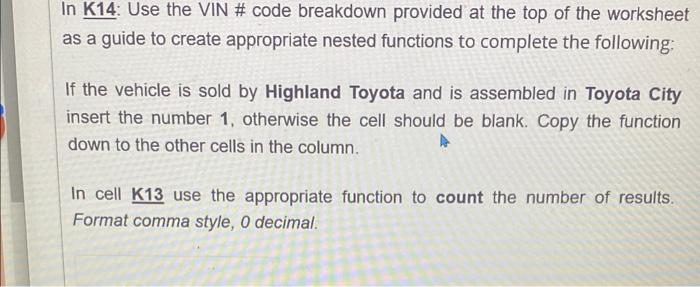
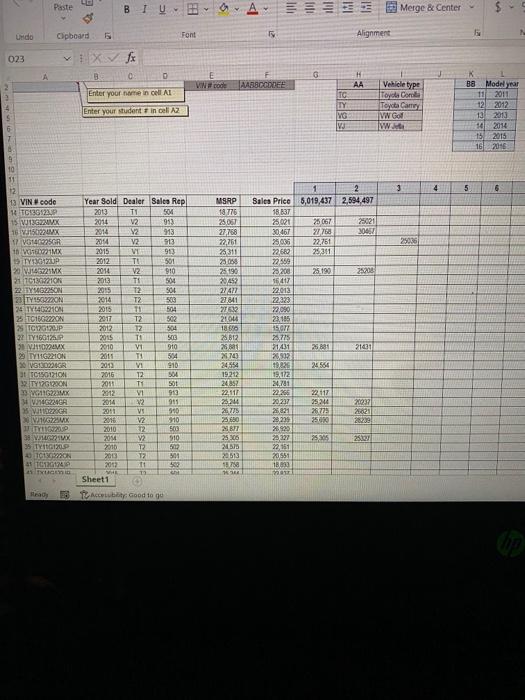
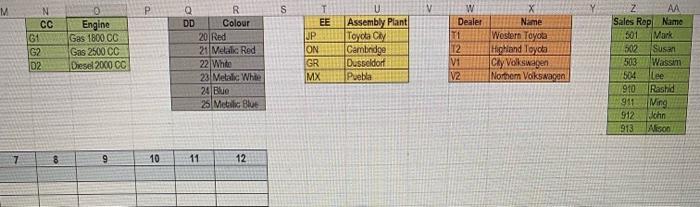
In K14: Use the VIN \# code breakdown provided at the top of the worksheet as a guide to create appropriate nested functions to complete the following; If the vehicle is sold by Highland Toyota and is assembled in Toyota City insert the number 1 , otherwise the cell should be blank. Copy the function down to the other cells in the column. In cell K13 use the appropriate function to count the number of results. Format comma style, 0 decimal. \begin{tabular}{|c|c|} \hline CC & Engine \\ \hline G & Gas 1800CC \\ \hline G2 & Gas 2500CC \\ \hline O2 & Orsed 20000CC \\ \hline \end{tabular} \begin{tabular}{|l|l|} \hline \multicolumn{1}{c|}{ I } & \multicolumn{1}{c|}{ U } \\ \hline EE & Assembly Plant \\ \hline JP & Toyda Cly \\ \hline ON & Cambndge \\ \hline GR & Dusbeldor \\ \hline MX & Puebla \\ \hline \end{tabular} \begin{tabular}{|c|c|} \hline Sales Rep & NA \\ \hline 501 & Name \\ \hline 502 & Sark \\ \hline 503 & Wassin \\ \hline 504 & lee \\ \hline 910 & Rashid \\ \hline 911 & Ning \\ \hline 912 & Nhin \\ \hline 913 & N 1500 \\ \hline \end{tabular} \begin{tabular}{|l|l|l|l|l|l|} \hline 7 & 8 & 9 & 10 & 11 & 12 \\ \hline \end{tabular}
Step by Step Solution
There are 3 Steps involved in it

Get step-by-step solutions from verified subject matter experts
 Study Help